20
IPX7A-ION Motherboard Reference Guide
8 BIOS Setup reference
BIOS setup program
When the computer rst starts up (before entering Windows), press and hold the
<Del> key to enter the BIOS setup program. (Press <Ctrl+Alt+Delete> to restart if
you missed the opportunity.)
NOTE: Default BIOS settings apply for most conditions to ensure optimum
performance. If this system becomes unstable after changing any BIOS set-
tings, load the default settings to ensure system compatibility and stability.
Find the load default options under the Exit Menu.
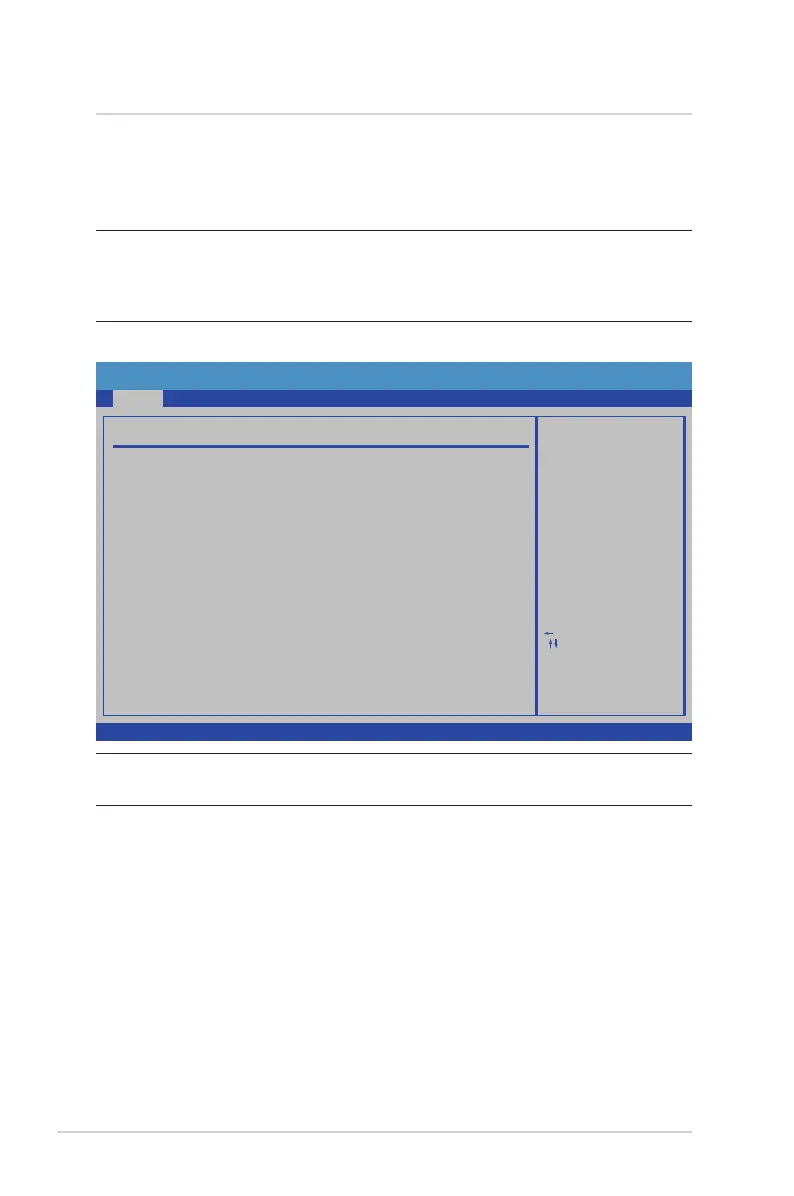
AMIBIOS
Displays the auto-detected BIOS information.
System Memory
Displays the auto-detected system memory information.
System Time [xx:xx:xx]
This item allows you to set the system time.
System Date [Day xx/xx/xxxx]
This item allows you to set the system date.
Main
The BIOS setup screens shown in this section are for reference purposes
only, and may not exactly match what you see on your screen.
BIOS SETUP UTILITY
Main
Field
Field
AMIBIOS
Use [ENTER], [TAB]
or [SHIFT-TAB] to
select a field.
Use [+] or [-] to
configure system Time.
Select Screen
Select Item
Change
Select
General HelpF1
Save and ExitF10
ExitESC
Tab
RT
Version :0800
:05/14/09
:2048MB
Build Date
Size
System Overview
System Memory
System Time
System Date
[19:43:50]
[Fri 05/22/2009]
BootSecurity
Exit
Power
Advanced
v02.61 (C) Copyright 1985-2009, American Megatrends, Inc.


 To Next Page