To Next Page

G
Gail AlvarezSep 10, 2025
How to lighten print on my Oki Printer?
- WwoodpaulSep 10, 2025
If the print from your Oki Printer is darker than usual, the darkness setting may be too high. Try adjusting the darkness setting to a lower level.

How to lighten print on my Oki Printer?
If the print from your Oki Printer is darker than usual, the darkness setting may be too high. Try adjusting the darkness setting to a lower level.
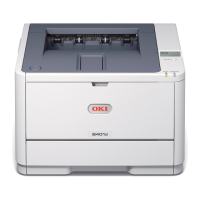
Why is my Oki B430DN Printer printing entire page faintly?
If the entire page prints faintly on your Oki Printer, it could be due to an empty toner cartridge. Install a new toner cartridge. Another possible cause is a dirty LED array, which requires cleaning.
How to fix FEED JAM OR EXIT JAM on Oki Printer?
If your Oki Printer has a FEED JAM OR EXIT JAM, remove the tray and clear any misfed sheets. Then, press the cover release and open the printer’s top cover.
Why does my Oki B430DN Printer freeze when the computer is rebooted?
If your Oki Printer freezes or displays an error message when the computer is rebooted, it may be due to booting the computer while the printer is on, which can cause a communications error. Turn the printer off before rebooting the computer.
Why is the print distorted on my Oki B430DN?
If your Oki Printer is producing distorted prints, it may be due to a paper path, lamp assembly, or fusing unit problem. Generate a cleaning page.
Why does my Oki B430DN Printer smell?
If you notice odors coming from your Oki Printer, it's because gases are being emitted by forms or adhesives passing through the hot fusing unit. Ensure that the forms you use can withstand heating, and provide adequate ventilation.
Why does my Oki Printer print all black?
If your Oki Printer prints all black, this indicates a hardware problem. Contact service.
Why does my Oki Printer print vertical black lines?
If your Oki Printer is printing vertical black lines, this indicates a hardware problem. Contact service.
Why does my Oki B430DN Printer produce odors?
If your Oki Printer is producing odors, gases are likely being given off by forms or adhesives passing through the hot fusing unit. Ensure the forms you use can withstand heating, and provide adequate ventilation.
Why won't my Oki B430DN Printer print even though it's ready?
If your Oki Printer indicates it's ready to receive data but nothing happens when you try to print, it could be a configuration error. Check the cable connection. Also, if multiple printers are available, ensure your printer is selected as the active printer.
 General
| Color | No |
|---|---|
| Duplex printing | Yes |
| Print technology | Laser |
| Maximum resolution | 1200 x 1200 DPI |
| Time to first page (black, normal) | 5.5 s |
| Print speed (black, normal quality, A4/US Letter) | 28 ppm |
| Internal memory | 64 MB |
| Processor model | PowerPC405 |
| Sound power level (standby) | 30 dB |
| Sound pressure level (printing) | 53 dB |
| Total input capacity | 250 sheets |
| Total output capacity | 150 sheets |
| Envelopes sizes | C5, C6, DL |
| Media weight (tray 1) | 60 - 120gsm |
| Paper tray media types | Envelopes |
| Non-ISO print media sizes | Executive (184 x 267mm), Legal (media size), Letter (media size), Statement (140 x 216mm) |
| ISO A-series sizes (A0...A9) | A4, A5, A6 |
| JIS B-series sizes (B0...B9) | B5 |
| Maximum ISO A-series paper size | A4 |
| Supported network protocols (IPv4) | TCP/IP:-ARP, IPv4/v6, TCPv4, ICMPv4/v6, UDPv4/v6, LPR, FTP, TELNET, HTTP(IPP), BOOTP, DHCP, AutoIP, SNMP, DNS, uPnP, Bonjour, WINS, Windows Rally(WSD-Print, LLTD), SLP, JetDirect protocols. Netware 3.x, 4.x, 5.x, and 6 with full NDS and NDPS support:- QServer over IP and IPX, R-Printer, N-Printer, NCP, SPX, IPX, SAP, RIP, Ethertalk:- ELAP, AARP, DDP, AEP, NBP, ZIP, RTMP, ATP, PAP, NetBEUI: SMB, NetBIOS |
| Power requirements | 230 VAC, 50 - 60Hz |
| Networking features | 10/100BaseTX |
| Compatible operating systems | Windows 2000 / XP / XP x64 / Server 2003 / Server 2003 x64 / Vista (32-bit) / Vista (64-bit) / UNIX / Linux; Mac OS X PowerPC 10.2.8 + / OS X Intel 10.4.4 + |
| Display | LCD |
| Maximum duty cycle | 70000 pages per month |
| Operating temperature (T-T) | 10 - 32 °C |
| Operating relative humidity (H-H) | 20 - 80 % |
 Weight and Dimensions
| Dimensions (WxDxH) | 268 x 369 x 395 mm |
|---|