33
Indication of printed page counters
This self-diagnosis is practiced to indicate the current number of printed pages of the printer.
1. Activate the normal self-diagnostic mode, and press and hold down the [MENU+] key or [MENU-] key, until
"PRINTER STATUS" appears in the display section, and then, press the ENTER key. (The MENU+ key
increments a test item, and the MENU- key decrements a test item.)
2. Pressing the [MENU+] key or [MENU-] key causes the current number of printed pages to be displayed
sequentially. (ONLINE and CANCEL keys inactive to pressing)
3. Press the [BACK] key to terminate the test. (Status of Item 1 restored)
Display Upper
Display Lower
Format
Unit
Function
K-IMPRESSIONS
********IMAGES
DEC
Images
Y-IMPRESSIONS
********IMAGES
DEC
Images
M-IMPRESSIONS
********IMAGES
DEC
Images
C-IMPRESSIONS
********IMAGES
DEC
Images
The printing number of sheets of each
color.
TOTAL SHEET CNT
********PRINTS
DEC
Prints
The indication of the total printing number
of sheets
Service Maintenance Menu/Adjustments
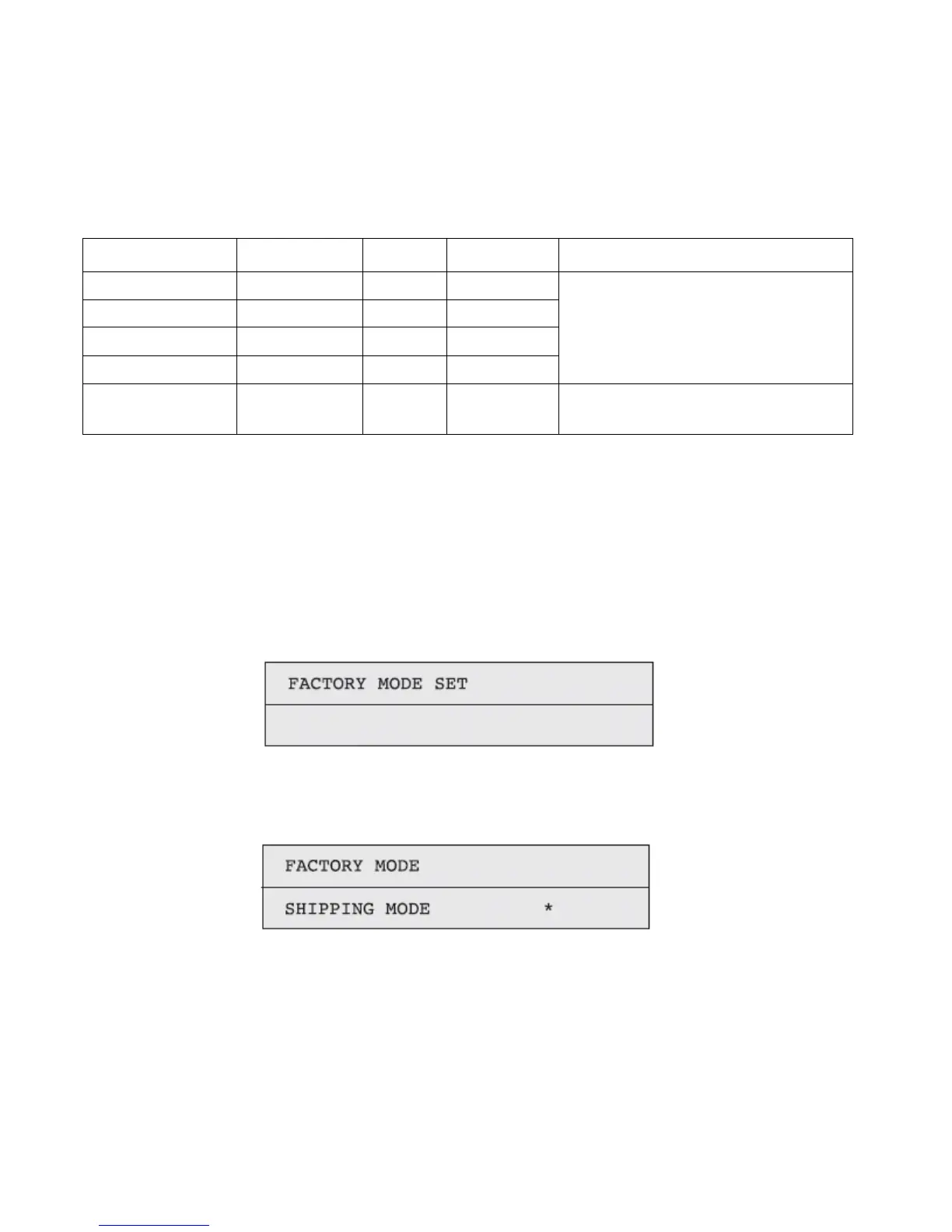
Factory/Shipping switching
This self-diagnosis is practiced to switch the PU(PRF) PCB between the Factory mode and the Shipping mode.
1. Activate the self-diagnostic (Level 1) mode, and press and hold down the [MENU+] key or [MENU-] key, until
the following message appears.
2. Pressing the [ENTER] key causes the following message to appear. Press and hold down the [MENU+] key or
[MENU-], until the intended item (See the table below) is displayed.
3. Pressing the [ENTER] key while the desired set item remains displayed selects the set value.
4. Pressing and holding down (3 sec) the [ENTER] key while the value you want to set remains displayed
registers the currently displayed value on the EEPROM. Then, the status of Item 2 will be restored.
5. Repeat Items 2 to 4, as needed.
6. Press the [BACK] key to terminate the test. (The status of Item 1 is restored.)



 To Next Page