35
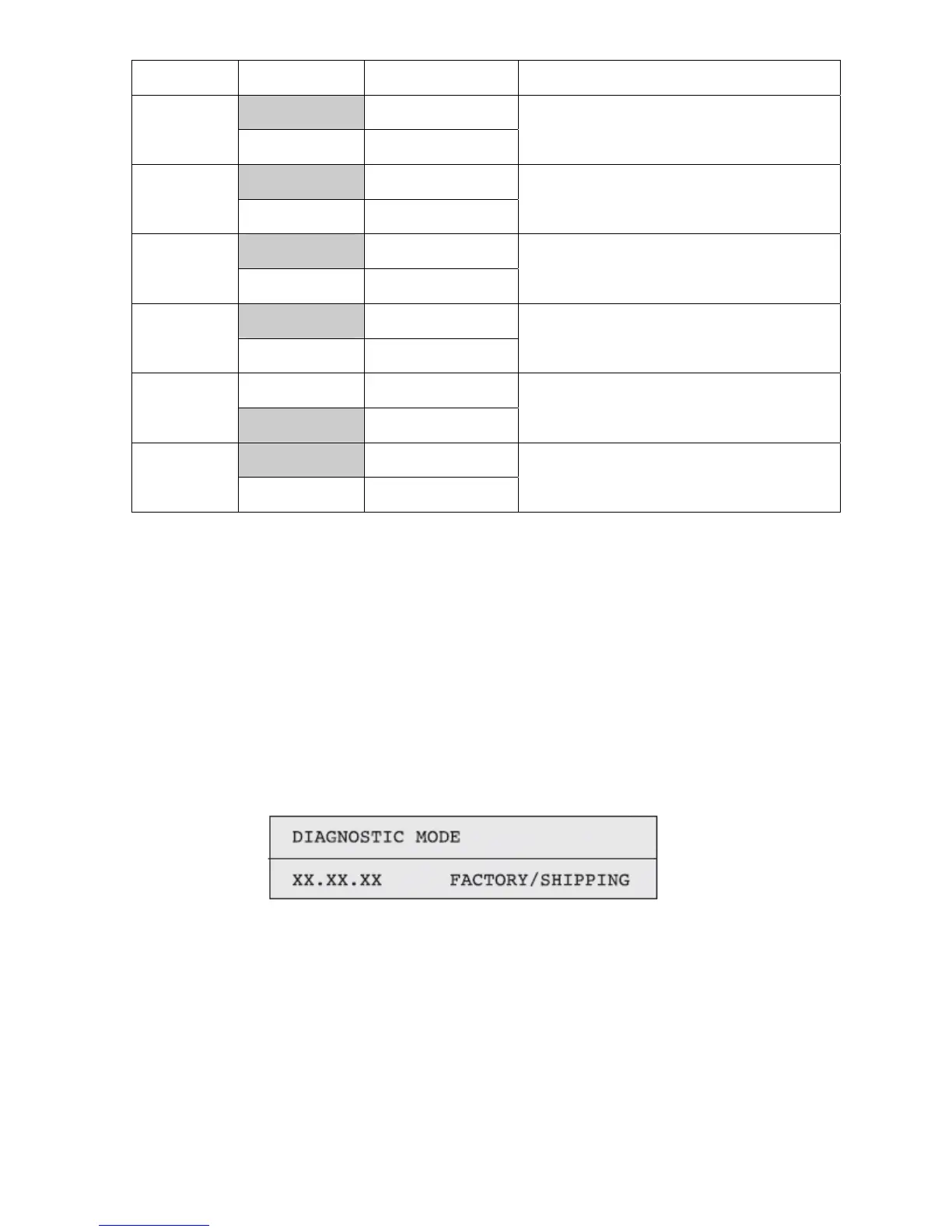
*Shaded areas are default settings
Indication
Set Value
Operation of set value
Function
ENABLE
Detects.
TONER
SENSOR
DISABLE
Does not detect.
For enabling/disabling toner sensor operation.
ENABLE
Checks
BELT UNIT
CHECK
DISABLE
Does not check.
For enabling/disabling checking operation for
mounted belt Unit
ENABLE
Checks
ID UNIT
CHECK
DISABLE
Does not check.
For enabling/disabling checking operation for
mounted ID Unit
ENABLE
Detects.
UP/DOWN
SENSOR
DISABLE
Does not detect.
For enabling/disabling ID UP/DOWN sensor
operation
ENABLE
Stops.
REG ADJUST
ERROR
DISABLE
Does not stop.
For enabling/disabling the stop of error issuance,
based on color drift detection value
STOP
Does not extend life.
DRUM OVER
LIFE
CONTINUANCE
Extends life.
For enabling/disabling extending the drum life.
Self-diagnostic mode
The CX 2032 has two (2) SERVICE MODE LEVELS as listed below.LEVEL0 and LEVEL1. The LEVEL0 is used
for monitoring purposes only and will not be detailed here. For more information on LEVEL0 consult the service
manual.
Normal self-diagnostic mode (Level 1)
The menus of the normal self-diagnostic mode are indicated below.
Activation method for self-diagnostic mode (Level 1)
1. The system maintenance menu mode is activated when the power is turned on with the MENU+ and MENU-
keys held down simultaneously
2. Press the MENU+ or MENU- key several times, until "ENGINE DIAG MODE" is displayed. Pressing the ENTER
key causes "DIAGNOSTIC MODE" to appear.
3. XX.XX.XX of "DIAGNOSTIC MODE XX.XX.XX" which is displayed in the LCD section is the version of the PU
firmware. The set value of FACTORY WORKING MODE is indicated in the lower line to the right. Normally, S-
MODE for "SHIPPING" is displayed.
4. Pressing the MENU+ or MENU- key takes you to each self-diagnostic step. (The menu items rotate as the
MENU+ or MENU- key is pressed.)
Deactivation of self-diagnostic mode
1. Turn the power off, and on again after ten seconds.



 To Next Page