36
Switch scan test
This self-diagnosis is practiced to check the inlet sensors and switches.
1. Activate the self-diagnostic mode (Level 1), press and hold down the MENU+ or MENU- key, until
"SWITCH SCAN" appears in the upper line of the display section, and then, press the ENTER key.
(The MENU+ key increments a test item, and the MENU- key decrements a test item.)
2. Press and hold down the MENU+ or MENU- key, until the item corresponding to the unit of Table 5-3 now to be
tested appears in the lower line of the display section.(The MENU+ key increments a test item, and the MENU-
key decrements a test item.)
3.Pressing the ENTER key initiates the test, and the name and current status of the corresponding unit are
displayed.
Note) Pressing and holding down (2 sec) the [ENTER] key when a motor is decided causes the motor to keep
running.
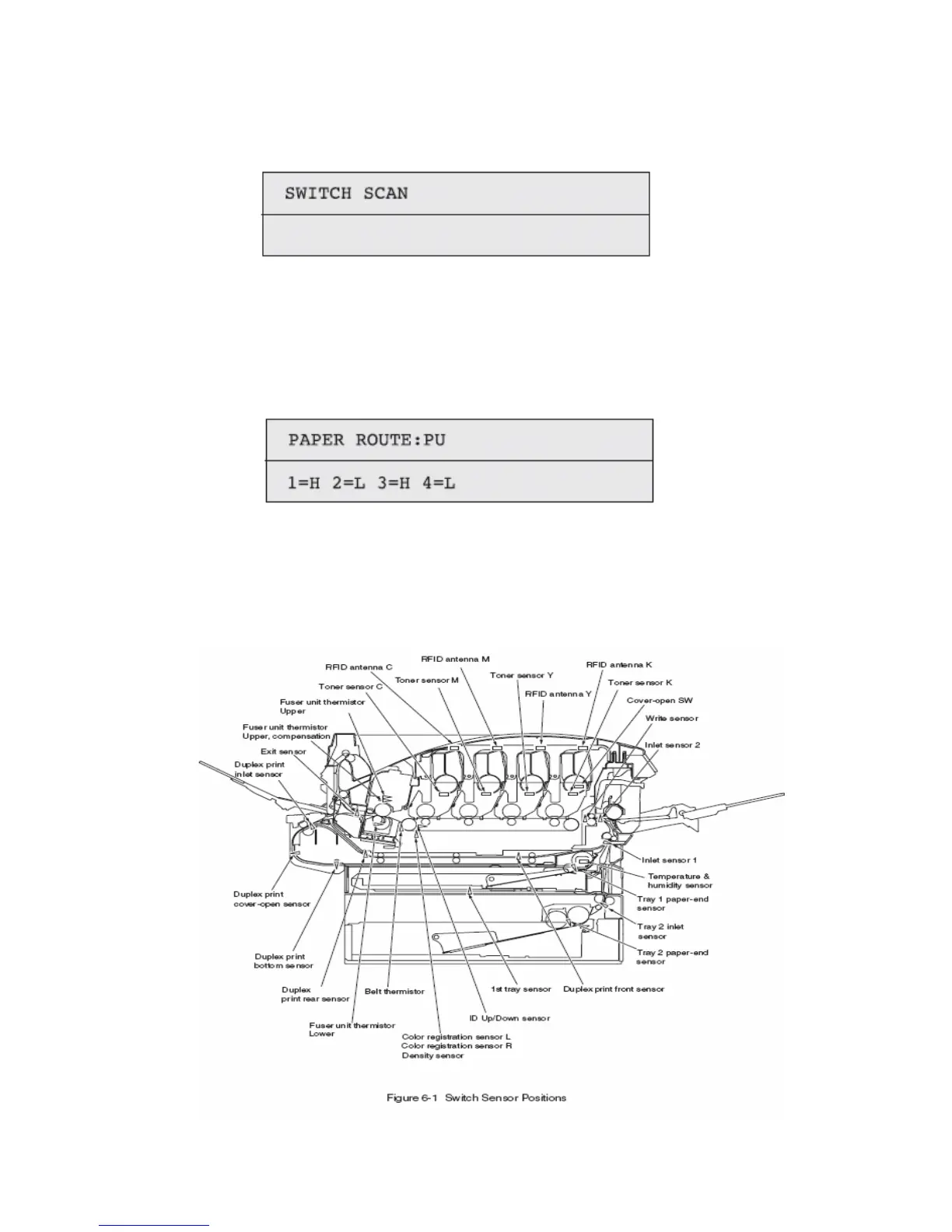
Conduct this operation on each unit (Figure 6-1). The indications are produced in the corresponding LCD display.
(The indications vary from one sensor to another. See Table 6-3 for details).
4. Pressing the CANCEL key restores the status of Item 2 above.
5. Repeat Items 2 to 4, as needed.
6. To end the test, press the BACK key. (The status of Item 1 will be restored).



 To Next Page