44
Color registration adjustment test
This self-diagnosis is practiced to conduct testing on the color registration function of the printer and to locate the
cause of color drift. Restore the normal operation of the printer by following the troubleshooting procedure if any
error is issued during the color registration test.
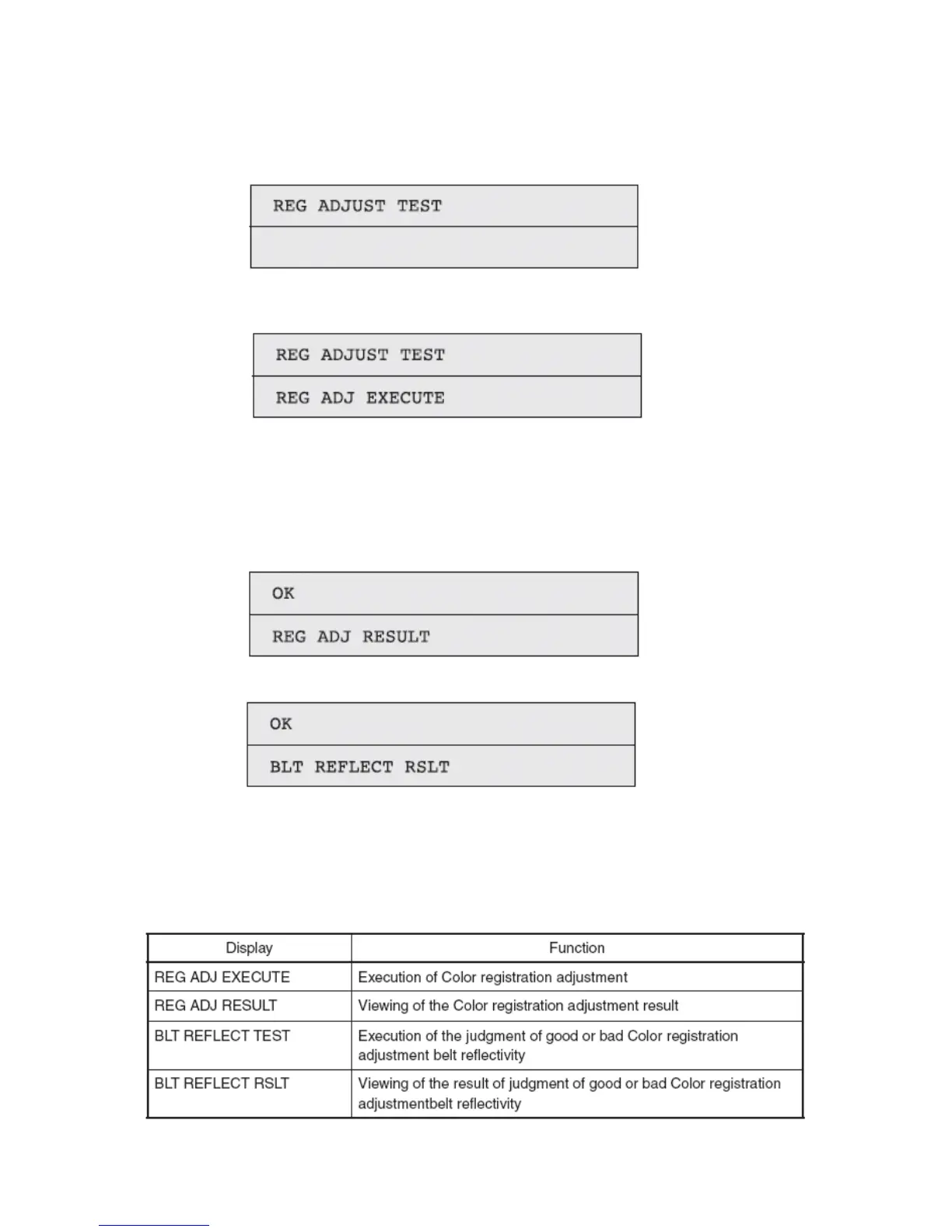
1. Activate the self-diagnostic (Level 1) mode, and press and hold down the [MENU+] key or
[MENU-] key, until the following message appears:
2. Pressing the [ENTER] key causes the following message to appear. Press and hold down the [MENU+] key or
[MENU-] key, until the intended item is displayed.
3. Pressing the [ENTER] key executes the test of the item currently displayed on the panel.
<<REG ADJ RESULT is executed>>
Color registration adjustment test is conducted. ([READY] light blinking)
When the test ends, the test result (OK or error name) appears in the upper line of the display
section, and **** RESULT, in the lower line.
<< BLT REFLECT TEST is executed>>
4. Repeat Items 2 and 3, as needed.
5. Press the [BACK] key to terminate the test. (Status of Item 1 restored)
Color registration adjustment test items



 To Next Page