45
Print density adjustment test
This self-diagnosis is practiced to conduct testing on the Print density adjustment function of the printer and to
view the execution result. This test is executed also to judge whether the Print density adjustment mechanism is
normal or abnormal.
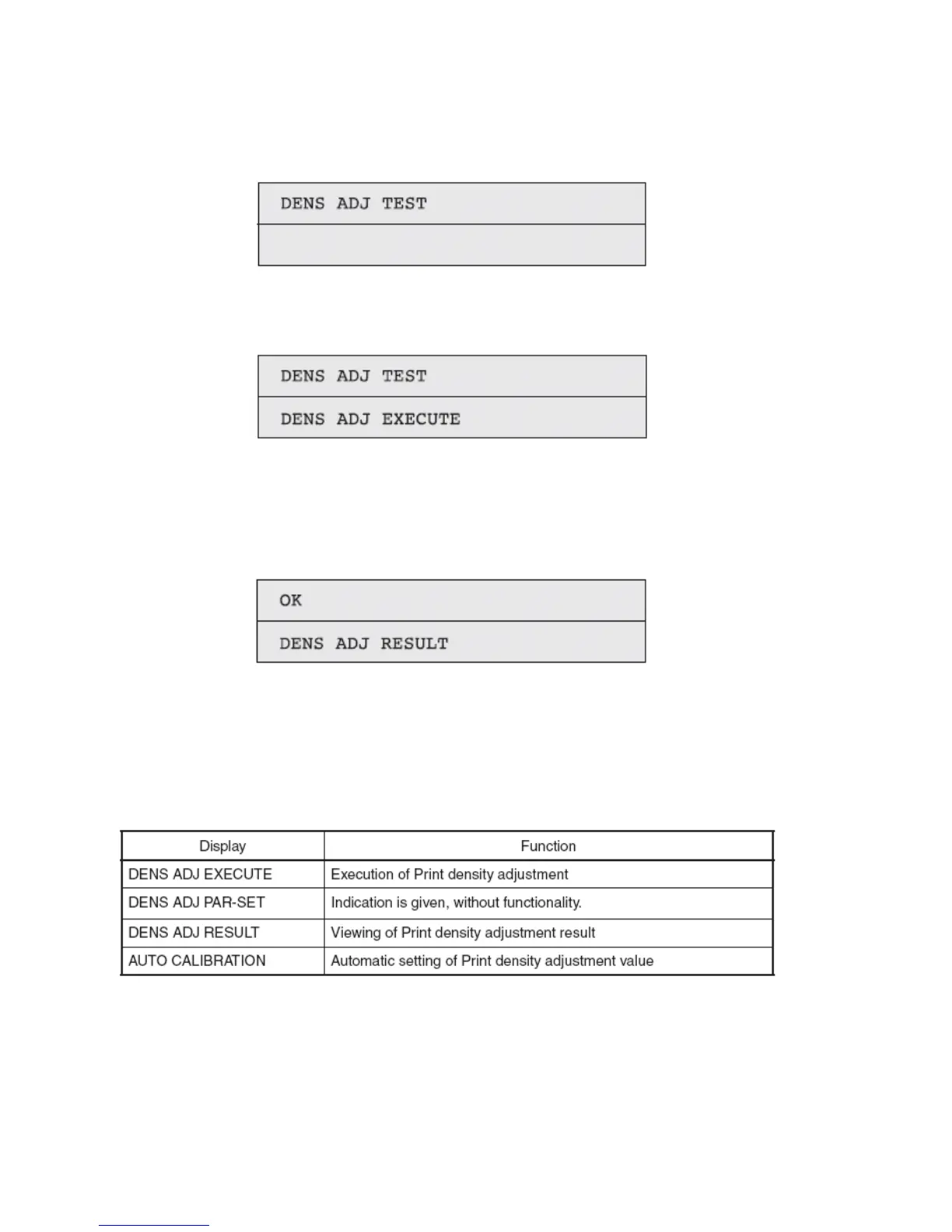
1. Activate the self-diagnostic (Level 1) mode, and press and hold down the [MENU+] key or [MENU-] key, until
the following message appears:
2. Pressing the [ENTER] key causes the following message to appear. Press and hold down the [MENU+] key or
[MENU-] key, until the intended item is displayed.
3. Pressing the [ENTER] key executes the test of the item currently displayed on the panel.
<< DENS ADJ EXECUTE is executed>>
A. A density correction test is conducted. ([READY] light blinking)
B. When the test ends, the test result (OK or error name) appears in the upper line of the display section, and ****
RESULT, in the lower line.
4. Repeat Item 3, as needed.
5. Press the [BACK] key to terminate the test. (Status of Item 1 restored)
Density Correction Test Items



 To Next Page