- 76 -
Scanning to Shared Folder
4
Scanning
Procedure for Scan to Shared
Folder
This section explains how to start Scan to
Shared Folder.
You need to congure the initial settings before
using the Scan to Shared Folder function.
Memo
● The following procedure uses the factory default settings.
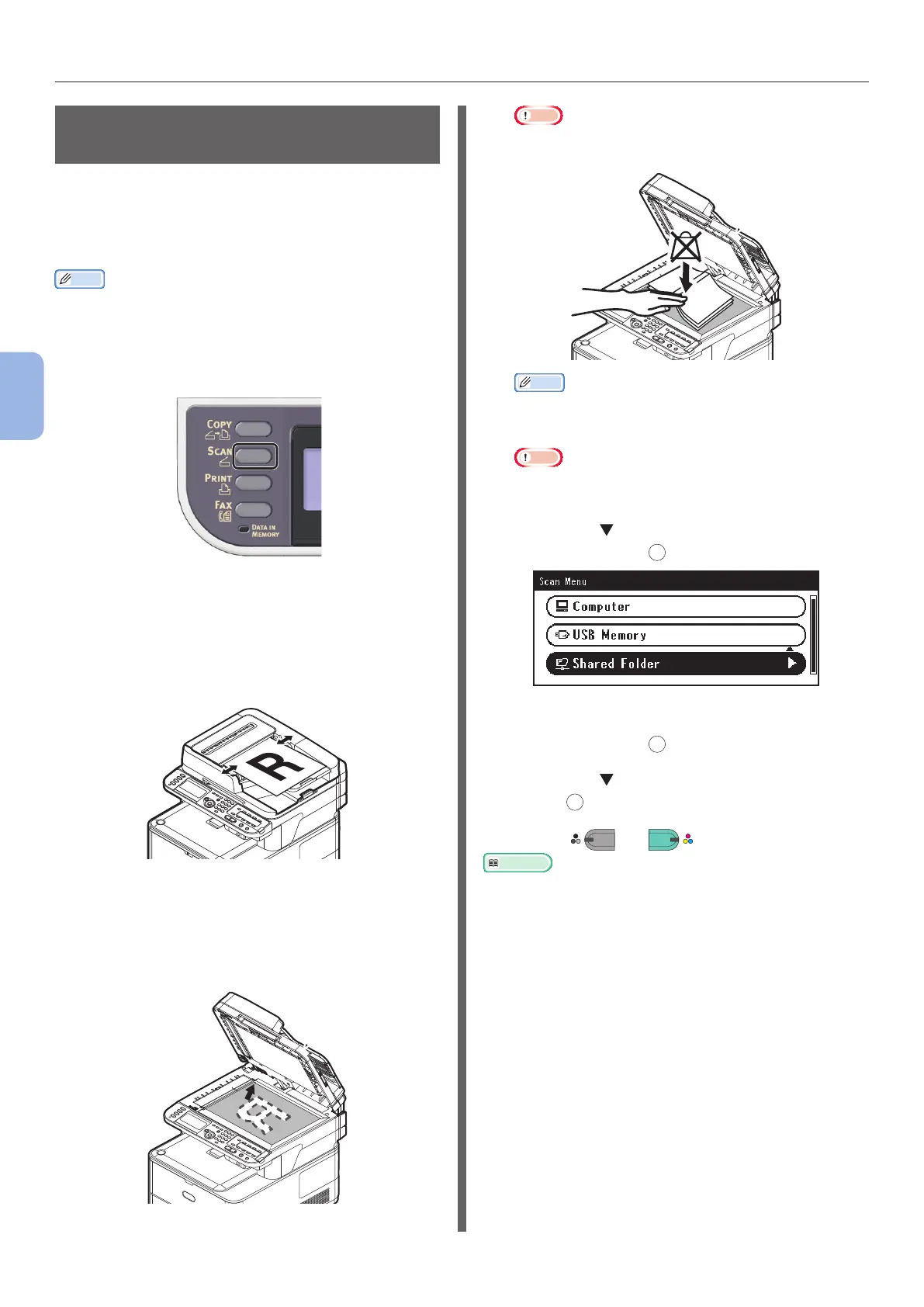
1 Press the <SCAN> key on the operator
panel.
2 Place your document in the ADF or on
the document glass as below:
● ADF
Load documents face up with the top edge of the
documents in rst.
Adjust the document guides to the width of your
documents.
● Document Glass
Place the document face down and align its top
edge to the upper-left corner of the glass.
Close the document glass cover gently.
Note
● Do not apply an excessive load to the document
glass.
Memo
● The machine prioritizes the ADF when scanning
documents. Be sure not to place documents on the
ADF when you use the document glass.
Note
● If Carriage Error <02> is displayed, press Power
OFF/ON.
3 Press the to select [Shared Folder]
and then press
OK
.
4 Check that [Select Prole] is selected
and then press
OK
.
5 Press the to select a prole and then
press
OK
.
6 Press
MONO
or
COLOR
.
Reference
● To load a landscape document, refer to the User’s Guide >
“Operation” > “Loading document(s)”.



 To Next Page