Once
you have chosen
which
Commodore mode you
will
use,
you may wish to choose particular character
set
options:
Slashed/unsiashed
zeros
The slashed zero
set
gives you standard Commodore char-
acters, and the zeros have slash bars through them. Slashed
zeros are useful in computer applications and other
cases
where it's important to distinguish between a zero and the
letter
"0".
If you
don't
want
a slashed zero, choose the un-
slashed zero selection.
Spanish/French-Canadian
When you
use
the command for one
of
these character
sets,
you can
print
symbols and characters unique to these
languages. You
see
standard characters on the screen, but
they'll print
out
as
language characters.
For
example,
if
you
enter the Spanish character
set
by using the
CHR$(27);"!";CHR$(67) command, and then type the @
key, it
will
appear on the screen
as
@.
But when your
document
is
printed, the @
will
be replaced by the Spanish
i symbol.
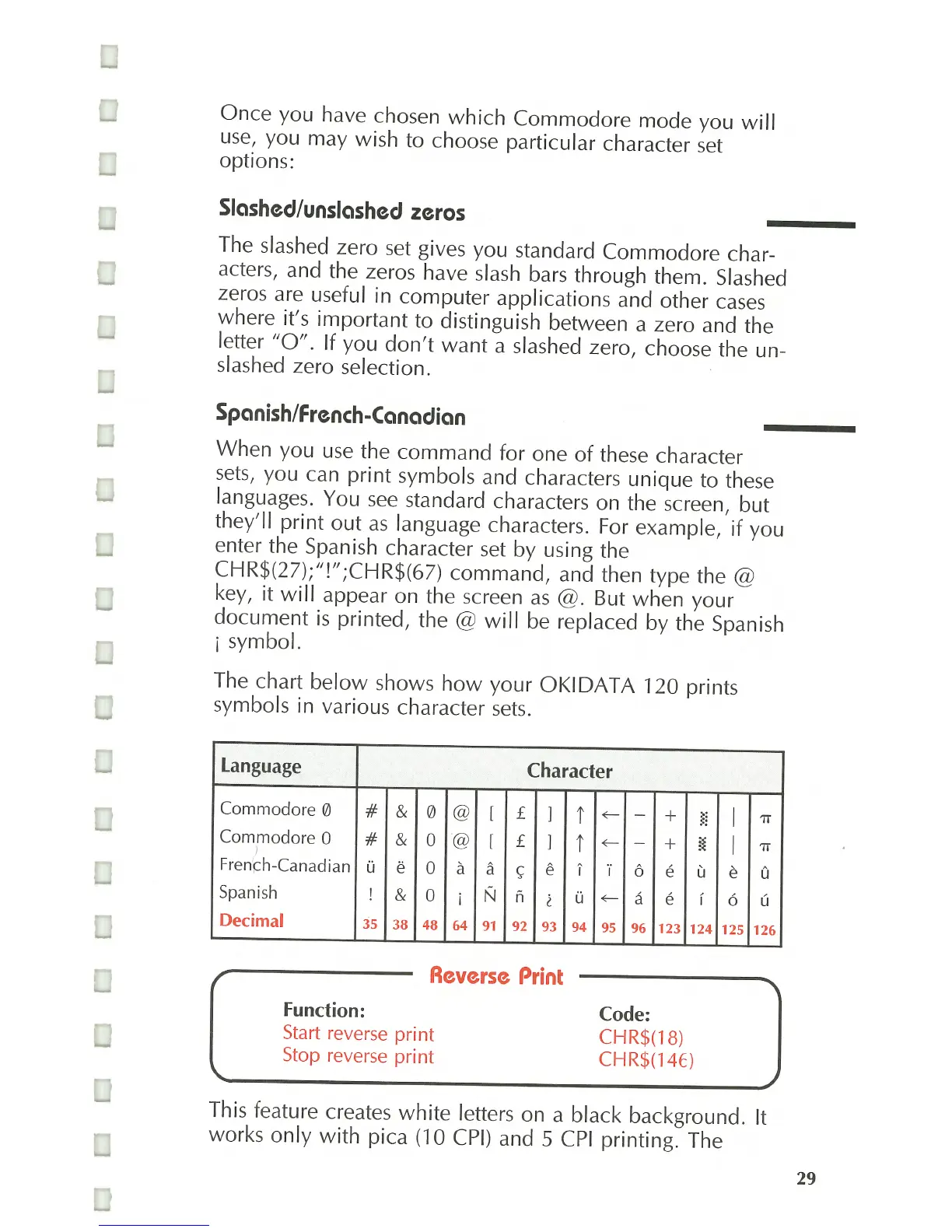
The chart
below
shows
how
your
OKIDATA
120 prints
symbols in various character
sets.
Language Character
Commodore 0
# & 0
@
[
£
1
t
~
-
+
~~
Commodore 0
#
& 0
@
l
£
1
t
~
-
+
l{
I
Fren
'
~h-Canadian
U e
0
a a
<;:
e I
·i
6 e u
Spanish ! &
0
i
N Ii
l
U
~
a e i
Decimal
35 38
48 64
91
92 93 94 95 96 123 124
Reverse
Print
Function:
Start reverse
print
Stop reverse
print
Code:
CHR$(18)
CHR$(14E)
I
I
e
6
125
'7T
'7T
a
U
126
This feature creates
white
letters on a black background. It
works
only
with
pica (10 CPI) and 5
CPI
printing. The
29



 To Next Page