APPENDIX
B:
INTERFACE
SPECIFICATIONS
Your
printer
is
sold
with
an
interface cable that connects
your printer to your computer. More technically-oriented
owners, however, may wish to design their own cable for
special needs. The information here
will
assist
the experi-
enced in identifying the printer's configuration and wiring
requirements.
This printer requires a shielded serial interface cable
with
the
following
connectors:
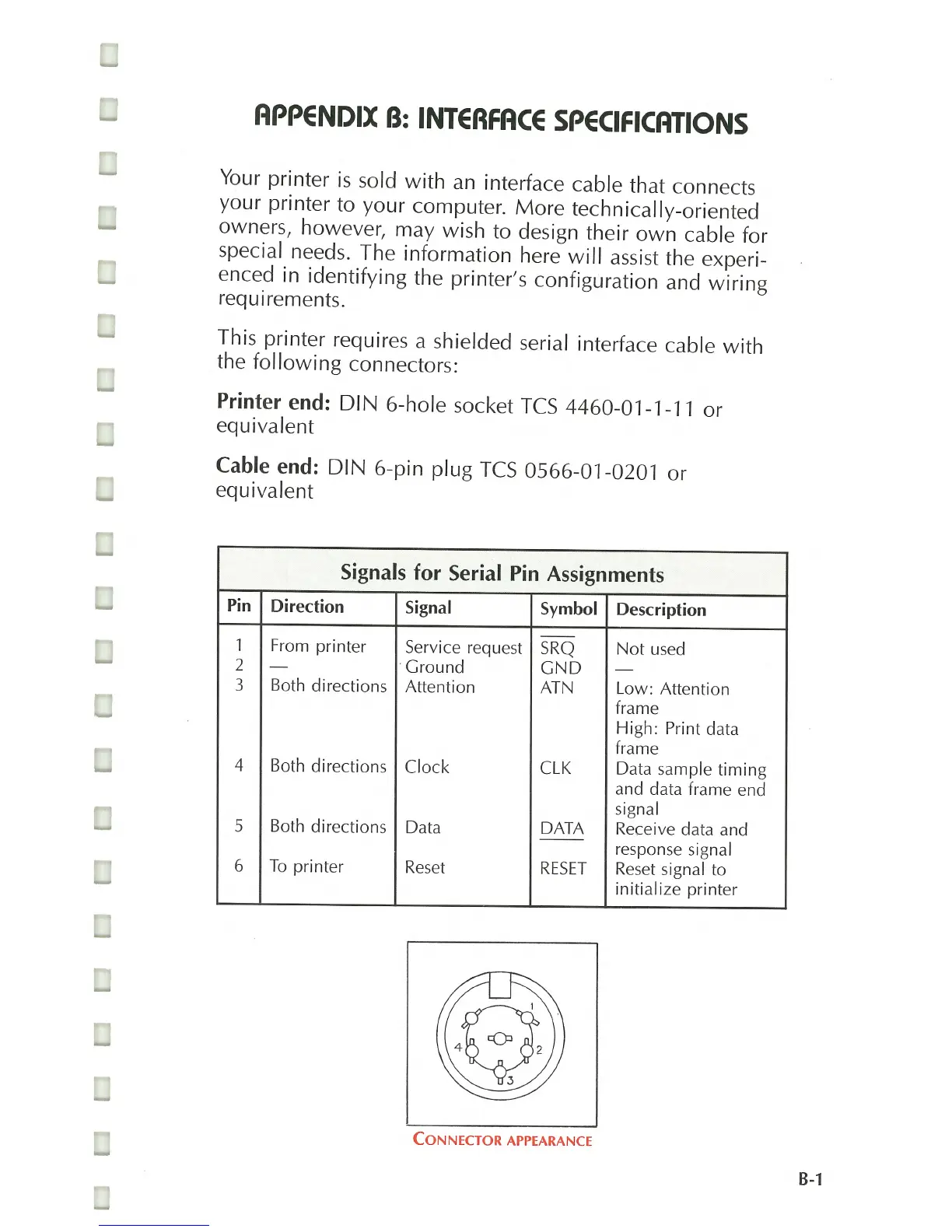
Printer end: DIN 6-hole socket TeS 4460-01-1-11 or
equivalent
Cable end: DIN 6-pin plug TeS 0566-01-0201 or
equivalent
Signals
for
Serial Pin Assignments
Pin Direction
Signal
Symbol Description
1 From pri nter Service request
SRQ
Not
used
2
-
. Ground
GND
-
3 Both directions
Attention ATN Low: Attention
frame
High: Print data
frame
4 Both directions Clock
CLK
Data sample timing
and data frame end
signal
5 Both directions Data
DATA
Receive data and
--
response signal
6
To
printer
Reset
RESET
Reset
signal to
initialize printer
CONNECTOR
APPEARANCE
8-1



 To Next Page