EasyManua.ls Logo

OKIDATA 120 - Page 45

Default Icon
58 pages
Print Icon
To Next Page IconTo Next Page
To Previous Page IconTo Previous Page
Loading...
A-2
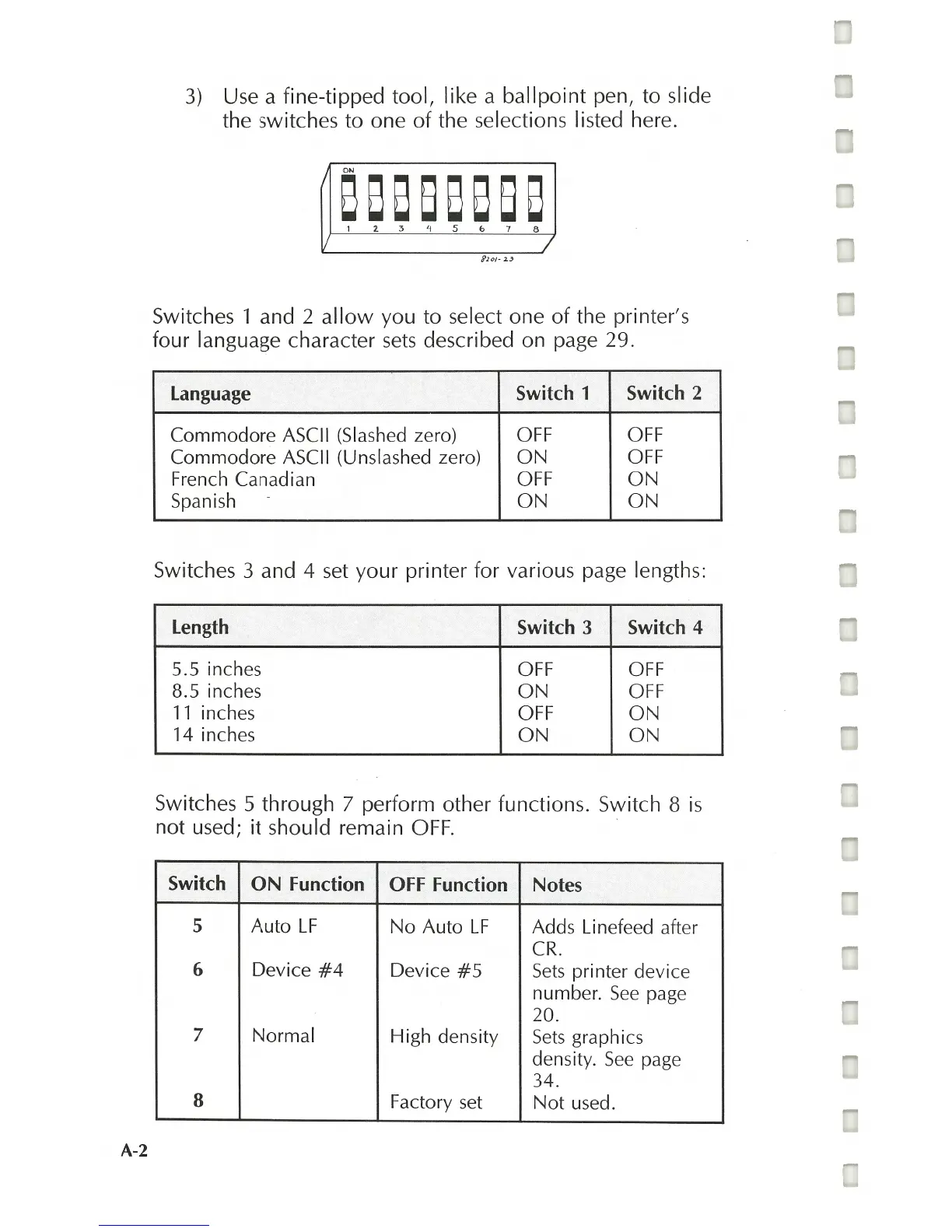
3)
Use a fine-tipped tool, like a
ballpoint
pen, to slide
the switches to one
of
the selections I isted here.
88888888
1 2
3'15b78
/
Switches 1 and 2
allow
you to select one
of
the printer's
four language character
sets
described on page 29.
Language
Switch 1 Switch 2
Commodore
ASCII (Slashed zero)
OFF OFF
Commodore
ASCII (Unslashed zero)
ON
OFF
French Canadian OFF
ON
Spanish
ON
ON
Switches 3 and 4
set
your printer for various page lengths:
Length
Switch
3 Switch 4
5.5 inches
OFF OFF
8.5 inches
ON
OFF
11
inches
OFF
ON
14 inches
ON ON
Switches 5 through 7 perform other functions. Switch 8
is
not used;
it
should remain
OFF.
Switch
ON
Function
OFF Function
Notes
5
Auto
LF
No
Auto
LF
Adds Linefeed after
CR
.
6
Device
#4
Device
#5
Sets
printer device
number.
See
page
20.
7
Normal
High density
Sets
graphics
density.
See
page
34.
8
Factory
set
Not
used.