32
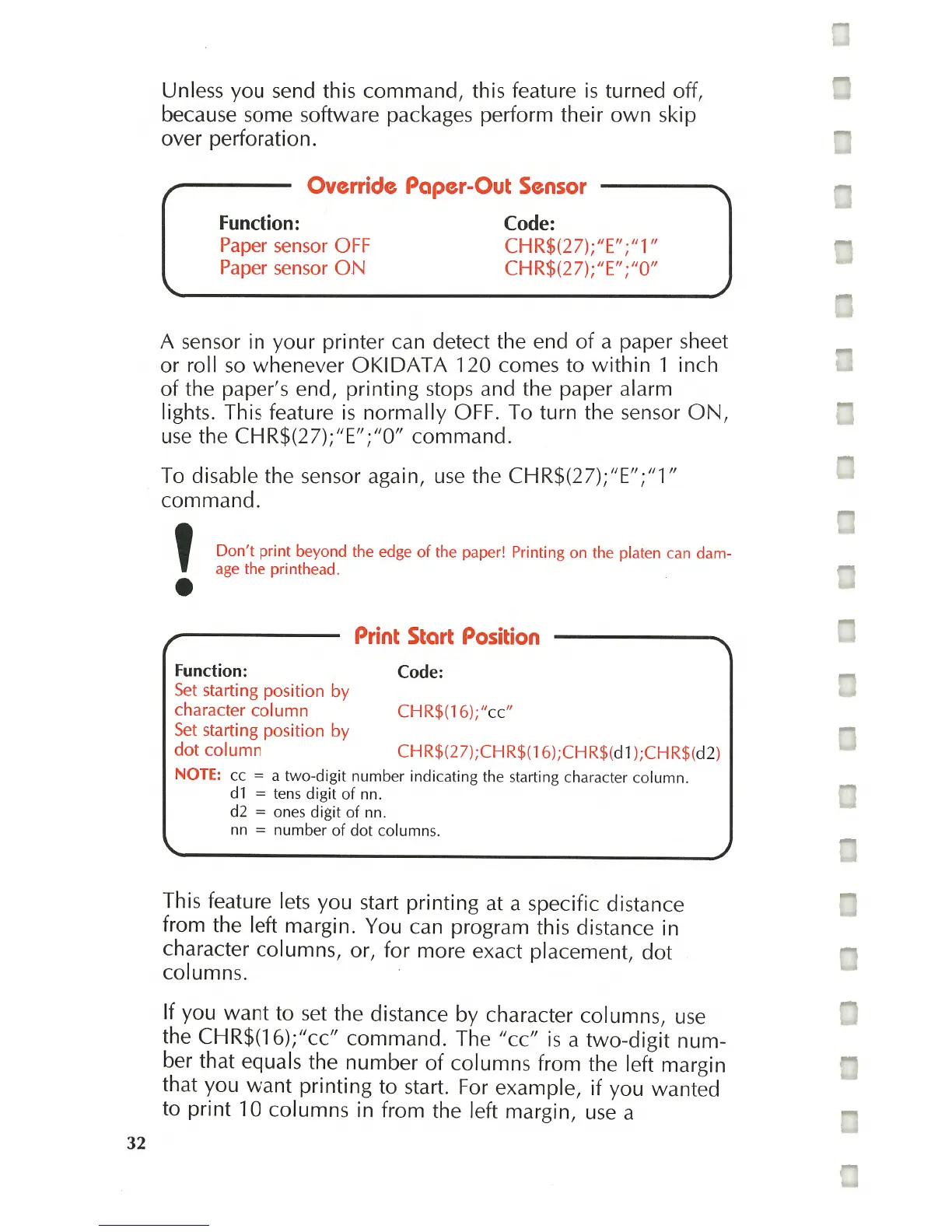
Unless you send this command, this feature
is
turned off,
because some software packages perform their
own
skip
over perforation.
,
Override Paper-Out
Sensor
Function:
Paper
sensor
OFF
Paper
sensor
ON
Code:
CHR$(27);IE"
;"1"
CHR$(27);"E";"
O"
A sensor in your printer can detect the end
of
a paper sheet
or roll
so
whenever
OKIDAT
A 120 comes to
within
1 inch
of
the paper's end, printing stops and the paper alarm
lights. This feature
is
normally
OFF. To turn the sensor
ON,
use
the CHR$(27);IE";"O/l command.
To disable the sensor again,
use
the CHR$(27);/IE/I;/Il/l
command.
,
Don't
print beyond the edge
of
the paper! Printing on the platen can dam-
age
the pri nthead .
•
Function:
Set
starting position
by
character column
Set
starting position
by
dot
column
Print
Start
Position
Code:
CHR$(16);/lcc"
CHR$(27);CHR$(16);CHR$(
dl
);CHR$(d2)
NOTE: cc = a two-digit number indicating the
sta
rti
ng
character column.
dl
=
tens
digit
of
nn
.
d2
= ones digit
of
nn
.
nn
= number
of
dot columns.
This feature lets you start printing at a specific distance
from the left margin. You can program this distance in
character columns, or, for more exact placement,
dot
columns.
If you
want
to
set
the distance by character columns,
use
the CHR$(16);/lcc/l command. The /lcc/l
is
a
two-digit
num-
ber that equals the number
of
columns from the left margin
that you
want
printing to start. For example,
if
you wanted
to print 10 columns in from the left margin,
use
a



 To Next Page