C
D
D9D1
D20
D19
D18 D16 D14
D2 D4
D6 D8
D7D5D3
D17 D15
D10
D11
D12
D13
B1
B2
B3
B4
B9
B11
B5
B12
B6
B7
B8
B10
US-ENGLISH
US-ENG- 16
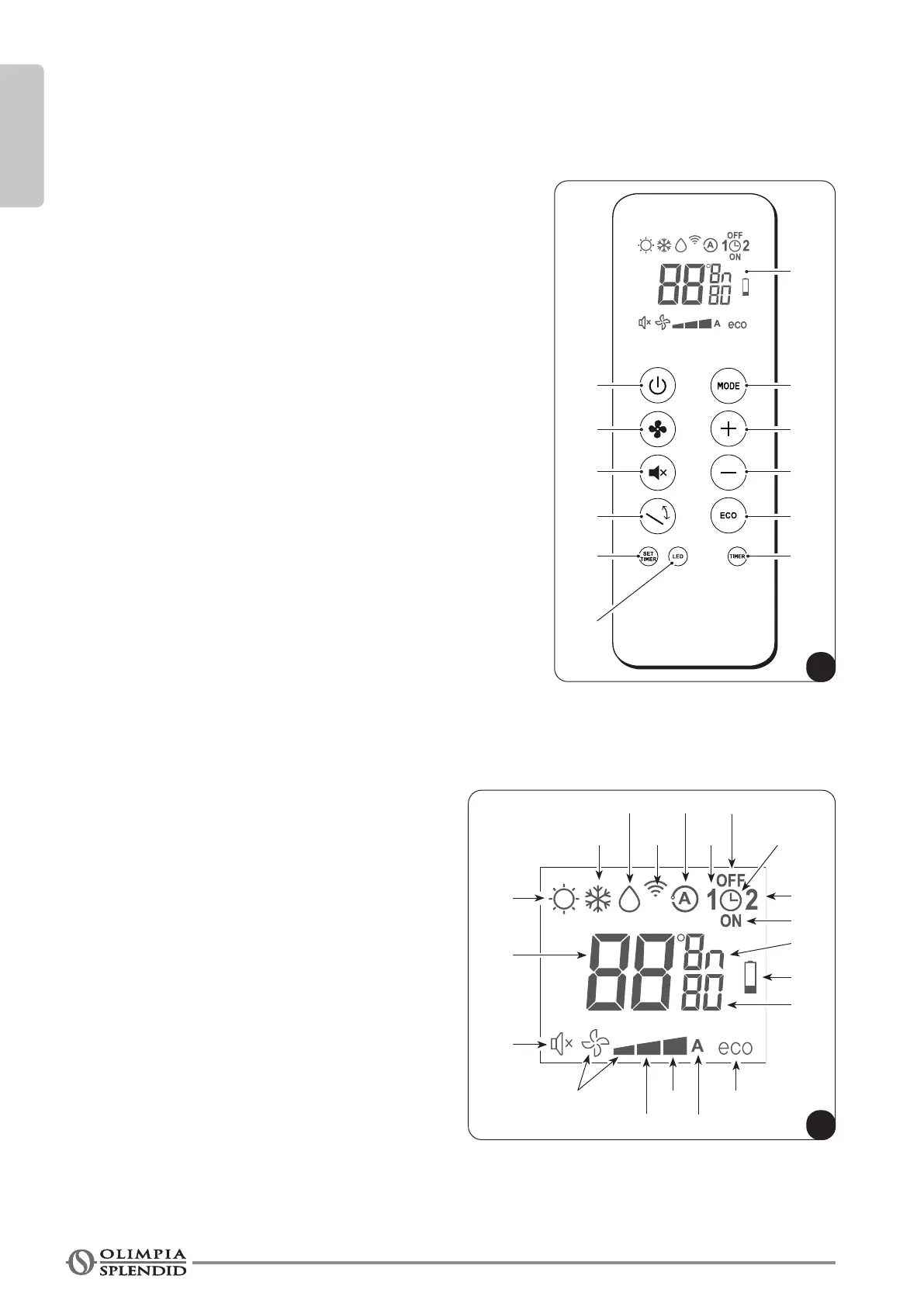
3.5 - DESCRIPTION OF REMOTE CONTROL
The remote control is the interface between the unit and the end user, so it is very important to learn all its
functions, the use of the various controls and the meaning of the symbols marked on it.
3.5.1 - Description of the remote control buttons
B1 Activation/deactivation (Stand-by) of the unit
B2 Low, medium high or automatic fan speed selection
B3 Activation/deactivation of the function Silent (Sleep)
B4 Activation/deactivation of the oscillating function of the
supplyairap
B5 Operating mode selection
- cooling > heating > fan >
>dehumidication>automatic
B6 Desired/clock/programming temperature increase.
Press it together with button B7 to change temperature unit
°F/°C
B7 Desired/clock/programming temperature decrease
Press it together with button B6 to change temperature unit
°F/°C
B8 Activation/deactivation of function ECO
B9 Clock/programming setting
B10 Activation/deactivation of the functions
program 1 / program 2
B11 Unit activation/deactivation of the display
B12 Activation/deactivation of the report unit display
3.5.2 - Description of the remote control display
D1 Heating mode
D2 Cooling mode
D3 Dehumidicationmode
D4 Transmission of the command in progress
D5 Automatic mode
D6 Program 1
D7 Programswitchingotimesetting
D8 Clock/program setting
D9 Program 2
D10 Program switching on time setting
D11 Temperature/time unit of measurement
D12 Lowbatterynotication
D13 Minutes timer
D14 ECO function enabled
D15 Automatic fan speed
D16 High fan speed
D17 Medium fan speed
D18 Low fan speed
D19 Function Silent (Sleep) mode enabled
D20 Desired temperature/clock/programming








 To Next Page