MAESTRO PRO INVERTER
E
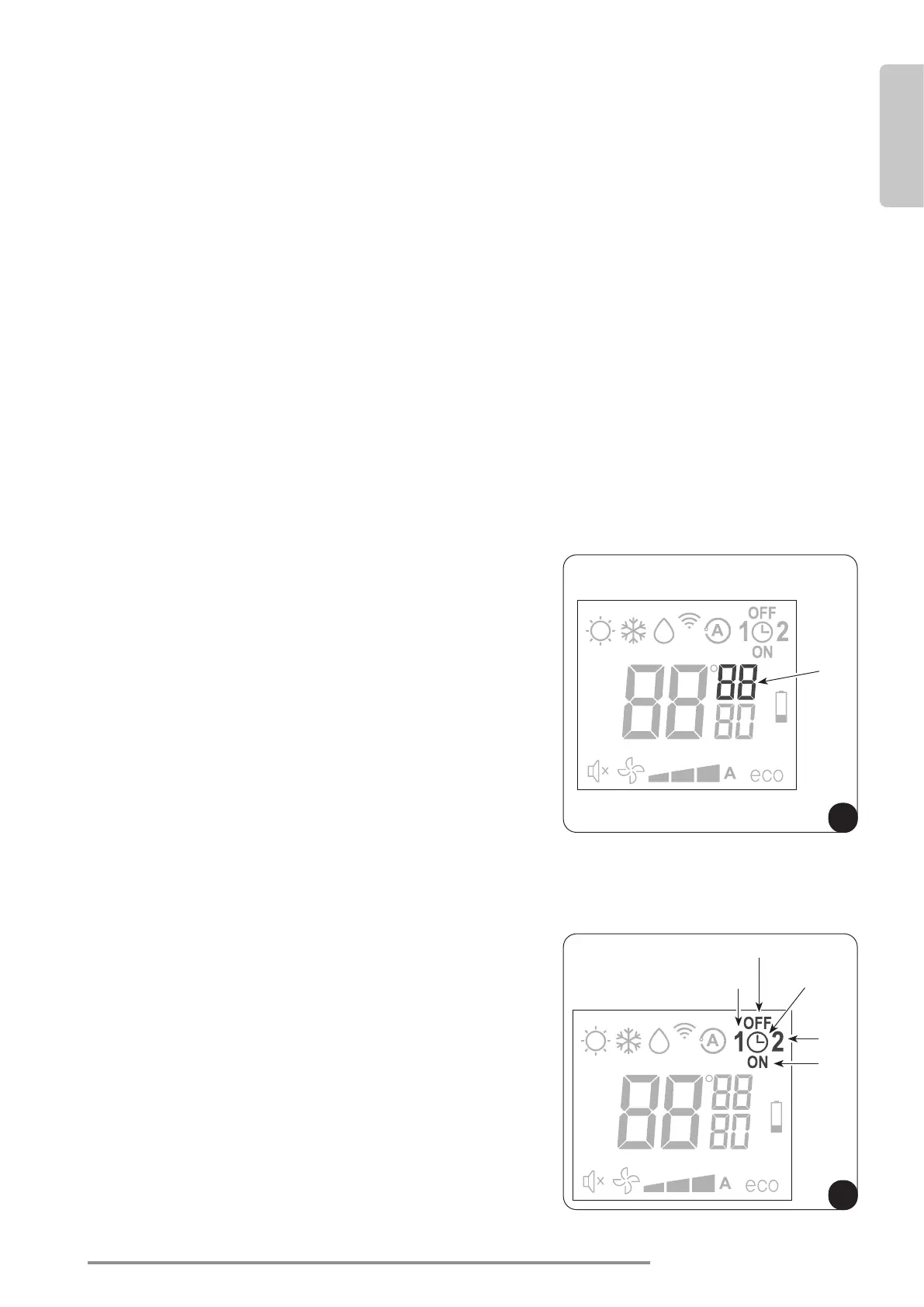
D11
F
D6
D8
D7
D10
D9
US-ENGLISH
US-ENG- 19
3.6.11 - Silent (Sleep) button
• Toactivatethismode,rstselectthedesiredoperationalmodeandusersetpoint.ThenpresstheB3
button on the remote control. The D14 symbol will appear on the display).
• The activation of Silent (Sleep) mode results in the following changes:
- Gradual increase in the user selected temperature during cooling mode
- Gradual decrease in the user selected temperature for heating (HP models only)
- Reduction of the sound level
- Reduction of fan speed
• Silent (Sleep mode) is achieved by lowering fan speed while responding slower to changes in room
temper.Ifcoolingcapacityisinsucient,disablethefunction.
3.6.12 - Timer setting
• Theunit’slogicallowstheusertousetwodierenttimerprograms(seeparagraph3.6.14),meaningthe
unit can be deactivated and activated for energy savings during times when the space is not occupied.
• Touseofthesetimers,rstsetthecorrecttime(seeparagraph3.6.13)andthensetthetimerasyou
prefer.
3.6.13 - Timer and clock setting
To set time, operate the remote control as follows:
a. Press B9 button (Set timer) until when the hour symbol
h (D11) appears on the display.
b. Set the hour with buttons B6 (+) and B7 (-).
c. Press the button B9 until when the minutes symbol m
(D11) appears on the display.
d. Set the minutes with buttons B6 (+) and B7 (-).
e. Press the B9 button to save the time and proceed with
the timer programming.
3.6.14 - Timer setting
(PROGR. 1 and PROGR. 2)
It is possible to set one or both the timer programs.
To set the appliance activation and deactivation times in the
two programs, use the remote control and work as follows:
a. Press the B9 button once or serveral times (Set timer)
until the 1 symbol (D6) and the ON symbol (D10) appear
on the display.
b. Use buttons B6 (+) and B7 (-) to increase or decrease the
hour you would like the unit to operate. The time length
is set-table with buttons B6 (+) and B7 (-) in 30 minute
increments.
c. Press button B9 (Set timer) a second time; symbol 1 (D6)
(Deactivation time of the 1° program) and symbol OFF
(D7) appear on the display.








 To Next Page