US-ENGLISH
US-ENG- 24
4.3.4 - Anomalies and remedies
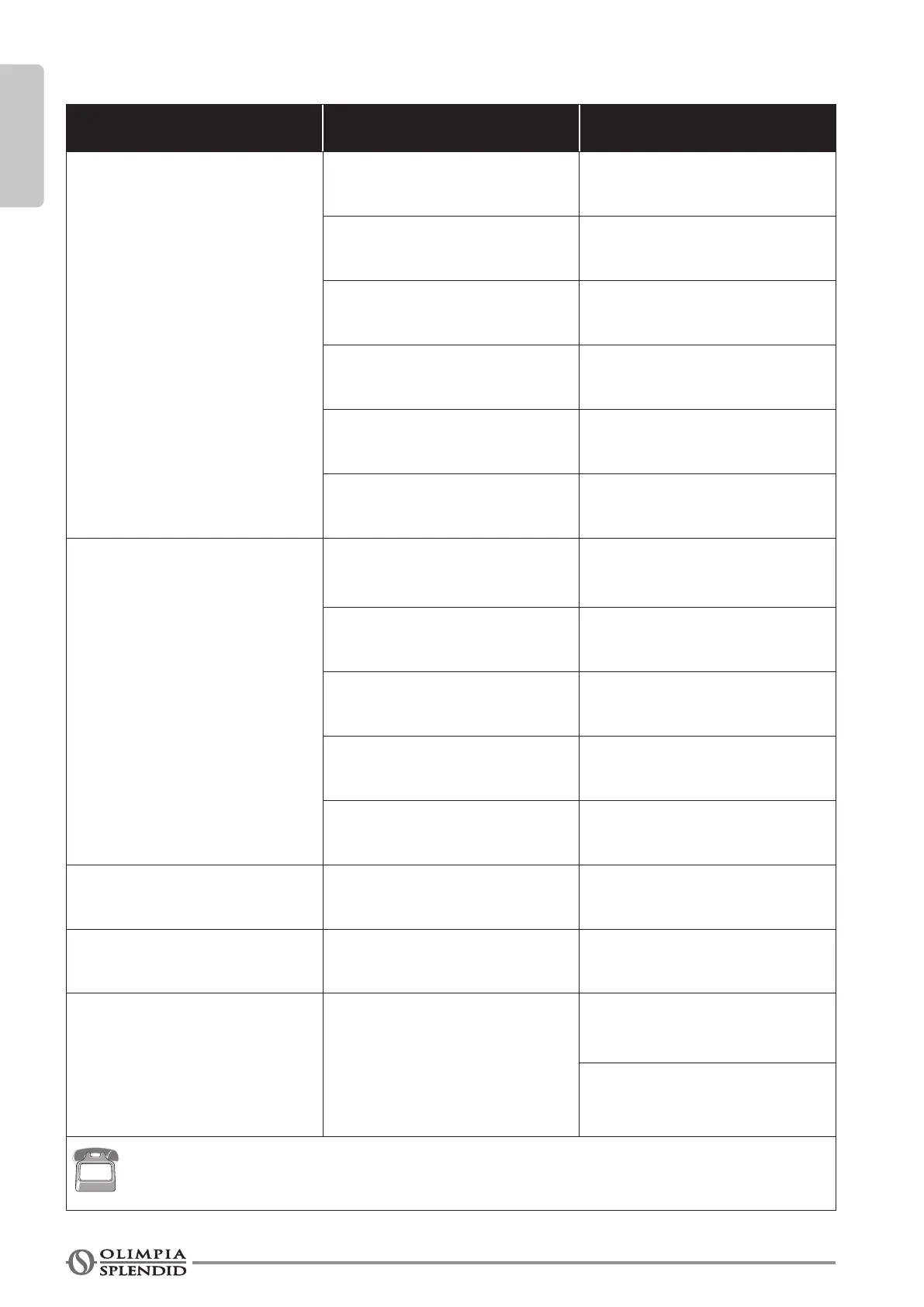
Malfunctioning Cause What must be done?
The unit will not start. Current failure Wait for the current to be restored.
The unit is disconnected from the
current.
Check that the plug is inserted in the
wall socket.
Power switch is switched to “0” Press the power switch when it is
positionedon“I”(gure37).
The fuse is interrupted or the ther-
mal-magnetic circuit breaker has
tripped.
Replace the fuse or restore the ther-
mal-magnetic circuit breaker.
The remote control batteries may be
discharged.
Replace the batteries.
The time set with the timer may not
be correct.
Wait or annul the timer setting.
The appliance doesn’t cool/heat
suciently anymore.
Incorrect temperature setting. Set the temperature correctly. Consul
the "Using the remote control" chapter
for the procedure.
Theairlterisdirty. Cleantheairlter.
The doors or windows are open. Close the doors or windows.
The air inlet or outlet vents of the
indoor or outdoor units are blocked.
First, remove the obstructions and
then re-start the unit.
The compressor 3 minute protection
has activated.
Wait.
The appliance works but
the report console is always
switched o.
The display has been set to OFF. Reactivate the display from the re-
mote control.
The appliance works but the
report console buttons don’t
work.
The keypad lock is active. Disable the keypad lock from the
report console.
The unit does not heat.
Alarm code 50 appears on the
unit display.
Check that the flap can be
openedand that the top side of the
unit is not covered or obstructed.
Turntheunitoffandpressthether-
mostat reset button on the right
side on the unit. (Fig.48)
If the problem has not been solved, please contact a technical service center. Providing serial
number along with detailed information about the issue will help the support team to more quickly
provide direction and/or resolution.







 To Next Page