Status / Job Cancel
5-6 ADVANCED OPERATION GUIDE
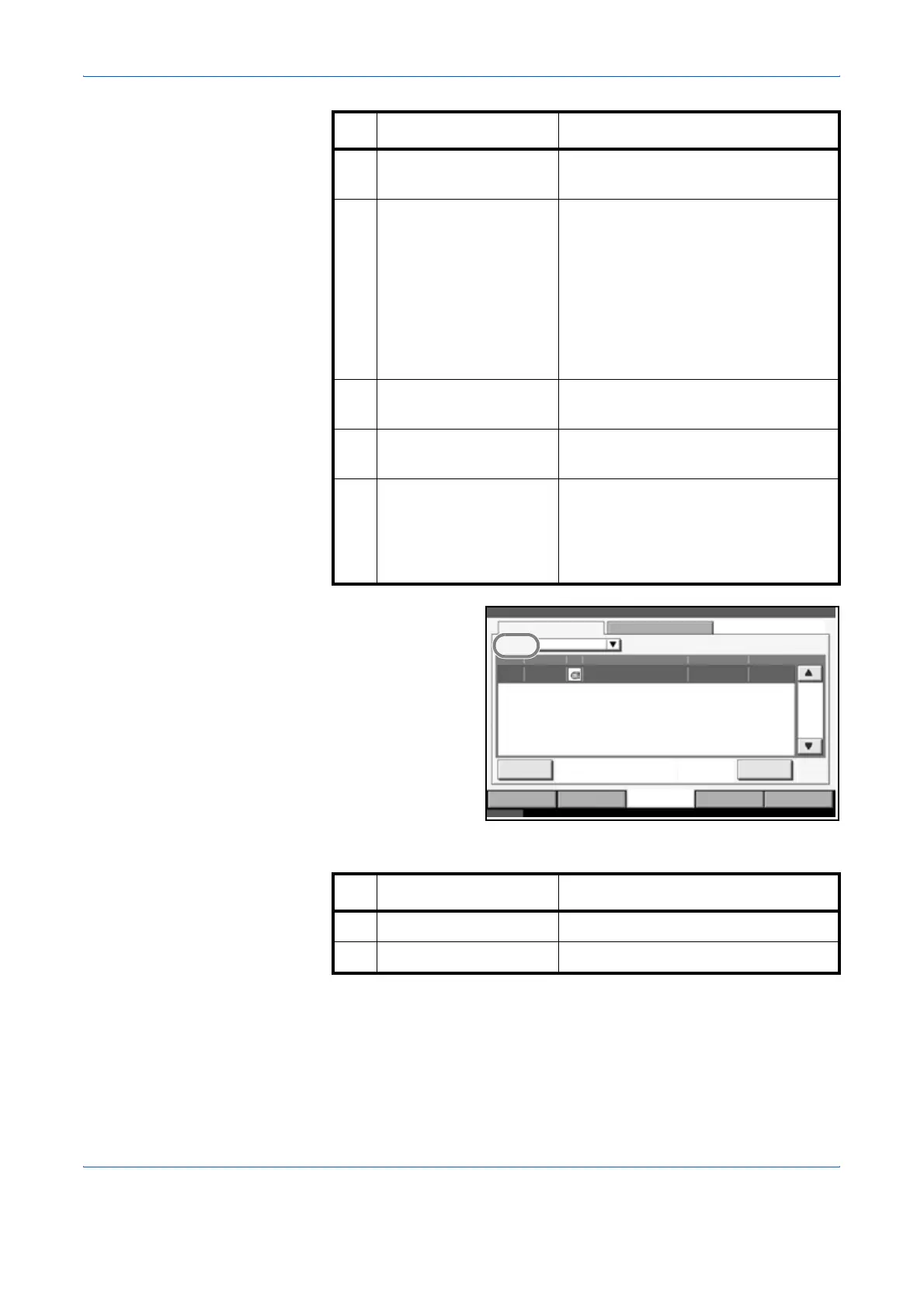
Storing Jobs Status
screen
The table below lists the items displayed in the Storing Jobs Status screen.
5 User Name User Name for the executed job or
Login User Name.
6 Status Status of job
InProcess: The status before
starting sending such as
during scanning
originals
Sending: Sending
Waiting: Sending Waiting
Canceling: Canceling the job
Pause: Pausing the job
7[T] of Job Type Only selected type of jobs are
displayed.
8 [Cancel] Select the job you want to cancel from
the list, and press this key.
9 [Detail] Select the job whose detailed
information you want to display from
the list, and press this key. (Refer to
Checking the Detailed Information of
Histories on page 5-11)
No. Item / Key Detail
Status Log
All
Job No. Accepted Time Type
doc20070225144758
User Name Status
InProcess438 14:47
Status
Job Name
001/001
Cancel
Printing Jobs Sending Jobs Storing Jobs
Device/
Communication
Paper /Supplies
Status 10/10/2007 10:10
Detail
Job Type
123 4 5 6
7
89
No. Display / Key Details
1 Job No. Acceptance No. of job
2 Accepted Time Accepted Time of job



 To Next Page