26
2. Press .
3. Press
.
4. Press
.
5. Press . The change due to the
customer is displayed.
Check Tender in Foreign Currency with
Change in Local Currency
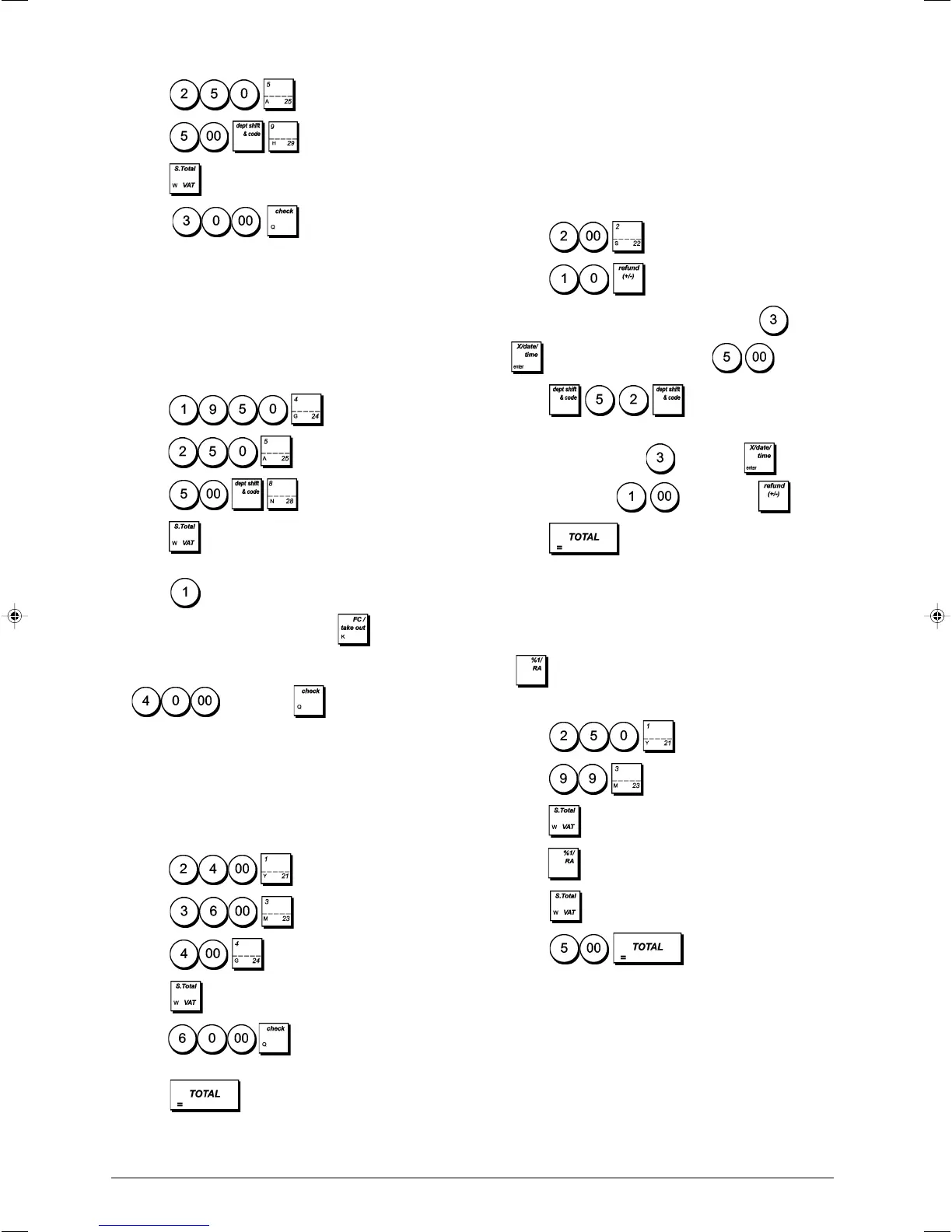
Example: Register a £19.50 item to Department 4, a
£2.50 item to Department 5 and a £5.00 item to Depart-
ment 28. Compute the change in Local currency for a
€ 40.00 check tender.
1. Press
.
2. Press .
3. Press
.
4. Press
to display and print the current balance due
in Local currency.
5. Press
for foreign currency number 1 (previously
programmed as Euro), and press to display the
current balance due in foreign currency.
6. Type the amount tendered by check in foreign currency
and press . The change due in
local currency is displayed.
Split Check/Cash Tender
Example: Register a £24.00 item to Department 1, a
£36.00 item to Department 3 and a £4.00 item to Depart-
ment 4. Split the tender between £60.00 check and £4.00
cash.
1. Press .
2. Press
.
3. Press .
4. Press
.
5. Press . The remaining balance due
is displayed.
6. Press .
Registering a Single and Multiple (-)
Reduction (Coupon)
Up to 8 digits can be used to enter the amount for a
transaction.
Example: Register a £0.10 reduction (coupon) on a £2.00
item to Department 2 and a £1.00 discount on the sale of 3
items costing £5.00 each to Department 52.
1. Press .
2. Press
.
3. Type the number of the multiple item sale
, press
and then enter the unit price .
4. Press
.
5. Type the number of items of the multiple item sale to be
discounted by pressing
followed by and then
type the discount followed by .
6. Press
.
Discounting the Total Sale Using a
Programmed Discount Rate
Example: Register a programmed 10% discount to an
entire sales transaction. Compute the change tender.
The
key must have been programmed to apply a
10% percent discount.
1. Press
.
2. Press
.
3. Press
.
4. Press . The amount discounted is displayed.
5. Press
.
6. Press
. The change due to the
customer is displayed.















 To Next Page