18
ECR SOFTWARE UTILITY - PROGRAM A NEW CASH REGISTER
This functionality is used primarily by a Service Technician to return the cash register to its factory (default)
configuration.
To create a new configuration, proceed as follows:
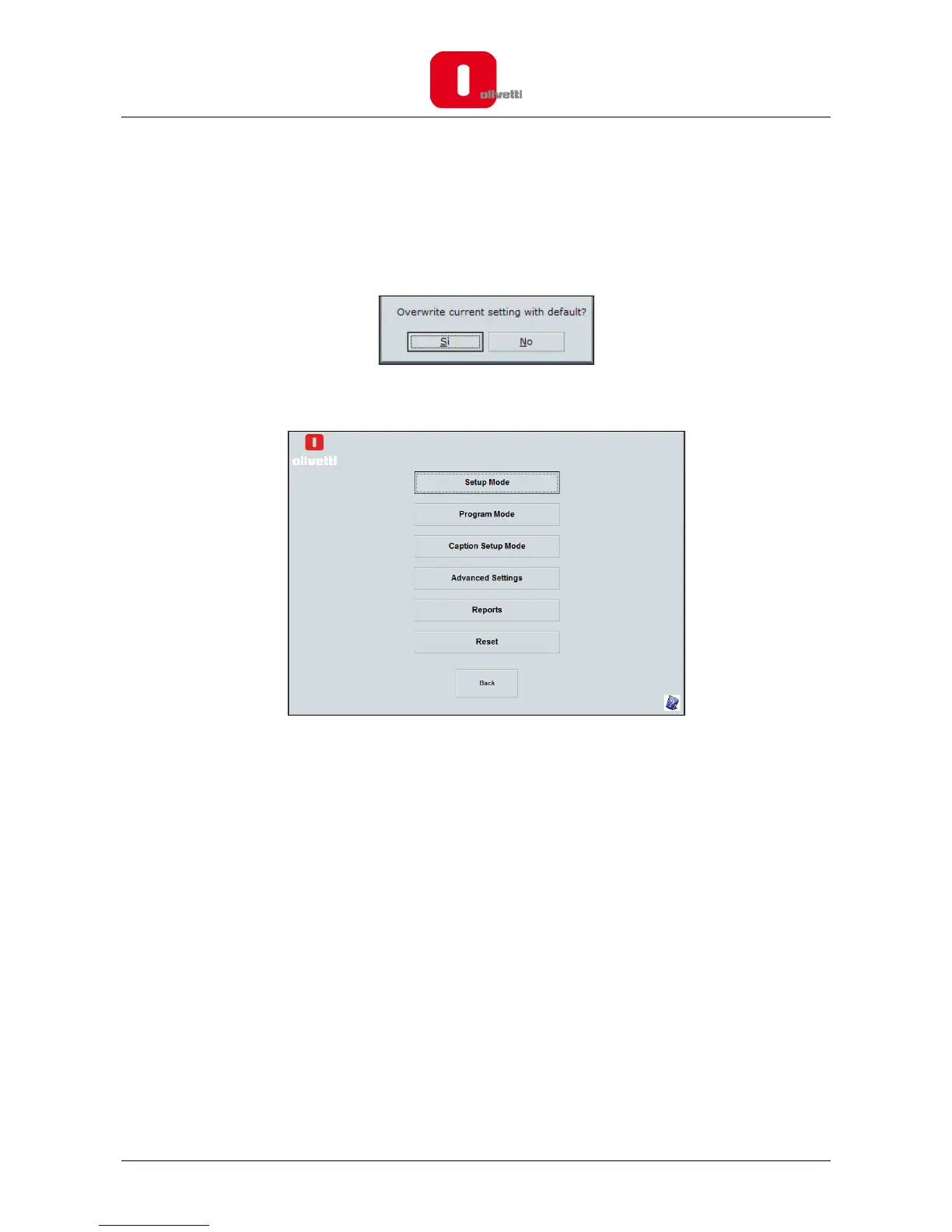
1. Click on the PROGRAM A NEW CASH REGISTER button.
2. Select Yes to continue or No to return to the main screen.
3. After choosing Yes, the main screen appears from which you can choose the various programming
activities:
4. To program a cash register, you can choose between these options:
• Setup Mode - to set options for:
o the basic setup, such as date and time formats
o financial calculations (VAT & Foreign Currency)
o receipt tax details and report printing
o clerk system activation
o Electronic Journal (EJ) storage
• Program Mode - to set up:
o sales registration data, such as PLUs, departments, VAT and Foreign Currency (FC) rates
o individual clerks and their passwords
o manager and training mode passwords
o transaction keys such as Paid Out (PO), Received on Account (RA) and discount/add-on keys
o barcodes.
• Caption Setup Mode - to customise the text that appears on receipts and displays.
• Advanced Setting - to automate report printing and program keyboard functions and pop-
up lists.
• Reports - to generate reports and save them on your PC.
• Reset – reset the Olivetti Cash Register.
Note: In order for any changes made in the programming screens to be actually applied, press the Save
button followed by Send to ECR to save the changes on the cash register.














 To Next Page