EasyManua.ls Logo

Olympus BX60 - Diaphragm, Specimen, and Stage Adjustments

Olympus BX60
47 pages
Print Icon
To Next Page IconTo Next Page
To Previous Page IconTo Previous Page
Loading...
BX60
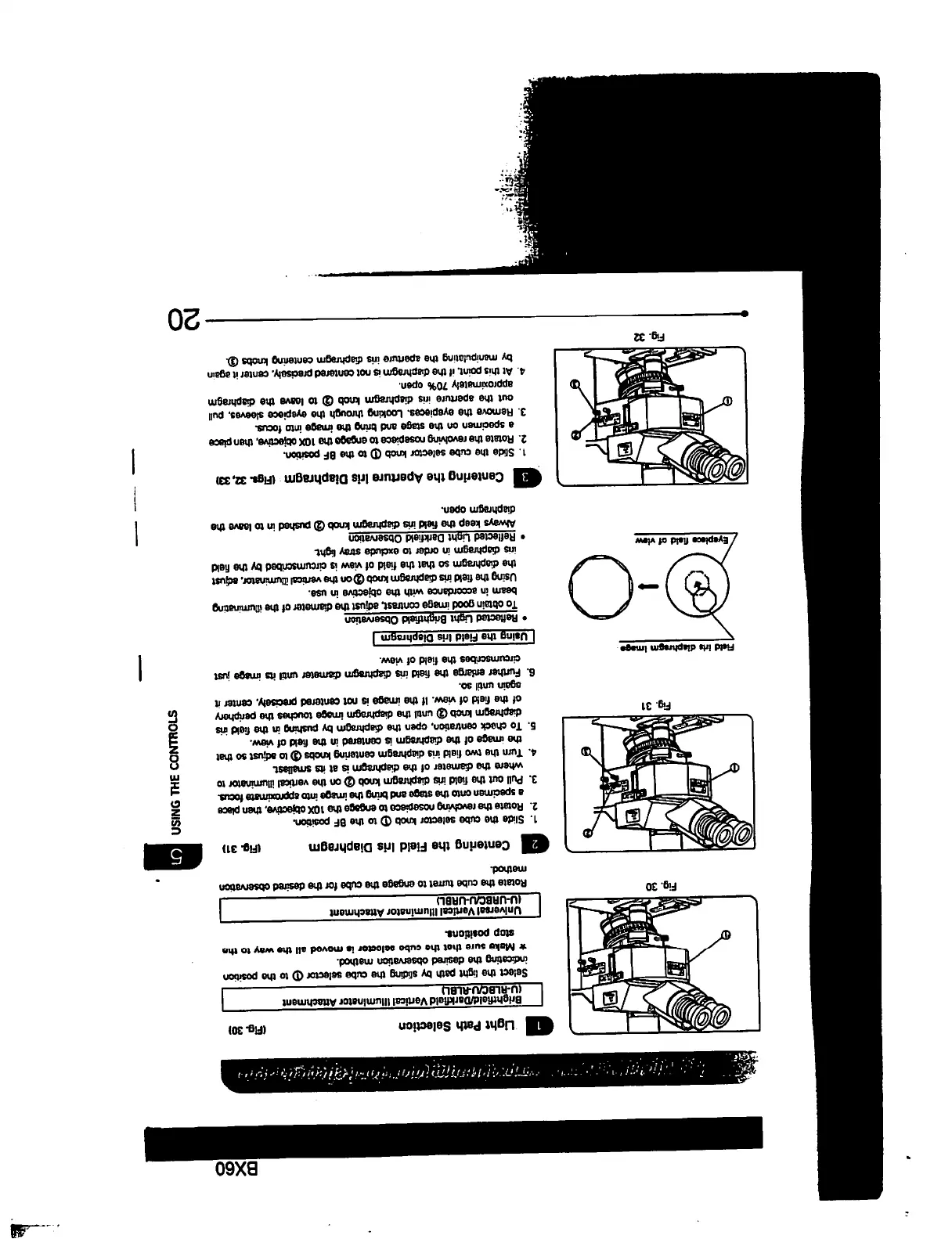
Light
Path
Selection
(Rg.30)
Fig.
30
Fig.
31
Rdd
litt
diaphragm
lm»g»
/Ey«pi«c«
fi«ld
at
vt«w
Rg.
32
1U-RLBC/U-RLBL)
aid
Vertical
Illuminator
Attaehmant
%^^—'
Select
the
light
path
by
sliding
the
cube
selector
©
to
tha
position
indicating
tha
desired
observation
method.
*
Make
sure
that
the
cube
selector
is
moved
all
the
way
to
tha
stop
position*.
Universal
Vertical
Illuminator
Attachment
IU4JRBCAJ-URBU
Rotate
the
cube
turret
to
engage
the
cube
for
the
desired
observation
method.
Q
Centering
the
Field
Iris
Diaphragm
<R»
3D
1.
Slide
the
cube
selector
knob
<J)
to
the
BF
position.
2.
Rotate
the
revolving
nosepiece
to
engage
tha
10X
objective,
then
place
a
specimen
onto
the
stage
and
bring
the
image
into
approximetB
focus.
3. Pull
out
the
field
iris
diaphragm
knob
®
on
the
vertical
illuminator
to
where
the
diameter
of
the
diaphragm
a
at
its
smallest
4.
Turn
the
two
field
iris
diaphragm
centering
knobs®
to
adjust
so
that
the
image
of
the
diaphragm
is
centered
in
the
field
of
view.
5.
To
check
centratkm.
open
the
diaphragm
by
pushing
in
the
field
iris
diaphragm
knob
(D
until
the
diaphragm
image
touches
the
periphery
of
the
field
of
view.
H
the
image
is
not
centered
precisely,
center
it
again
until
so.
6.
Further
enlarge
the
field
iris
diaphragm
diameter
until
Ha
image
just
circumscribes
the
field
of
view.
I
Using
the
Field
Iris
Diaphragm
|
.
Reflected
light
Briphtfield
Observation
To
obtain
good
image
contrast
adjust
the
diameter
of
the
illuminating
beam
in
accordance
with
the
objective
in
use.
Using
the
field
iris
diaphragm
knob
®
on
the
vertical
illuminator,
adjust
the
diaphragm
so
that
the
fiald
of
view
is
circumscribed
by
the
field
ins
diaphragm
in
order
to
exclude
stray light
Reflected
Unht
DarHiald
Observation
Always
keep
the
field
iris
diaphragm
knob
@
pushed
in
to leave
the
diaphragm
open.
dtl
Cantering
the
Aperture
Iris
Diaphragm
(Figs.
32,33)
1.
Slide
the
cube
selector
knob
©
to
the
BF
position.
2.
Rotate
the
revolving
nosepiece
to
engage
the
10X
objective,
than
place
a
specimen
on
the
stage
and
bring
the
image
into
focus.
3.
Remove
the
eyepieces.
Looking
through
the
eyepiece
sleeves,
pull
out
the
aperture
iris
diaphragm
knob
(3)
to
leave
the
diaphragm
approximately
70%
open.
4.
At
this
point,
if
the
diaphragm
is
not
centered
precisely,
center
it
again
by
manipulating
the
aperture
iris
diaphragm
centering
knobs
®.
20

Table of Contents

Other manuals for Olympus BX60

Related product manuals