54
EN
Setting the channel (CH)
Press HI on the arrow pad to highlight CH. Then, turn the dial to select a
communication channel. Press the OK button to confi rm.
• You can select SCAN* or a channel from 1 to 15.
* Select this setting when the communication conditions are poor due to interference from
other devices. When an unused channel appears automatically, press the OK button
again to confi rm.
5
On the wireless receivers, select the same channel that you set on the
wireless commander/commander fl ash.
Using the fl ash as a wireless receiver Using the fl ash as a wireless receiver
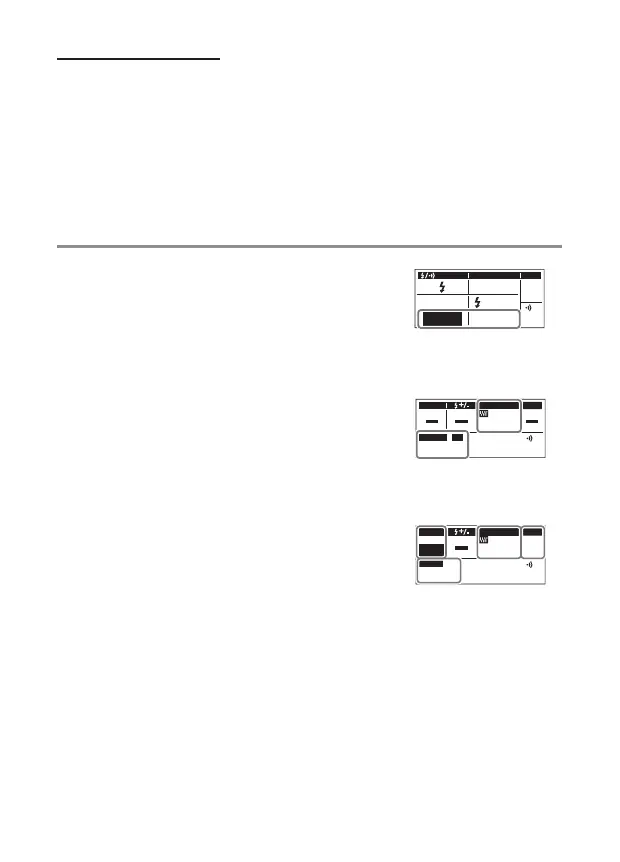
1
Press the #/l button. Then, turn the dial to
select an operating mode. Press the OK button
to confi rm.
RCV
CMD
X-RCV
CMD
When you select
the operating mode
RCV (group control) mode
• In this mode, you set the fl ash control mode and
fl ash intensity on the radio wireless commander.
The radio wireless receiver (this fl ash) receives
the setting information and fi ring signal from
the radio wireless commander. Then, the radio
wireless receiver fi res a fl ash.
MODE ZOOM
A
mm75
GROUP
A
CH
1
G/CH
X-RCV (individual setting) mode
• In this mode, you set the fl ash control mode and
fl ash intensity on the radio wireless receiver (this
fl ash). The radio wireless receiver receives a fi ring
signal from the radio wireless commander. Then,
the radio wireless receiver fi res a fl ash with its
own settings.
MODE ZOOM
A
mm75
G/CH
M
A11
1/128
RATIO
2
Press the MODE button. Then, turn the dial to select a fl ash control
mode. Press the OK button to confi rm. (only for the X-RCV mode)
3
Adjust the settings.


 To Next Page