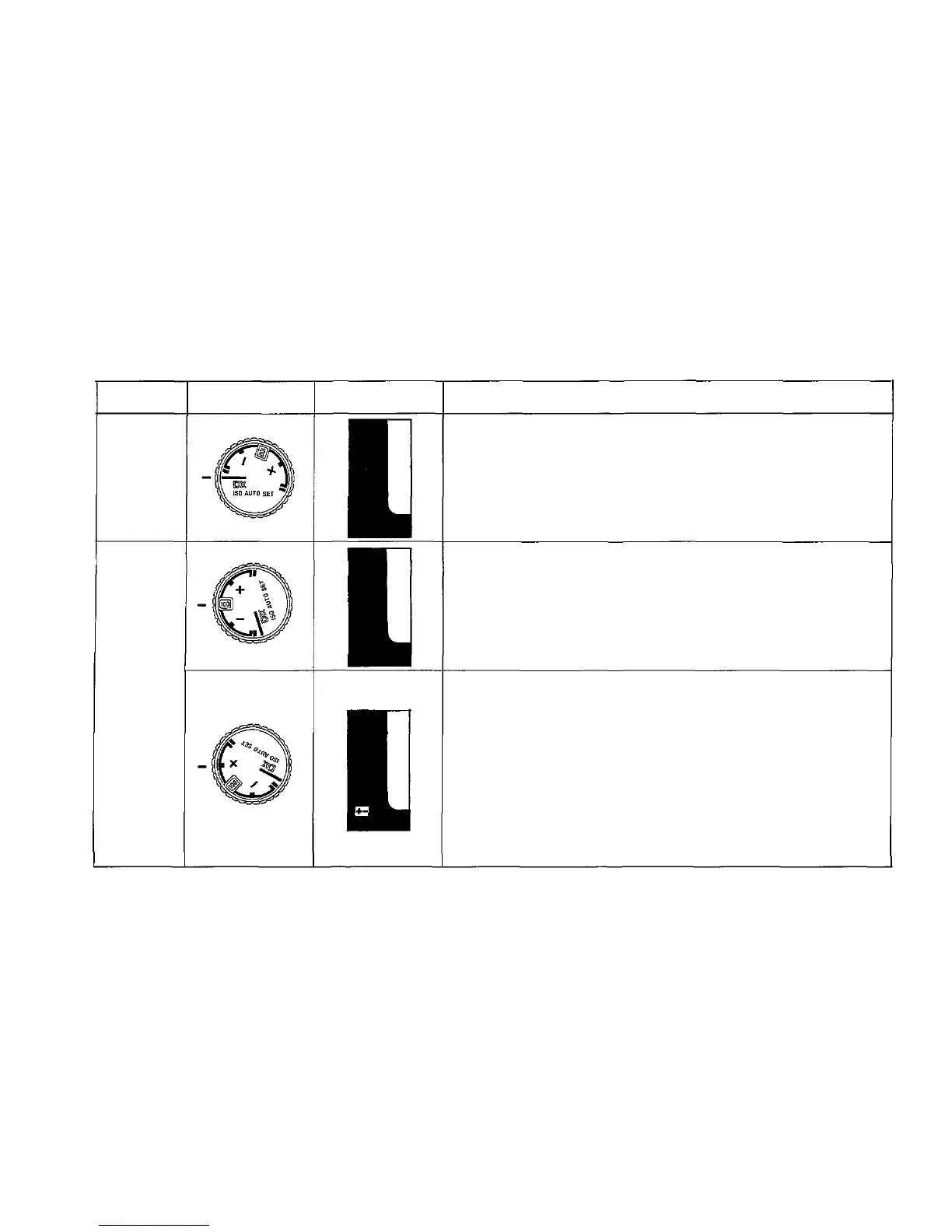
SELECTING THE FILM SPEED SETTING MODE
Mode
DX ISO
AUTO
SET
ISO
MANUAL
SET
Mode
Selector Dial
Finder
Indication
Features
1. If you use film that has the DX code and set the selector
dial
to
this
mode,
the
film
speed
is set
automatically
on
the camera. (The range of auto settings available is from
ISO 25 to 3,200.)
1. For when you use film without the DX code.
(The range of settings is from ISO 25 to 3,200.)
2. For
when
you
prefer
to set a
different
film
speed
ac-
cording to your own experience or preference.
3. For when you plan to use forced or under-developing of
the film.
1. You can make this setting manually according to your
own experience in order to prevent darkening of the
model's face, etc., in backlit or strong contrast situa-
tions. (The exposure compensation range is from —2 to
+2 stops, in 1/3 stop increments.)
2. When using a super wide angle lens in situations where
the sky unavoidably forms a large part of the composi-
tion,
it may be
useful
to set a
plus
exposure compensa-
tion.
3. When using together with ESP Metering mode, exposure
compensation set by the ESP Metering system are added
to those that are manually set.
51


 To Next Page