10
SZ2-STU2
Fig. 15
Fig. 14
1
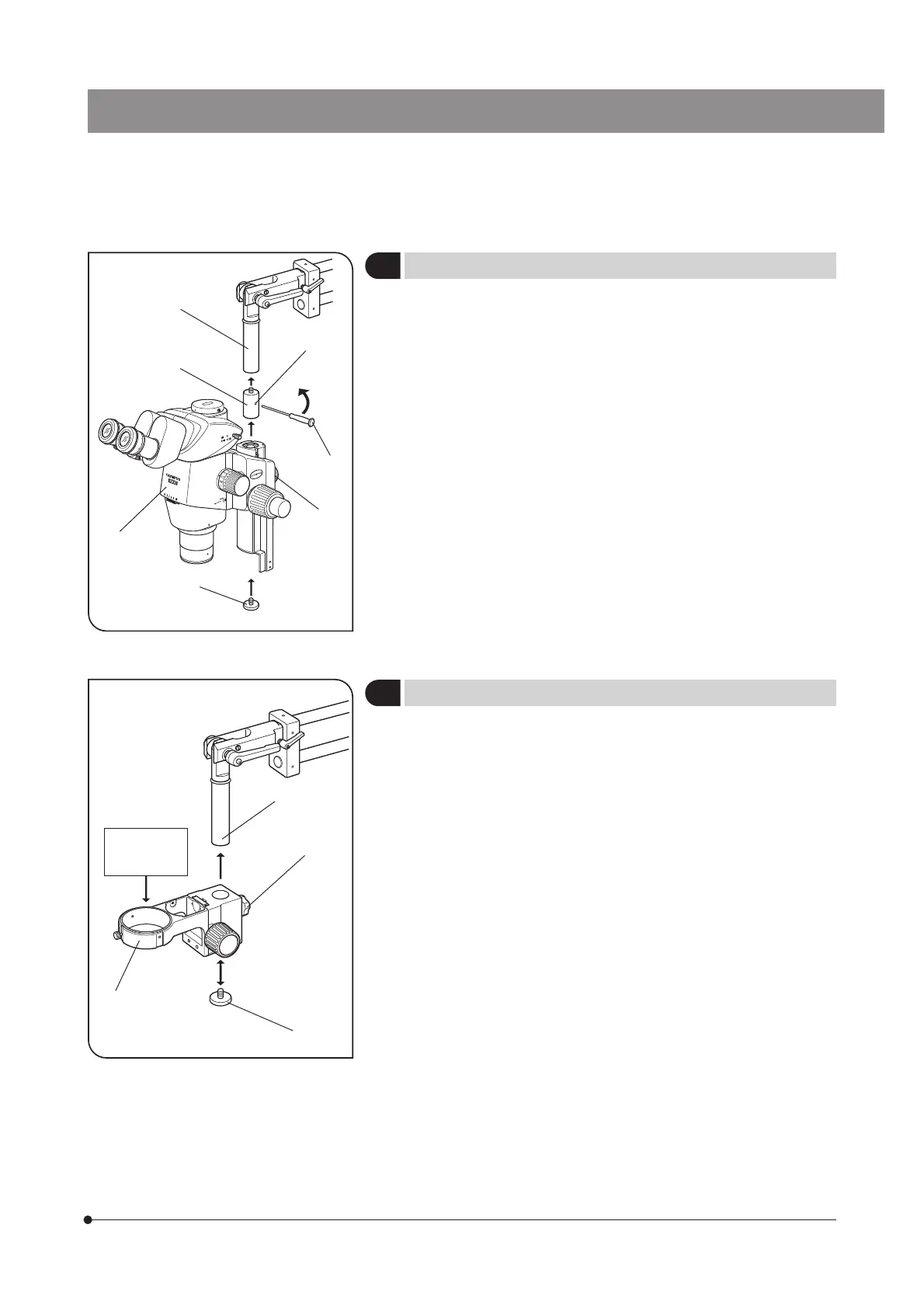
Installing an Applicable Microscope Body
(Fig. 14)
1. Remove the microscope body drop prevention screw @ and screw the
SZX extension adapter ² into the mount shaft ³.
2. Insert the Allen screwdriver ƒ, provided with the SZX microscope body,
into the hole | on the center of the extension adapter ² and rotate the
screwdriver in the direction of the arrow to clamp the extension adapter
firmly.
3. Mount the SZX microscope body … and tighten the focusing assembly
clamping knob †.
4. Screw in the microscope body drop prevention screw @ tightly using a
coin.
1. Remove the microscope body drop prevention screw @, loosen the clamp-
ing knob ³ of the SZ2-STS ², attach the SZ2-STS to the mount shaft |
and tighten the clamping knob ³.
2. Screw in the microscope body drop prevention screw @ tightly using a
coin.
3. Mount the applicable microscope body to be used.
2
Installing SZX Stand Arm SZ2-STS
(Fig. 15)
@
²
³
|
ƒ
…
†
Applicable
microscope
frame
@
²
³
|



 To Next Page