EasyManua.ls Logo

Olympus VANOX-T - Page 10

Olympus VANOX-T
41 pages
Print Icon
To Next Page IconTo Next Page
To Previous Page IconTo Previous Page
Loading...
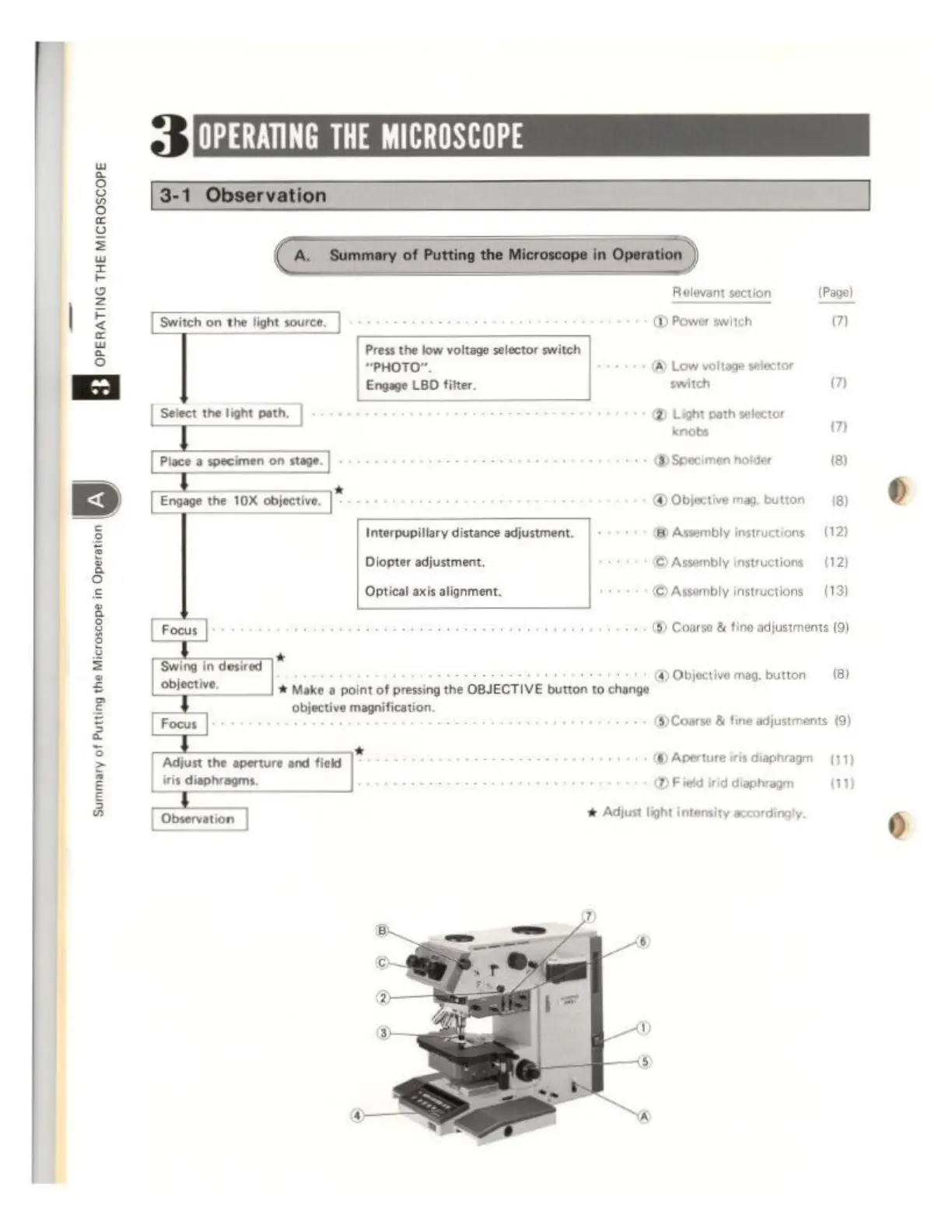
3
JOPERATING
THE
MICROSCOPE
à
PRE
8
È
2
é
ο
σος
το
το
8
È
2
Releant
section
(ον)
|
Gaec).
@
Power
switch
σ
=
Press
the
low
voltage
selector
switch
=
“PHOTO”.
(A)
Low
voltage
selector
κα
Enga
LBD
fer
sich
m
Select
the
light
path.
®
Light
path
selector
knobs
m
(A)
Specimen
holder
18)
Ega
a
OX
bles,
©
Object
mag
button
18)
Interpupillary
distance
adjustment.
(8)
Assembly
instructions
(12)
Deeer
fuen
©
Awonbty
auction
(12
pti
axe
lomem
Слить
instructions
(3
©
Coarse
&
tine
adjustments
(9)
Swing
in
desired
|*
ーーー
#
Make
a
point
of
pressing
the
OBJECTIVE
button
to
change
objective
magnification.
[Four]
@
Course
&
fine
adjustments
(9)
@
Objective
mag.
button
(8)
*
Adjust
the
aperture
and
field
©
Aperture
iris
diaphragm
(17)
iris
diaphragms.
x
@
Field
irid
diaphragm
(11)
Observation
Adjust
light
intensity
accordingly.
Summary
of
Putting
the
Microscope
in
Operation
WAN