EasyManua.ls Logo

Olympus VANOX-T - Page 11

Olympus VANOX-T
41 pages
Print Icon
To Next Page IconTo Next Page
To Previous Page IconTo Previous Page
Loading...
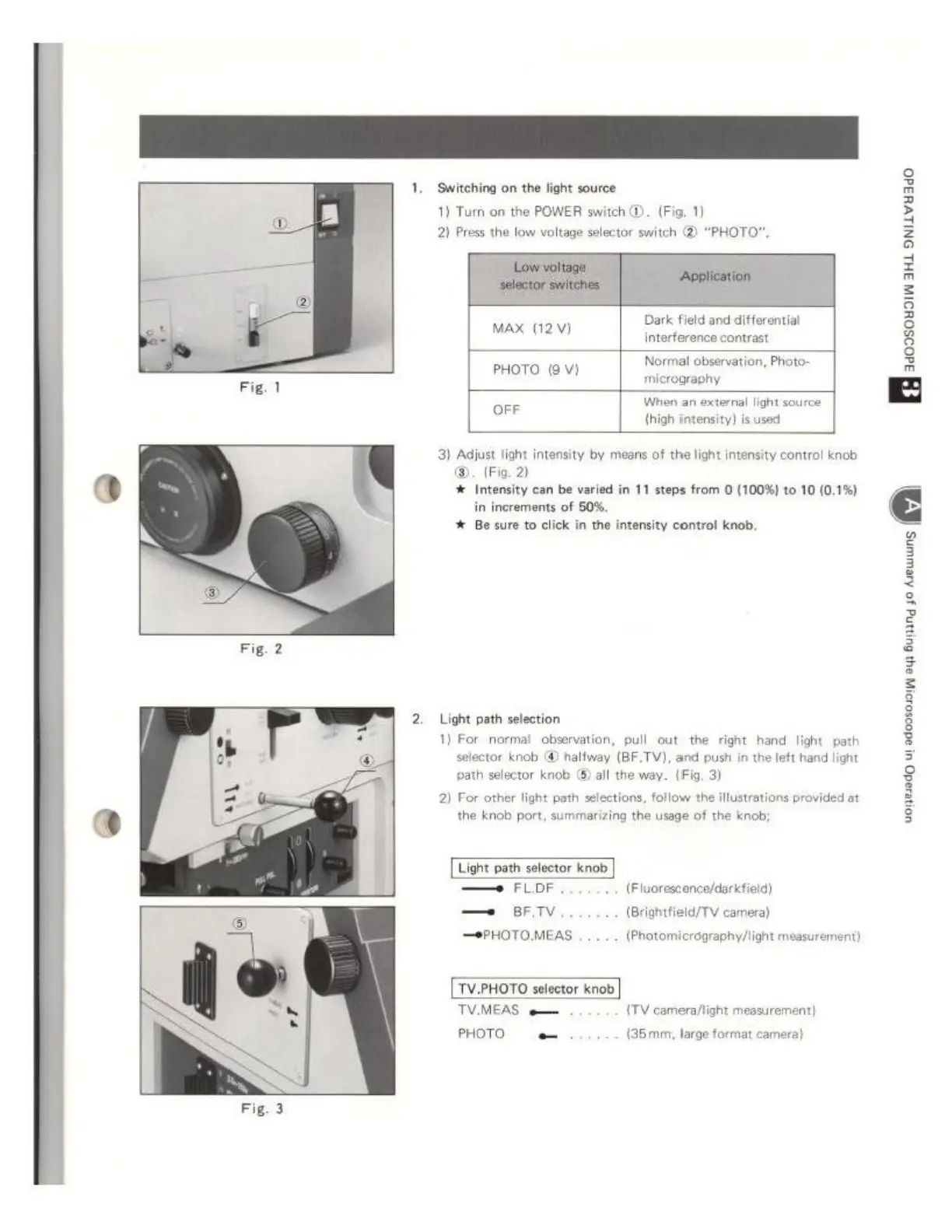
‘Switching
on
the
light
source
1)
Turn
on the
POWER
switch
D.
(Fig.
1)
2)
Press
the
low
voltage
selector
switch
(2)
“PHOTO”.
=
~
ey
-eg
©.
(Fig. 2)
4
Intensity
can
be
varied
in
11
steps
from
(100%)
to
10
(0.1%)
in
increments
of
50%.
# Be sure
to
click
in
the
intensity
control
knob.
Light
path
selection
1)
For
normal
observation,
pull
out
the
right
hand
light
path
selector
knob
@
halfway
(BF.TV),
and
push
in
the
left
hand
light
path
selector
knob
©
all
the
way.
(Fig.
3)
2)
For
other
light
path
selections,
follow
the
illustrations
provided
at
the
knob
port,
summarizing
the
usage
of
the
knob:
Light
path
selector
knob
FLoF
(Fluoresconce/darkfield)
eri
(Brightfield/TV
camera)
PHOTOMEAS
(Photomicrography/light
measurement)
TV.PHOTO
selector
knob
TV.MEAS
e
{TV
camera/light
measurer
PHOTO
e
(35mm;
large
format
camera)