EasyManua.ls Logo

Olympus WS-812 - Identification of Parts

Olympus WS-812
95 pages
Print Icon
To Next Page IconTo Next Page
To Previous Page IconTo Previous Page
Loading...
10
1
*
7
8
6
4
(
w
1
2
)
-
q
=
5
3
$
^
&
%
9
0
!
@
#
EN
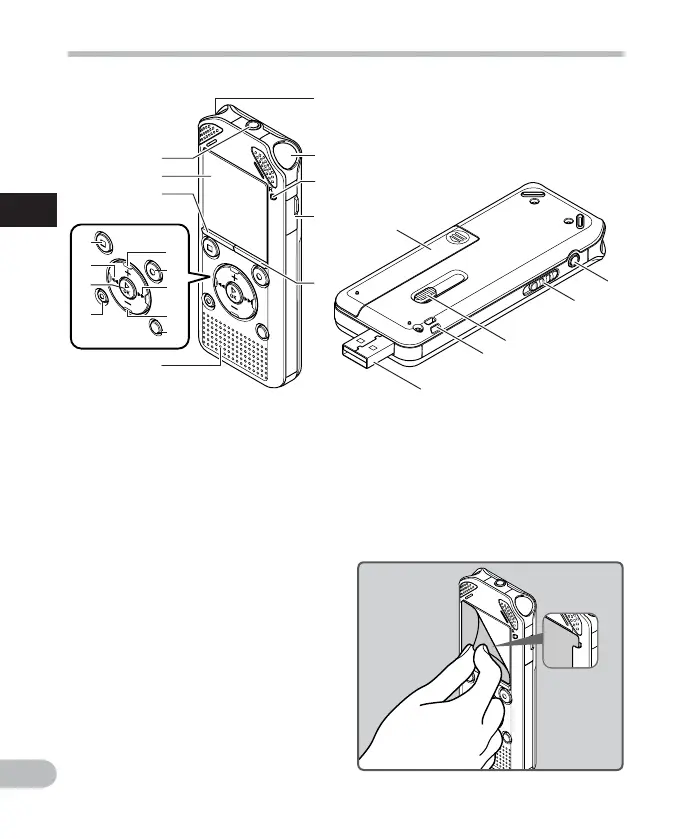
Identification of parts
1 Built-in stereo microphone (L)
2 Built-in stereo microphone (R)
3 LED indicator light (LED)
4 Card cover
5
LIST
button
6
MIC
(Microphone) jack
7 Display (LCD panel)
8
MENU
button
9
+
button
0
REC
( s ) (Record) button
! 9 button
@
button
#
SCENE
/
INDEX
button
$
STOP
( 4 ) button
% 0 button
^ `
OK
button
&
ERASE
button
* Built-in speaker
( Battery cover
)
EAR
(Earphone) jack
-
POWER
/
HOLD
switch
= USB connector slide lever
q Strap hole
w USB connector
Remove the screen protector from the
display.

Table of Contents

Related product manuals