Button operations
o
f)
~
e-----...
O~~~~0-o
0-H--------++-+o
.--~+-
8
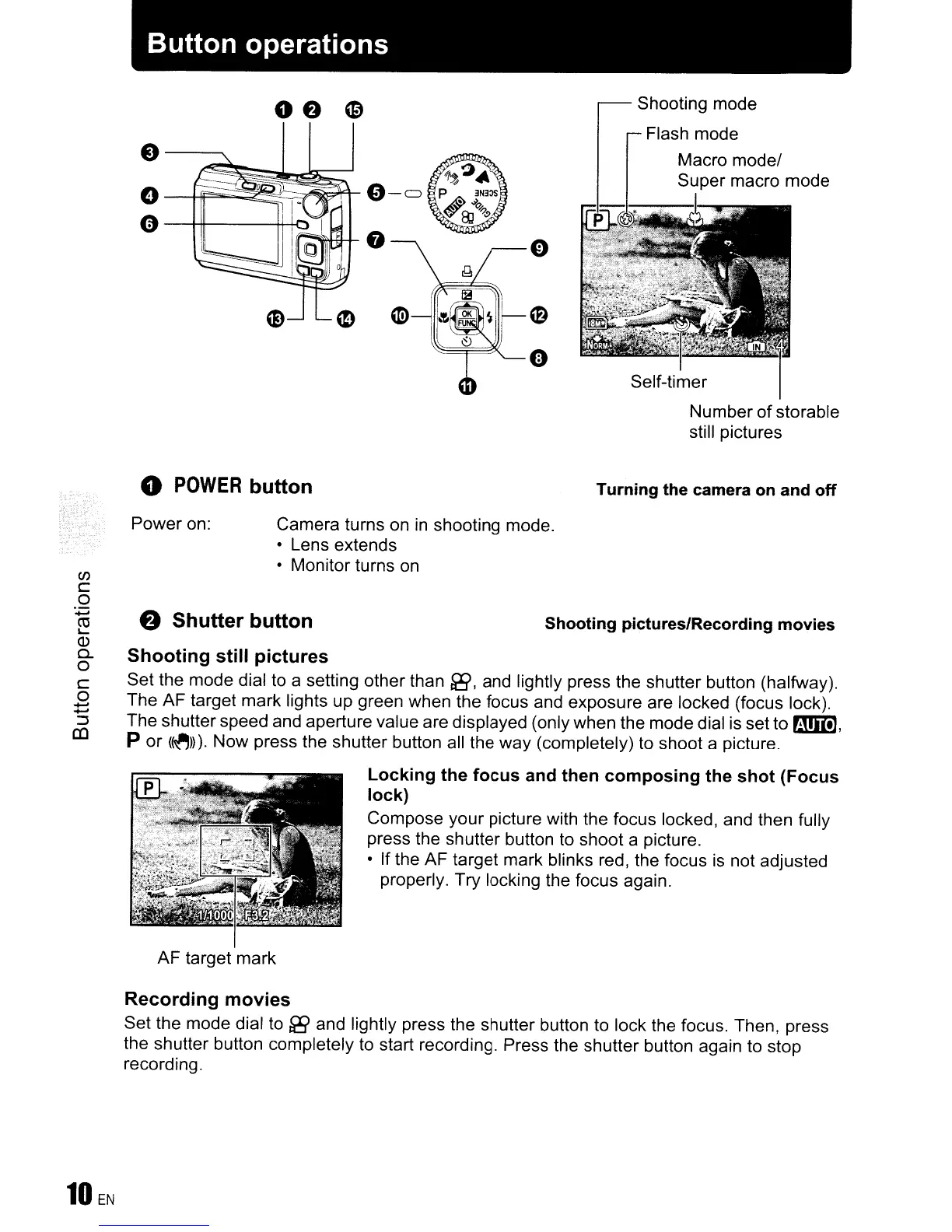
Shooting mode
Flash mode
Macro
model
Super macro mode
Self-timer
Number
of
storable
still pictures
Turning the camera on and off
Shooting pictures/Recording movies
Camera turns
on
in
shooting mode.
• Lens extends
• Monitor turns on
& Shutter button
o
POWER
button
Power on:
Shooting still pictures
Set the mode dial to a setting other than
fi9,
and lightly press the shutter button (halfway).
The AF target mark lights up green when the focus and exposure are locked (focus lock).
The shutter speed and aperture value are displayed (only when the mode dial is set to
ml!),
p or
(~))).
Now press the shutter button all the way (completely)
to
shoot a picture.
Locking the focus and then composing the shot (Focus
lock)
Compose your picture with the focus locked, and then fully
press the shutter button to shoot a picture.
• If the AF target mark blinks red, the focus
is
not adjusted
properly. Try locking the focus again.
(J)
c
o
:;:;
~
Q)
0..
o
C
o
.....
.....
~
((l
AF target mark
Recording movies
Set the mode dial
to
fi9
and lightly press the shutter button to lock the focus. Then, press
the shutter button completely
to
start recording. Press the shutter button again to stop
recording.









 To Next Page