Printing pictures
Direct printing (PictBridge)
By connecting the camera to a PictBridge-compatible printer, you can print out pictures
directly.
EASY PRINT Prints the picture displayed
in
the monitor by using
the standard settings
of
your printer.
CUSTOM PRINT Prints with the various print settings available
on
your printer.
• PictBridge
is
a standard for connecting digital cameras and printers
of
different makers and
printing out pictures directly. To find out
if
your printer is compatible with PictBridge, refer
to the printer's instruction manual.
• For printer's standard settings, available printing modes, the setting items such as paper
sizes, and printer's specifications such as available types
of
paper, how to install the
papers and ink cassettes, etc., refer to the printer's instruction manual.
EASY PRINT
1
In
playback mode, display the picture you want to print out
on
the
monitor.
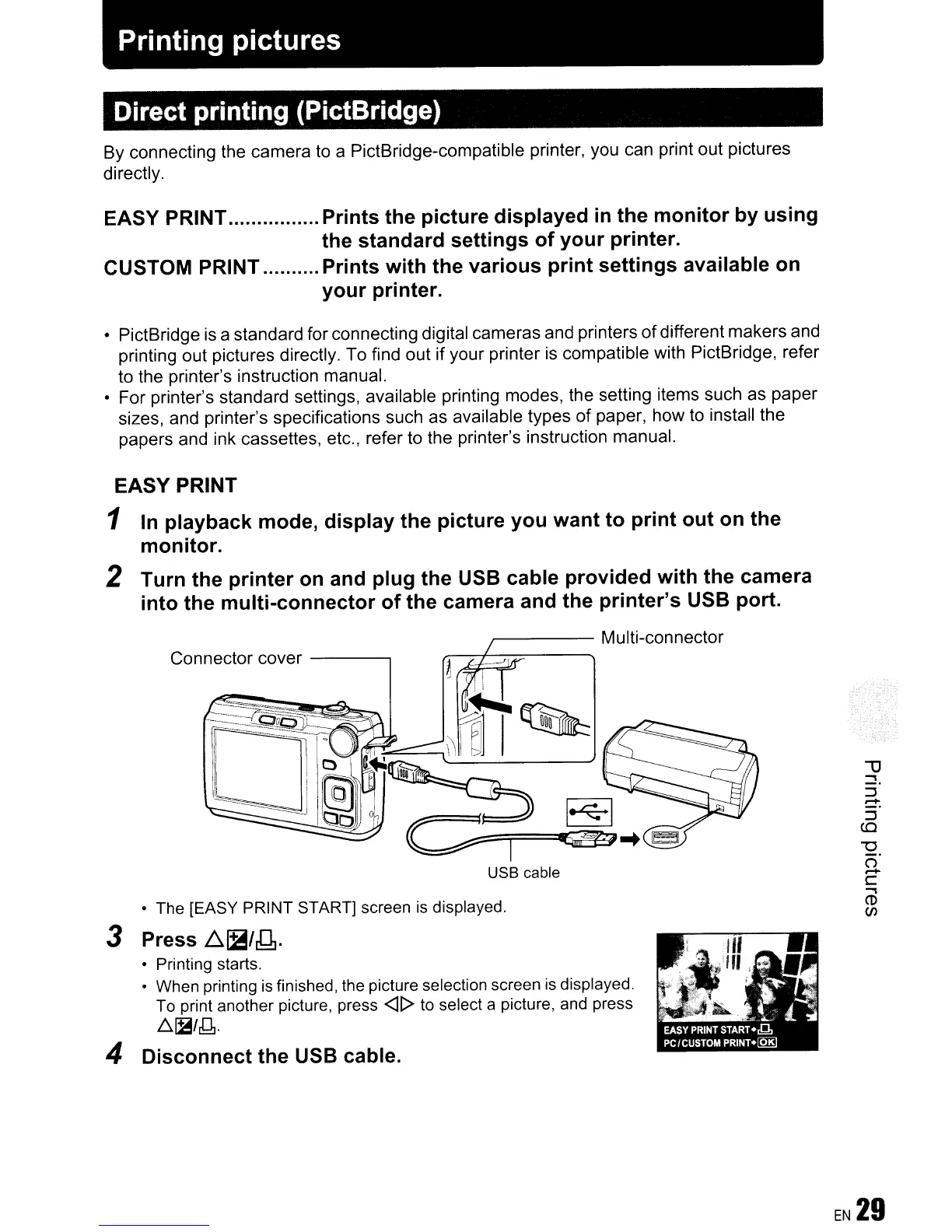
2 Turn the printer
on
and plug the USB cable provided with the camera
into the multi-connector of the camera and the printer's USB port.
~----
Multi-connector
USB cable
Connector cover
------,
•
The
[EASY PRINT START] screen
is
displayed.
3 Press
~~/g.
• Printing starts.
•
When
printing
is
finished,
the
picture selection screen
is
displayed.
To
print another picture, press
<ll>
to
select a picture,
and
press
.6.
[B/J1.
4 Disconnect the USB cable.









 To Next Page