f)
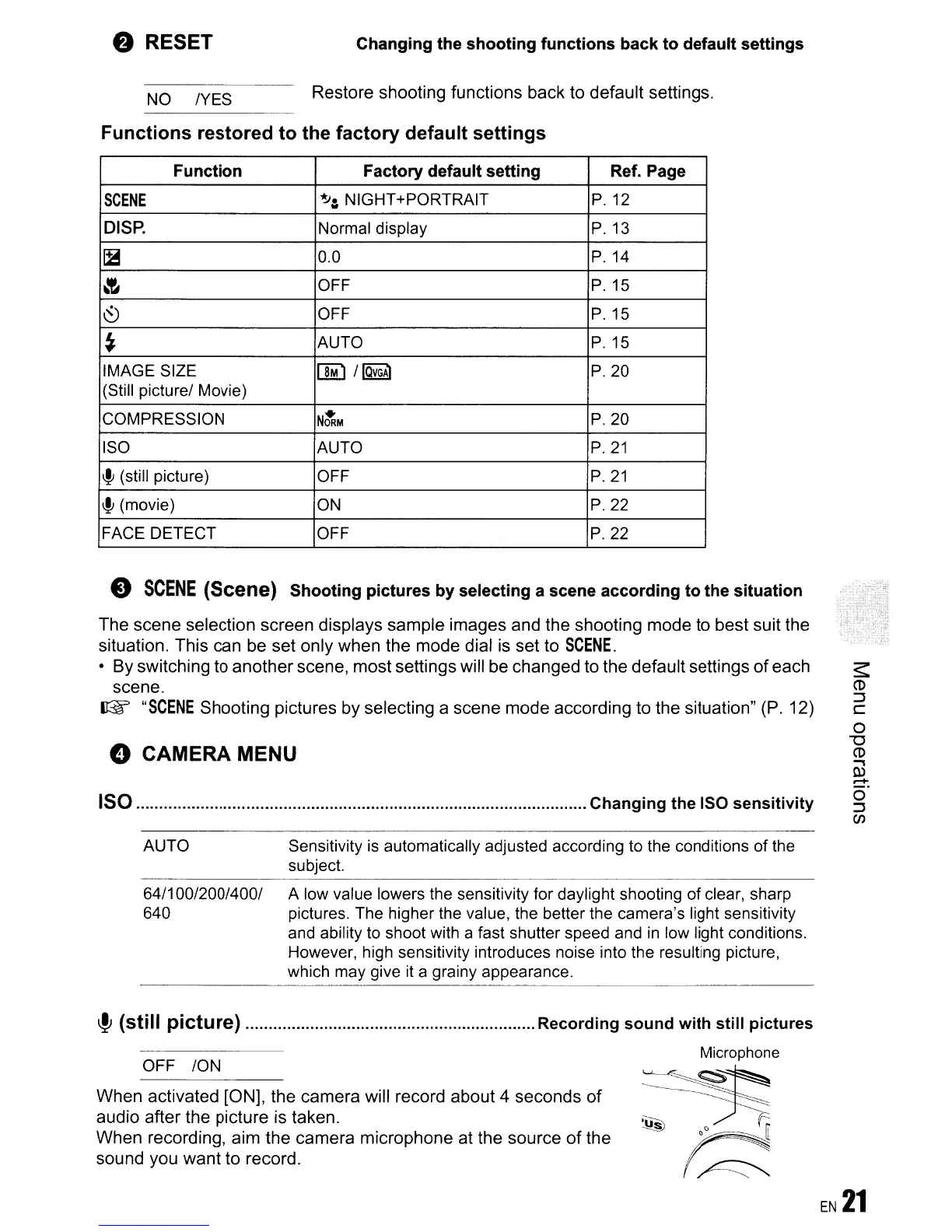
RESET
NO
/YES
Changing the shooting functions back to default settings
Restore shooting functions back to default settings.
Functions restored to the factory default settings
Function Factory default setting Ref. Page
SCENE
~:
NIGHT+PORTRAIT
P.12
DISP.
Normal display
P.13
~
0.0
P.14
~
OFF
P.15
~
OFF
P.15
~
AUTO
P.
15
IMAGE SIZE
[]M) I
IQvGAl
P.20
(Still picturel Movie)
COMPRESSION
NtRM
P.20
ISO
AUTO P.21
~
(still picture) OFF P.21
~
(movie)
ON
P.22
FACE DETECT
OFF
P.22
e
SCENE
(Scene) Shooting pictures by selecting a scene according to the situation
The scene selection screen displays sample images and the shooting mode to best suit the
situation. This can be set only when the mode dial
is
set to
SCENE.
• By switching to another scene, most settings will be changed to the default settings
of
each
scene.
(@f'
"SCENE
Shooting pictures by selecting a scene mode according to the situation"
(P.
12)
o
CAMERA
MENU
150 Changing the ISO sensitivity
AUTO Sensitivity
is
automatically adjusted according
to
the conditions of the
subject.
64/100/200/4001 A low value lowers the sensitivity for daylight shooting of clear, sharp
640 pictures. The higher the value, the better the camera's light sensitivity
and ability
to
shoot with a fast shutter speed and
in
low light conditions.
However, high sensitivity introduces noise into the resulting picture,
which may give
it
a grainy appearance.
~
(still picture) Recording sound with still pictures
OFF ION
When activated [ON], the camera will record about 4 seconds
of
audio after the picture is taken.
When recording, aim the camera microphone at the source
of
the
sound you want to record.
Microphone
~~:~~~[
r;;;:
EN
21







 To Next Page