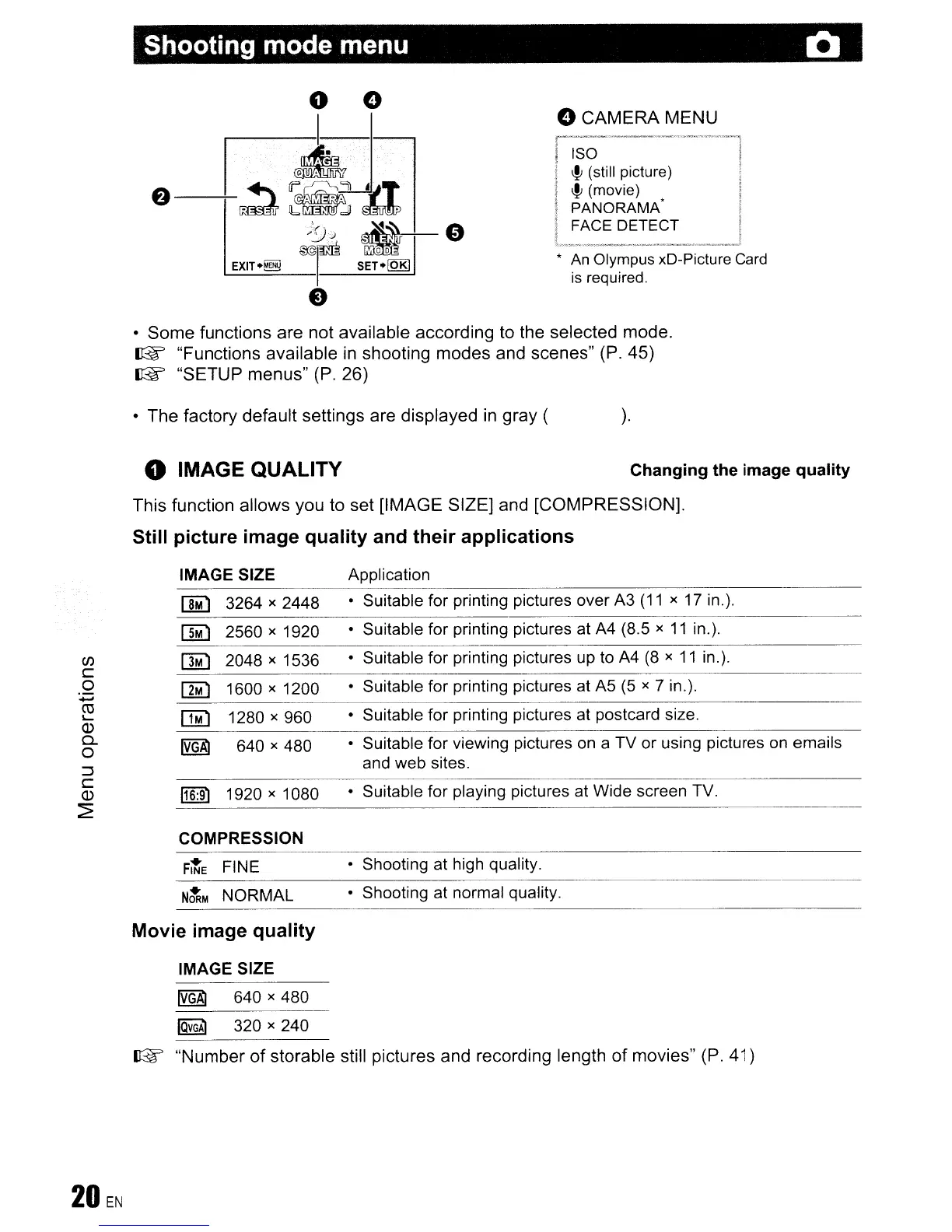
Shooting mode menu 0
oCAMERA MENU
~
~
'-'~'-----;
i ISO I
!
~
(still picture) !
t
~
(movie) I
! PANORAMA- I
I FACE DETECT !
l
__
-
__
~._
..
__
..J
*
An
Olympus xD-Picture Card
is
required.
• Some functions are not available according to the selected mode.
~
"Functions available
in
shooting modes and scenes" (P.
45)
~
"SETUP menus"
(P.
26)
• The factory default settings are displayed
in
gray (
o IMAGE QUALITY
).
Changing the image quality
This function allows you to set [IMAGE SIZE] and [COMPRESSION).
Still picture image quality and their applications
(/)
c
o
+oJ
CO
'-
Q)
a.
o
:::J
C
Q)
~
IMAGE SIZE
[]M)
3264)(
2448
OM)
2560
x
1920
[1M)
2048
x
1536
~
1600
x
1200
[]i)
1280)(
960
IVGA1
640
x
480
116:91
1920 x
1080
Application
• Suitable
for
printing pictures
over
A3
(11
)(
17 in.).
• Suitable
for
printing pictures at A4 (8.5
)(
11
in.).
• Suitable
for
printing pictures up to
A4
(8 x
11
in.).
•
Suitable
for
printing pictures
at
A5
(5 x 7 in.).
• Suitable
for
printing pictures at postcard size.
• Suitable
for
viewing pictures on a
TV
or
using pictures on
emails
and
web
sites.
• Suitable
for
playing pictures at
Wide
screen TV.
• Shooting
at
high quality.
COMPRESSION
---------------------------
FItE
FINE
N~M
NORMAL
Movie image quality
IMAGE SIZE
• Shooting
at
normal
quality.
~
640 x
480
~
320 x
240
~
"Number of storable still pictures and recording length of movies" (P.
41)









 To Next Page