EasyManua.ls Logo

Olympus X-840 - Face Detect off; SCENE (Scene)

Olympus X-840
72 pages
Print Icon
To Next Page IconTo Next Page
To Previous Page IconTo Previous Page
Loading...
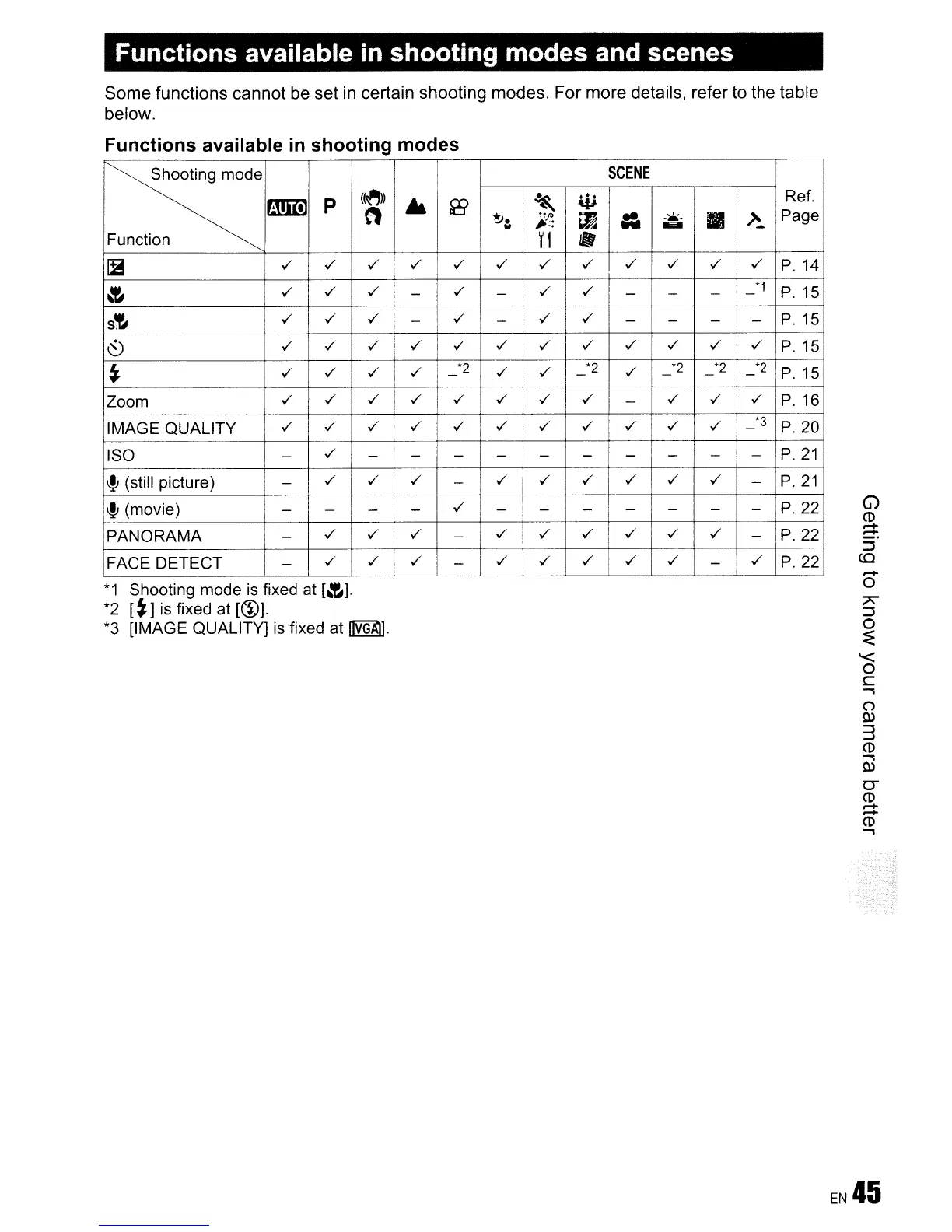
Functions available in shooting modes and scenes
Some functions cannot be set in certain shooting modes. For more details, refer to the table
below.
Functions available
in
shooting modes
~
SCENE
rmm
p
(~))
~
~
W
Ref.
n
~.
"p
LJi!
=-
-..a.-
II
~
Page
~
..
Ell
..
..
Function
fl
~
../ ../
../
I
../ ../ ../
I
../ ../ ../ ../
../
../
P.14
~
../ ../
../
-
../
-
i
../ ../
I
- -
-
-
*1
P.15
s~
../
../
../
-
../
-
../ ../
- -
-
-
P.15
~
../
../
../ ../ ../ ../
../
../ ../ ../ ../ ../
P.15
t
../
../
../ ../
-
*2
../
../
-
*2
../
-
*2
-
*2
-
*2
P.15
Zoom
../
../
../ ../ ../ ../
../ ../
-
../ ../ ../
P.16
IMAGE QUALITY
../
../ ../
../ ../ ../
../ ../ ../
../
../
-
*3
P.20
ISO -
../
- - - - - - -
-
-
-
P.21
!~
(still picture) -
../
../ ../
-
../
../
../
../ ../ ../
-
P.21
~
(movie)
-
- - -
../
- -
- - - - -
P.
22
PANORAMA
-
../ ../ ../
-
../
../ ../ ../ ../ ../
-
P.22
FACE DETECT
-
../
../
../
-
../ ../ ../
I
../ ../
-
../
P.22
*1
Shooting mode is fixed at
[~].
*2
[t]
is fixed at [(1)].
*3 [IMAGE QUALITY] is fixed at
~.
G)
CD
.....
~
:::J
CO
.....
o
7'
:::J
o
:E
'<
o
c
...,
(')
w
3
CD
...,
W
0-
CD
~
CD
...,

Related product manuals