L...
Q)
.....
.....
Q)
..c
co
L...
Q)
E
co
(,)
L...
:::J
o
>.
~
o
C
.:::&:.
o
.....
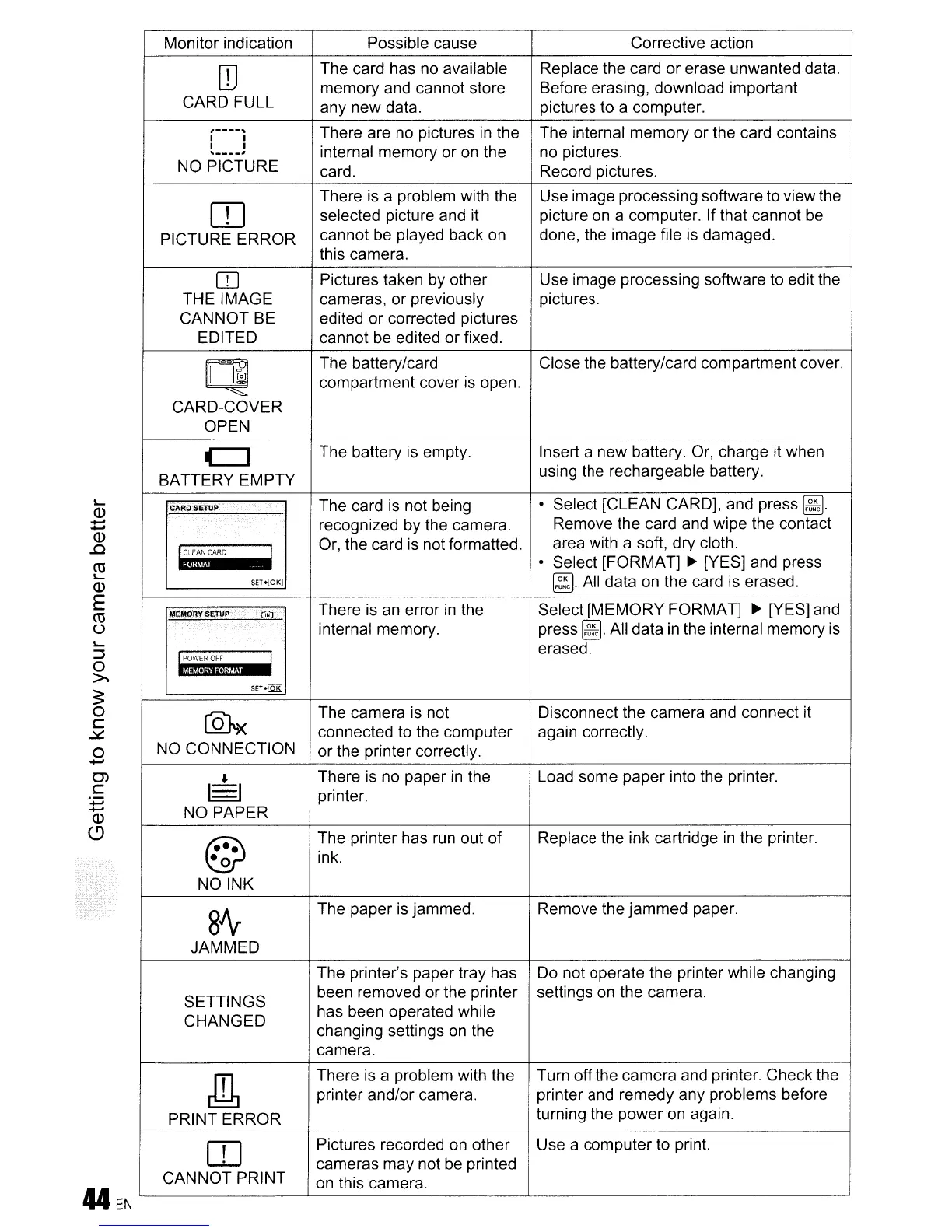
Monitor indication Possible cause
Corrective action
ITJ
The card has no available
Replace the card
or
erase unwanted data.
memory and cannot store Before erasing, download important
CARD FULL
any new data. pictures to a computer.
,----,
There are no pictures
in
the The internal memory or the card contains
I I
I I
internal memory or on the no pictures.
,----,
NO PICTURE
card. Record pictures.
[[]
There is a problem with the Use image processing software to view the
selected picture and it picture on a computer. If that cannot be
PICTURE
ERROR
cannot be played back on
done, the image file is damaged.
this camera.
CO
Pictures taken by other Use image processing software to edit the
THE IMAGE
cameras,
or
previously pictures.
CANNOT
BE edited or corrected pictures
EDITED cannot be edited
or
fixed.
CI
The battery/card
Close the battery/card compartment cover.
compartment cover is open.
CARD-COVER
OPEN
c::J
The battery is empty.
Insert a new battery. Or, charge it when
BATTERY EMPTY
using the rechargeable battery.
C"RDSETUP The card is not being
• Select [CLEAN CARD], and press
~.
recognized by the camera.
Remove the card and wipe the contact
'CLEAN
CARD
I
Or, the card is not formatted.
area with a soft, dry cloth.
i3-W·'
• Select [FORMAT]
~
[YES] and press
SET.[QR]
~.
All data on the card is erased.
There is an error
in
the Select
[MEMORY
FORMAT]
~
[YES] and
"'''I!(1RYSE1VP
ClliJ
internal memory. press
~.
All data
in
the internal memory
is
~OWEROFF
!
erased.
Mij,!I·!;iii·!;J.!h
SET·~
®OX
The camera is not Disconnect the camera and connect it
connected to the computer again correctly.
NO CONNECTION
or
the printer correctly.
..
There is no paper
in
the Load some paper into the printer.
~
printer.
NO
PAPER
©
The printer has run out
of
Replace the ink cartridge
in
the printer.
·0
ink.
NO INK
8Ar
The paper is jammed. Remove the
jammed
paper.
JAMMED
The printer's paper tray has
Do not operate the printer while changing
SETTINGS
been removed or the printer settings on the camera.
CHANGED
has been operated while
changing settings
on
the
camera.
Jrb
There is a problem with the
Turn
off
the camera and printer. Check the
printer and/or camera. printer and remedy any problems before
PRINT
ERROR
turning the power on again.
[[]
Pictures recorded on other Use a computer to print.
cameras
may
not be printed
CANNOT
PRINT
on this camera.









 To Next Page