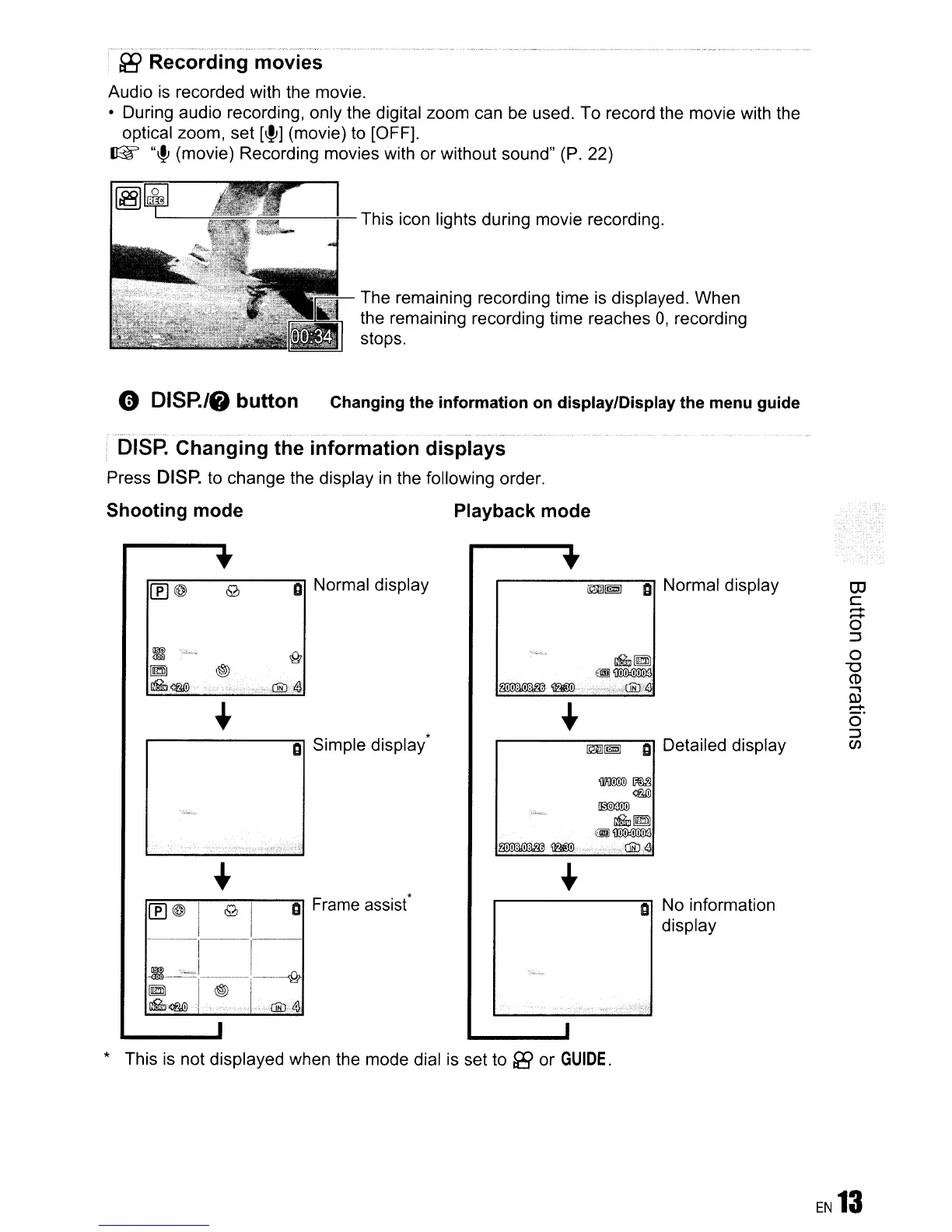
f8 Recording movies
Audio
is
recorded with the movie.
• During audio recording, only the digital zoom can be used. To record the movie with the
optical zoom, set
[~]
(movie) to [OFF].
~
"~(movie)
Recording movies with or without sound"
(P.
22)
'----f--This
icon lights during movie recording.
The remaining recording time
is
displayed. When
the remaining recording time reaches
0,
recording
stops.
G
DISR/f)
button
Changing the information on display/Display the menu guide
DISP.
Changing the information displays
Press
DISP.
to
change the display
in
the following order.
Shooting mode
o Normal display
~
'"~""
l[@)
®
ilGJ<m'
.-----------'Al
o
Simple display'
Playback mode
•
m!!§J
0 Normal display
~~
@.~
~
~
',:,.,.,:,,,.{1ii'J-4\
m!!§J
a Detailed display
.,
co
C
r-+
r-+
o
~
o
"0
co
..,
m
r-+
o'
~
en
o No information
display
WOOJI(j)
~
®!l
~
Mi~
@j]~
~.
~"~'·:-"'iClli:J.41
r:(f]=-:~:--;I--I9--;-----'Alo
Frame
assist*
1---:---
1
~
,.1
~
I~-:
~
<m
"'
-{Jib
.41
* This is not displayed when the mode dial
is
set to [i9 or
GUIDE.









 To Next Page