,
Using the menus
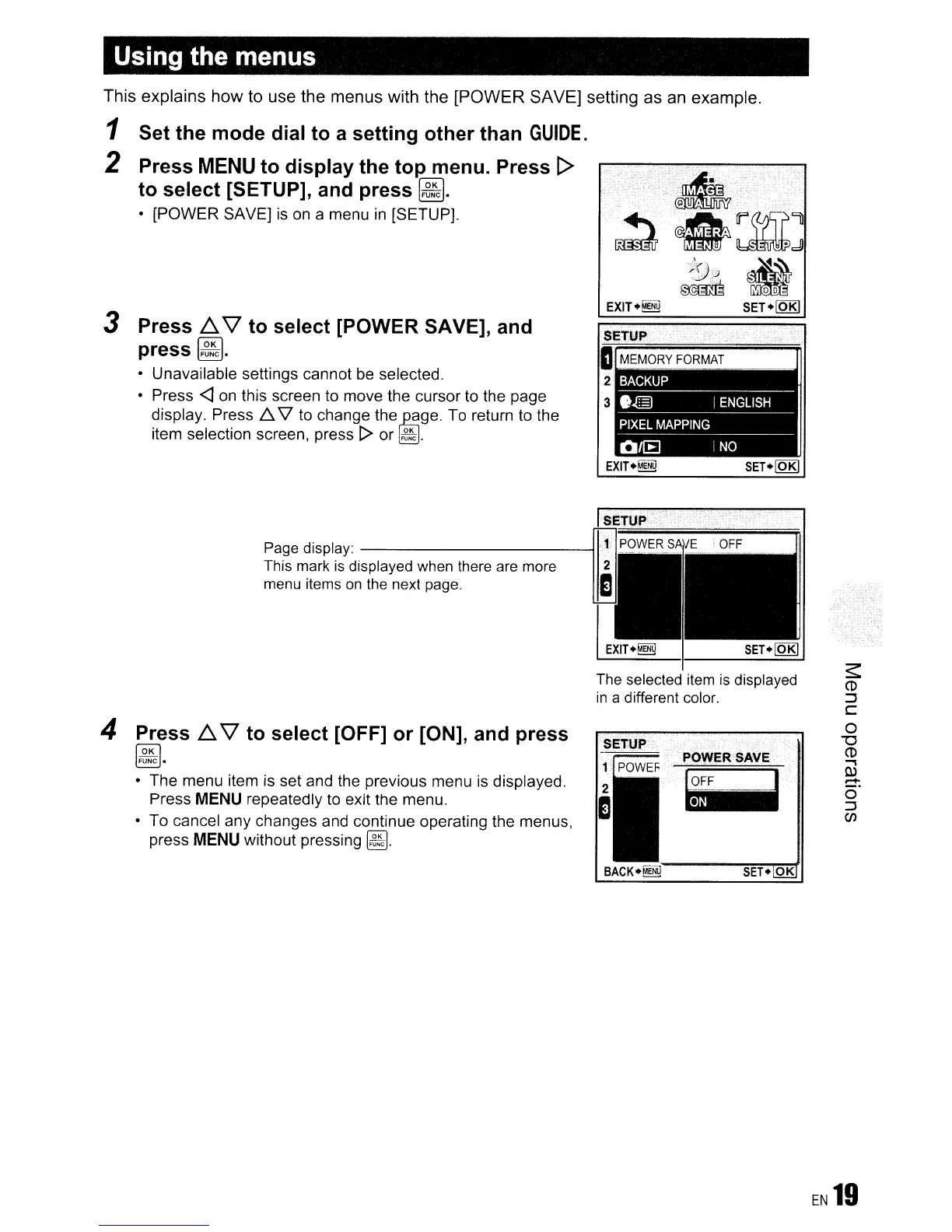
This explains how to use the menus with the [POWER SAVE] setting as
an
example.
1 Set the mode dial to a setting other than
GUIDE.
2 Press
MENU
to display the top menu. Press [>
to select [SETUP], and press
~.
• [POWER SAVE]
is
on
a menu
in
[SETUP].
3 Press
6.
'\l
to select [POWER SAVE], and
press
~.
• Unavailable settings cannot be selected.
• Press
<J
on
this screen
to
move the cursor to the page
display. Press
1::.
V
to
change the
~ge.
To return to the
item selection screen, press
[> or
~.
EXITUENU
SET.lQBl
The selected item
is
displayed
in
a different color.
SET.
OK
POWl=R·
SAVE
.~
BACK.~
Page display:
------------11
This mark
is
displayed when there are more
menu items
on
the next page.
4 Press
6.
'\l
to select [OFF] or [ON], and press
~.
• The menu item is set and the previous menu
is
displayed.
Press
MENU
repeatedly
to
exit the menu.
• To cancel any changes and continue operating the menus,
press
MENU
without pressing
~.
EN
19









 To Next Page