Additional shooting tips and information
Increasing the number of pictures that can be taken
There
are
two
ways
to
record
the
pictures
you
take
with
this
camera.
Recording pictures to the internal memory
• Pictures are recorded to the internal memory, and when the number
of
storable still
pictures reaches
0,
you connect the camera to a computer to download the pictures; and
then erase the pictures from the internal memory.
Using a card (xD-Picture Card) (optional)
• Pictures are recorded to the card when inserted
in
the camera. When the card is full, you
download the pictures to a computer and then either erase the pictures from the card
or
use a new card.
• Pictures are not recorded to the internal memory when a card is inserted
in
the camera.
Pictures in the internal memory can be copied to the card using the [BACKUP] function.
~
"BACKUP Copying pictures in the internal memory to the card" (P. 26)
"The card" (P. 47)
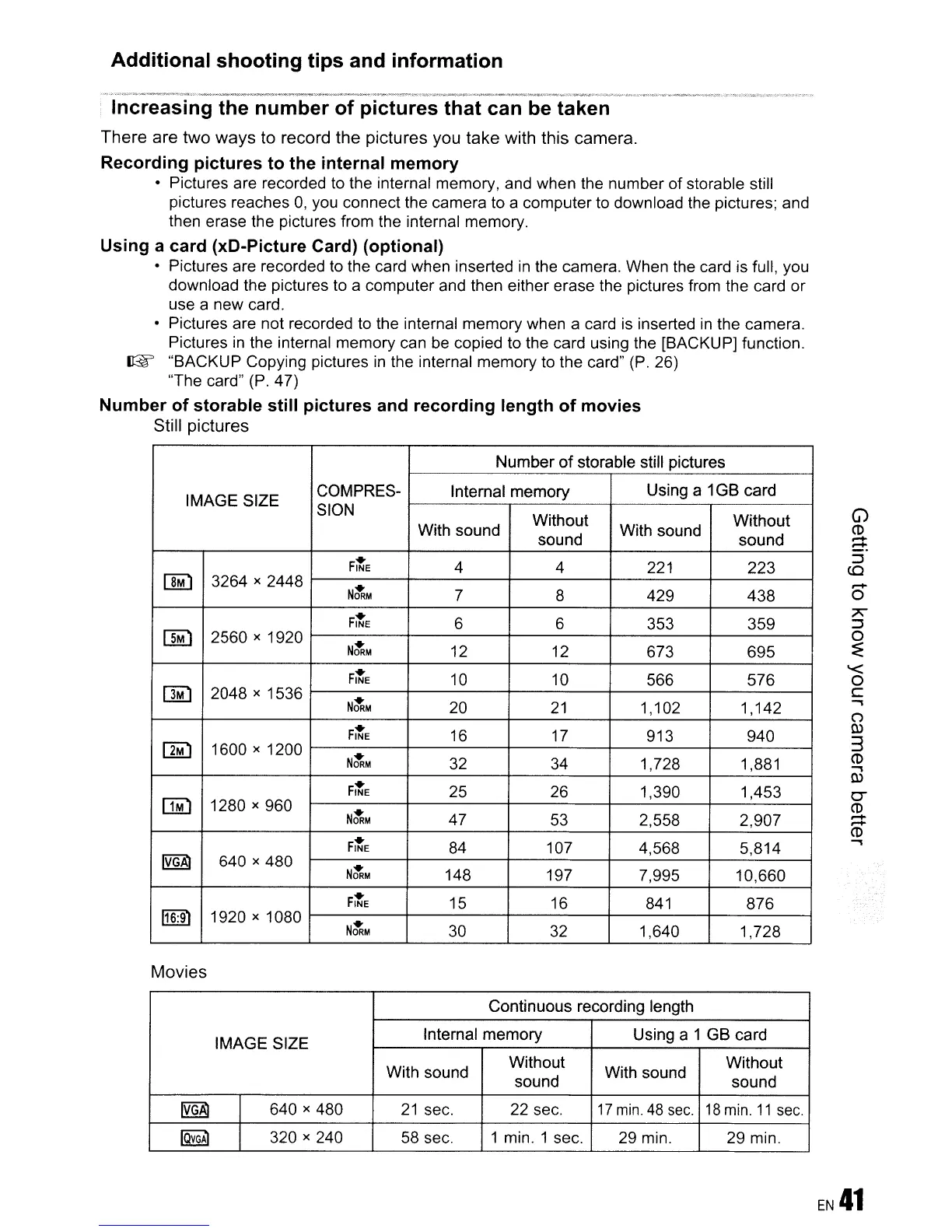
Number of storable still pictures and recording length
of
movies
Still
pictures
Number
of
storable still pictures
IMAGE SIZE
COMPRES-
Internal memory
Using a 1GB card
SION
Without
Without
With sound
sound
With sound
sound
FitE
4 4 221
223
IJM)
3264 x 2448
NtRM
7
8 429
438
FitE
6 6
353 359
[]M)
2560 x 1920
NtRM
12 12
673
695
FitE
10 10
566 576
DM:I
2048 x 1536
NtRM
20
21
1,102 1,142
FitE
16
17 913
940
[]M)
1600 x 1200
NtRM
32
34 1,728 1,881
FitE
25
26 1,390 1,453
OM)
1280 x 960
NtRM
47
53 2,558 2,907
FitE
84 107
4,568 5,814
~
640 x 480
NtRM
148
197 7,995
10,660
FitE
15 16
841
876
116:91
1920 x 1080
NtRM
30 32 1,640
1,728
Movies
Continuous recording length
IMAGE SIZE
Internal memory
Using a 1 GB card
With sound
Without
With sound
Without
sound
sound
~
640 x 480
21
sec. 22 sec.
17
min.
48
sec.
18
min.
11
sec.
IOVGA1
320 x 240
58 sec. 1 min. 1 sec.
29 min. 29 min.
.....
o
7'
::J
o
~
'<
o
c
,
()
Q)
3
CD
,
Q)
0-
CD
.....
.....
CD
,









 To Next Page