16
1
EN
Selecting folders and les
Selecting folders and files
If the desired file is in the same folder, select it by
performing the operation of step 4.
1 When the file display screen appears,
press the F1 (FOLDER) button while the
voice recorder is in stop mode.
• The folder list screen will be displayed.
2 Press the +, – or F1 (FOLDER) button to
select the folder.
3 Press the OK/MENU or X button.
4 While the file is being displayed, press
the X or W button.
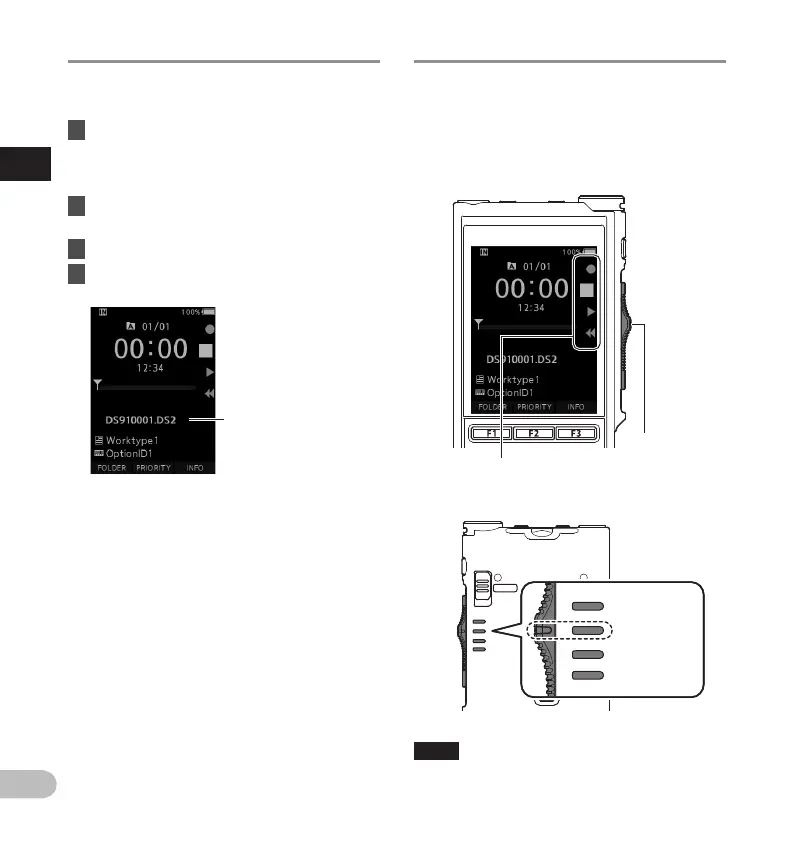
Current folder and file name
Operate the slide switch
Slide the slide switch on the side of the recorder up
or down to perform the recording, stop, playback,
and fast-rewind operations.
You can determine the current position at a glance
even from the front because the slide switch works in
conjunction with the slide switch guide on the screen.
TIP
• If you use the ODMS software, you can change the
assignments of the NEW button and slide switch
(gP. 42).
Slide switch
The place indicated large in the slide switch guide is
the current slide switch position.
POWER
ON
OFF
Recording
Stop
Playback
Fast-rewind
The figure shows
the stop position.



 To Next Page