2
25
EN
Erasing
Erasing
Partially erasing a file
NOTE
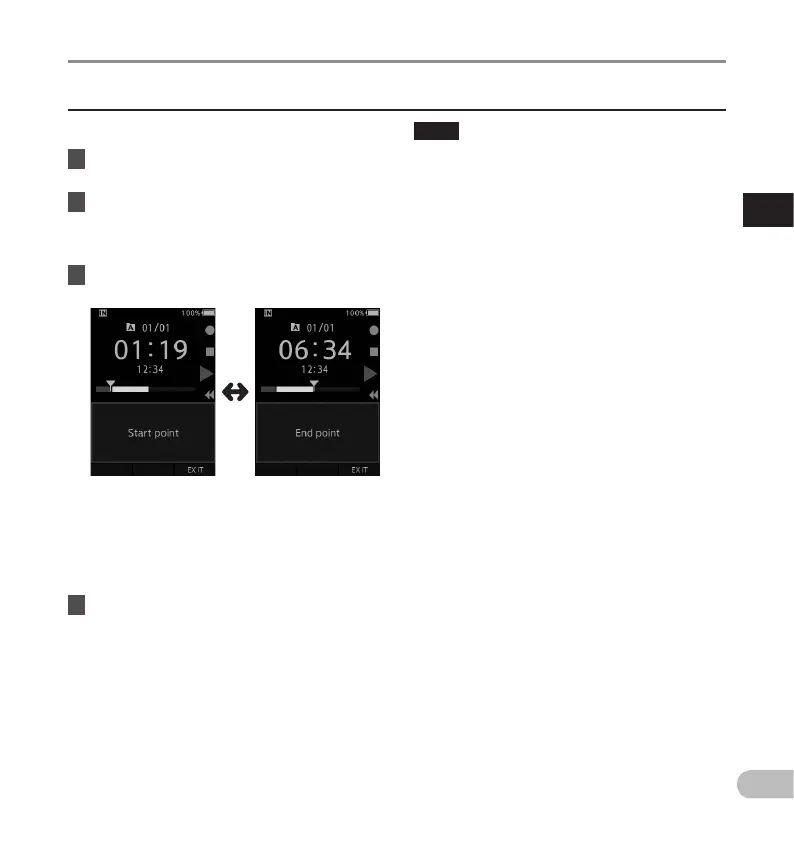
• If the D (erase) button is not pressed within 8
seconds after the [Start point] and [End point]
are alternately displayed, the recorder will revert
to play back status.
• MP3 files cannot be partially erased.
• An erased file cannot be restored.
• The erasing process may take up to 10 seconds.
Do not interrupt this process or data may be
damaged.
• Files cannot be partially erased in the following
cases.
- Files are locked (gP. 33).
- Partial erasing is not possible on parts of files
with a Verbal comment on them (g P. 29 ).
- Files are inside a locked memory card.
Any unnecessary part of a file can be erased.
1 Playback the file you would like to
partially erase.
2 Press the D (erase) button at the point
you want to start erasing.
• While playback continues, [Start point] will
appear on the display.
3 In the position you want to end partial
erase, press the D (erase) button again.
• The erase starting point (time) set in step 2
and the ending point (time) set in this step
will be displayed alternatively for 8 seconds.
• If you let the playback continue until the end
of the file, or in case of a Verbal comment
(g P.29) before it, that will be considered
the ending point of the partial erase.
4 Press the D (erase) button to confirm
the erasure.
• The display changes to [Partial erasing] and
erasing will start.
• When [Partial erase completed] appears on
the display, partial erase is complete.


 To Next Page