2
24
EN
Erasing
Erasing
Erasing files
A selected file can be erased from a folder. Also, all
files in a folder can be erased simultaneously.
1 Select the file you want to erase.
2 Press the D (erase) button.
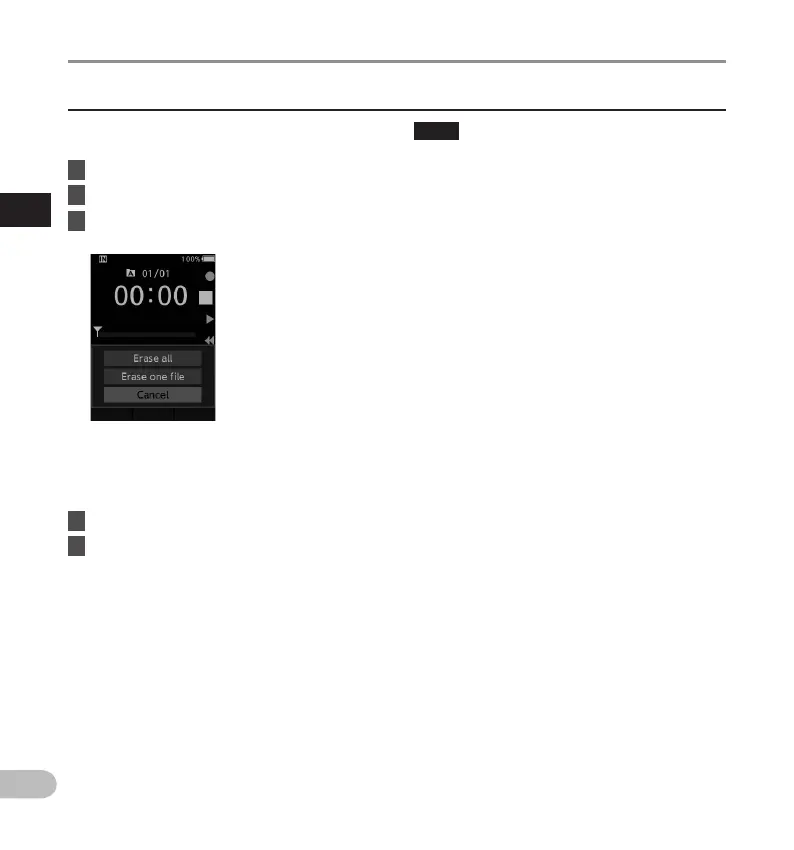
3 Press the + button to select
[Erase all] or [Erase one file].
[Erase all]:
All files in a folder can be erased
simultaneously.
[Erase one file]:
Erase one file.
4 Press the OK/MENU button.
5 Press the + button to select [Start],
then press the OK/MENU button.
• The display changes to [Erasing] and erasing
will start.
• [Erased] is displayed when the file is erased.
NOTE
• An erased file cannot be restored.
• The erasing process may take up to 10 seconds.
Do not interrupt this process or data may be
damaged.
• Files cannot be erased in the following cases.
- Files are locked (gP. 33).
- Files stored on a locked memory card.


 To Next Page