2
23
EN
Playback
Playback
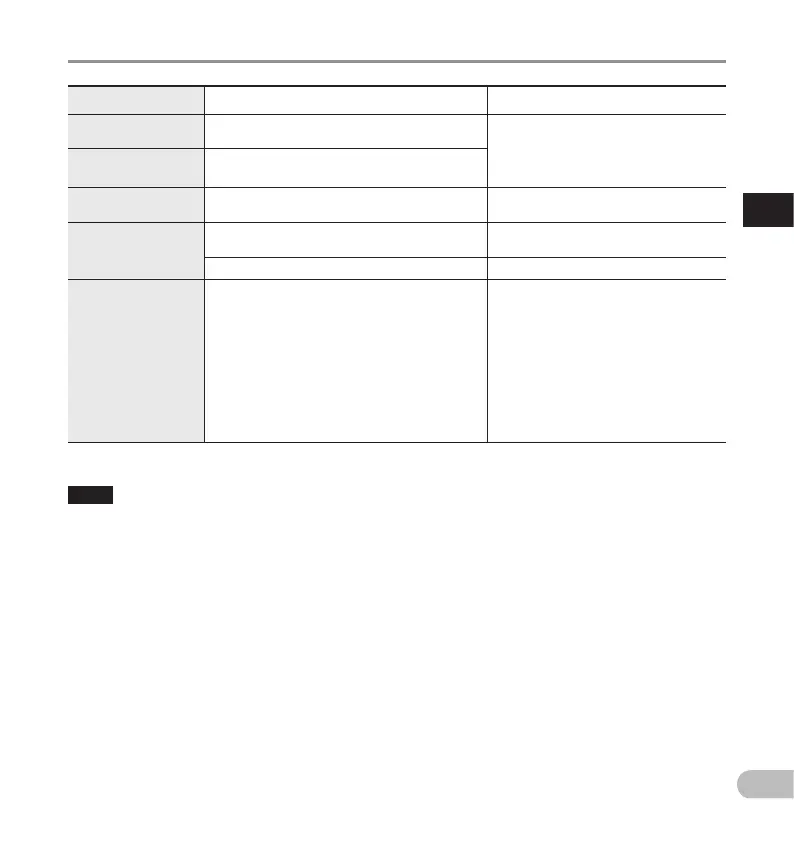
Playback functions Operation How to cancel
Fast Forward
(FF)
Press the X button once while in stop mode.
Move the slide switch to a position other
than the STOP (
n
) position.
• The recorder starts the operation of
the set position.
Press the OK/MENU button.
Rewind
(REW)
Press the W button once while in stop mode.
Cue
(Cue)
Press and hold the X button while in stop or
playback mode.
Release the button.
Review
(Rev)
Press and hold the W button while in stop or
playback mode.
Release the button.
Move the slide switch to the REV (Y) position.
Release the slide switch.
Playback Speed
Press the F2 (SPEED) button during playback.
• The playback speed will change at each press
of the F2 (SPEED) button.
Play (playback):
Playback at normal speed.
Slow play (slow playback):
Playback speed slows down (-50%), and
“Slow play” will be displayed.
Fast play (fast playback):
Playback speed becomes faster (+50%), and
“Fast play” will be displayed.
———
NOTE
• If you press the X button once while fast-forwarding or twice while in stop mode, the recorder will stop at
the end of the file (F.Skip).
• If you press the W button once while rewinding or twice while in stop mode, the recorder will stop at
the beginning of the file (B.Skip). If the W button is pressed within 2 seconds, the recorder skips to the
beginning of the previous file.
• If you press and hold the X button while fast forwarding (FF), the recorder will continue to skip forward.
• If you press and hold the W button while rewinding (REW), the recorder will continue to skip backward.
• The Cue and Review speed can be set from [Speed 1] to [Speed 5] (gP.36). Cue and Review playback
sound can be set to [On] or [Off] (gP. 36).



 To Next Page