8.1 Dive Mode -Dive Status Indicator and Dive Site Selection
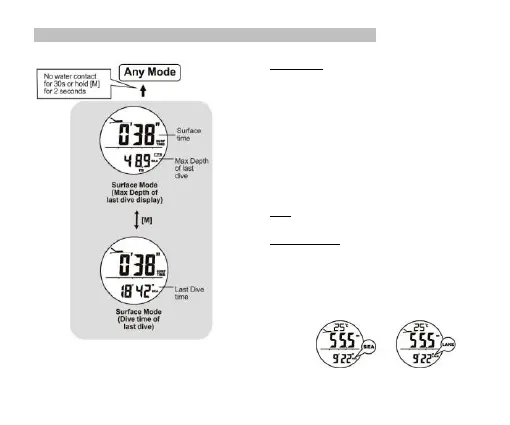
Surface Mode
▪ When the user dive shallower than 1.5 meters, the
watch will switch to Surface mode automatically.
▪ The surface time will start counting and will be shown on
display.
▪ During Surface mode, the user can ceck the Max depyh
of last dive and Dive time of last dive by pressing [M].
▪ When the user comes out of the wather the sensors are
no contact with wather for 30 seconds or the user holds
the [M] for 2 seconds, it will exit from the Surface Mode
automatically.
Note: The surface Mode can only be activated after the
user user returns from diving below wather level 1.5 m.
Sea and Lake dive
▪ The watch can work either in sea water of lake water.
Set ‘Sea’ for sea water diving or ‘Lake’ for lake water
diving.
▪ Ceck chapter 8.3 for more details on how to set the
diving site setting.


 To Next Page