9.0 Dive Recall Mode -Recalling the Dive Records
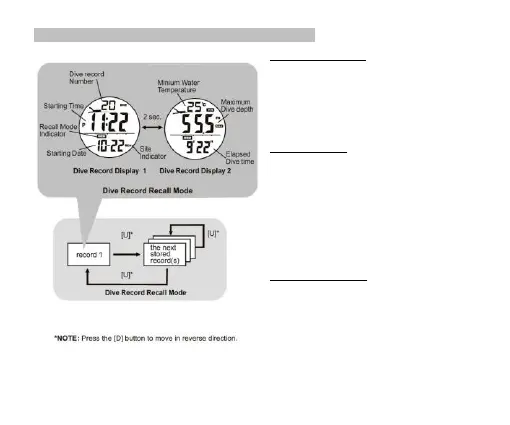
Dive Record Recall Mode
▪ To select the Dive Record Recall Mode, press the [M]
button in the Current Time Mode.
▪ User can store up to 199 dive records, and user can
select displaying those records by pressing the [U] or [D]
button.
▪ When the number of the Dive records are over 199, the
oldest one well be overwritten automatically.
Dive Record Display
▪ In the Recall Mode, the Watch will show the following
information alternatively:
Display 1:
1) Records Number
2) Starting Time
3) Starting Date
4) Dive Site indicator
Display 2:
5) Minium Water Temperature
6) Maximum Dive Depth
7) Elapsed Dive Time
How to Reset the records
▪ Hold down the [M] button for 2 seconds to select
deleting the CURRENT record. Press [U] or [D] to select
YES or NO and hold [M] to confirm.
▪ Hold down the [M] button for 4 seconds to select
deleting the PREVIOUS record. Press [U] or [D] to
select YES or NO and hold [M] to confirm.
▪ Hold down the [M] button for 6 seconds to select
deleting ALL records. Press [U] or [D] to select YES or
NO and hold [M] to confirm.
In the ‘Del’ mode, if NO button is pressed for 1 minute, it
will return to the Dive Recall Mode display.


 To Next Page