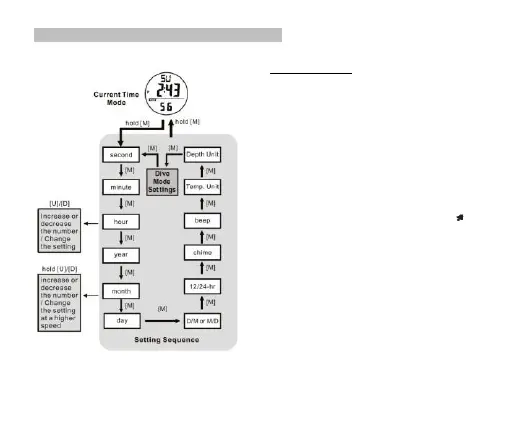
4.1 Current Time Mode -The Setting Display
How to Set the Watch
▪ To select the setting display, hold the [M] button for 2
seconds in the Current Time Mode, and then the
'Second' digits will start flashing.
▪ In setting display, press the [M] button to move the
flashing following the adjacent diagram to select among
different settings.
▪ During one of the settings (except second) is flashing,
press the [U] or [D] button to increase or decrease the
number / change the setting (hold down the button to
change it at a higher speed).
▪ When the second digits start flashing, press the [U] or
[D] button to reset to zero.
▪ When the ‘beep’ (Key tone) is set ON, there will be a
beep sound when a key is pressed.
▪ If the 'chime' (Hourly Chime) is turned ON ( ) the
Watch will beep once every hour.
▪ When the setting is completed, hold the [M] button for 2
seconds to exit the setting display. If there is NO key-
stroke for 1 minute, the Watch will also exit the setting
display automatically.
NOTE: Please check the Chapter 8.3 for more detail of
Dive Mode Settings.


 To Next Page