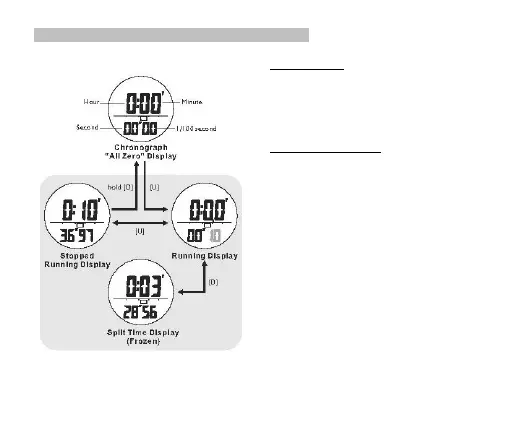
5.0 Chronograph Mode -Using the Chronograph
Chronograph Mode
▪ This Watch includes a stopwatch function which
measures elapsed time and current split time.
▪ The measuring capacity of the chronograph:
▪ Measuring resolution: 1/100 second
▪ Measuring range: 99 hours, 59 minutes and
59.99 seconds.
How to Use the Chronograph
▪ When the Chronograph Display is selected, press the
[U] button to start the chronograph. Press [U] again to
Stop counting.
▪ When the chronograph is running, press the [D] button
will freeze the counting display for user to take a split
time.
NOTE: When the [D] button is pressed, the chronograph is
still running.
▪ Press the [D] button again to resume the running
display.
▪ When the chronograph is stopped, hold the [D] button
will reset the counter to all zero.


 To Next Page