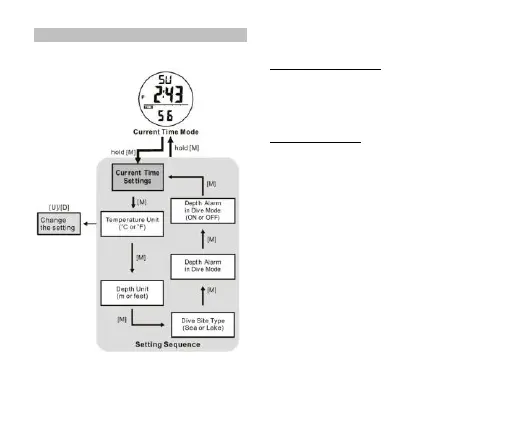
8.3 Dive Mode -Settings of Dive Mode
How to Set for the Dive Mode
▪ Check for Chapter 4.1 of how to go into Setting Display.
▪ In setting display, press the [M] button to bypass the
settings of current time until ‘ C’ or ‘ F’ is flashing .
▪ During one of the settings is flashing (selected), press
the [U] or [D] button to change the setting.
How to Set Depth Alarm
▪ This watch features depth alarm to remind the user
when he/she reaches the pre-set depth. Once it is
switched on and when the user dive deeper than the
pre-set depth, a flashing icon MAX will be shown with
alert sound for 30 seconds .
▪ After the setting of th Dive site Type, the default depth
30 is flashing, press the [U] or [D] button to change the
setting and the [M] button to confirm. Press the [U] or [D]
button to switch on/off this function and the [M] button to
confirm.
▪ When the setting is completed, hold the [M] button for 2
seconds to exit the setting display. If NO button is
pressed for 1 minute, the watch will exit the setting
display automatically.


 To Next Page