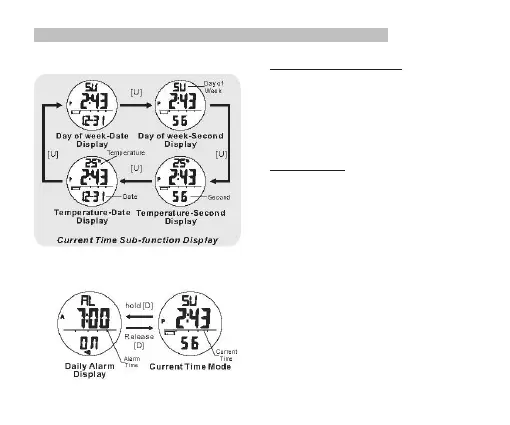
4.0 Current Time Mode - Sub-function Display and Daily Alarm
Current Time Sub-function Display
▪ Press the [U] button will change the sub-function display
on the 1st and 3rd row in the Current time Mode
following the adjacent diagram:
▪ The 1st row of display will show the Day of
week or the current temperature.
▪ The 2nd row will be the current Time.
▪ The 3rd row will show the Second or Date.
Daily Alarm Display
▪ Press the [D] button will display the Alarm Time until the
[D] button is released.
NOTE: If [D] is pressed and hold for more than 2 seconds,
it will go into the Alarm Time setting display. Please refer to
the Chapter 4.2 for more details on Alarm Time setting.


 To Next Page