4.2 Current Time Mode -Setting the Daily Alarm
How to Set the Daily Alarm
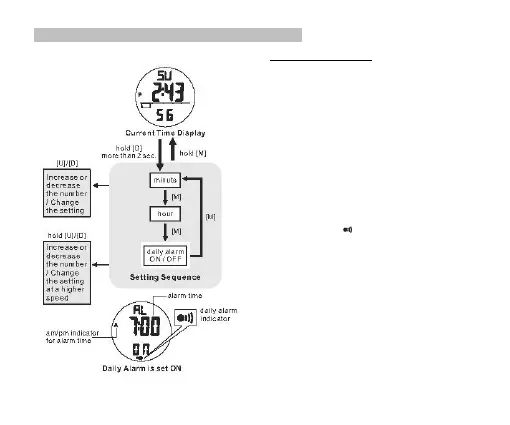
▪ To select the Daily Alarm setting display, hold the [D]
button for 2 seconds in the Current Time Mode until the
'Minute’ digits start flashing.
▪ In setting display, press the [M] button to move the
flashing following the adjacent diagram to select among
different settings.
▪ When the digits of “minute” or “hour” is flashing, press
the [U] or [D] button to increase or decrease the number
(hold down the button to change the number at a higher
speed).
▪ When ‘ON’ or ‘OFF’ is flashing, press the [U] or [D]
button to turn ON/OFF the daily alarm.
▪ When the setting is completed, hold the [M] button for 2
seconds to exit the setting display. If there is NO key-
stroke for 1 minute, the Watch will also exit the setting
display automatically.
▪ When the daily alarm is ON, the daily alarm indicator
will be appeared.


 To Next Page