Page 11 of 15
Page 10 of 15
The lifetime of the lithium battery can be maximized by allowing it to fully
charge and then fully discharge during regular use.
Store the Omnilux CLEAR device flat and at room temperature in dry
conditions. Use the carry bag provided to store your device.
Avoid storing the Omnilux CLEAR device in dusty conditions, in direct
sunlight
or in damp and humid conditions.
The Omnilux CLEAR device contains no serviceable parts.
Before each use, with the device turned off, clean the device following
the cleaning instructions below.
If you follow the care and maintenance for your Omnilux CLEAR, then
Omnilux CLEAR has a minimum lifetime of 2 years.
7. Using the Omnilux CLEAR device 8. Care and maintenance
8.1 Cleaning the Omnilux CLEAR device
DO NOT use any other cleansing products as these
may damage the plastics.
People who have undergone a course of 4 weekly treatments for 6
weeks using the Omnilux CLEAR device report a reduction of mild
to moderate acne vulgaris.
Clean the front and back of the device with a water-based wipe or
damp, clean cloth. Stubborn stains can be removed by wiping gently
with 70% alcohol.
Regarding electromagnetic compatibility (EMC) and
electromagnetic fields (EMF), in and around the home
environment the Omnilux CLEAR device should be kept away
from radio frequency (RF) equipment to avoid interference.
7.1 Treatment recommendations
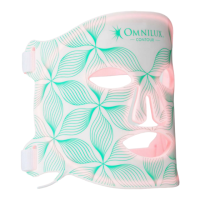
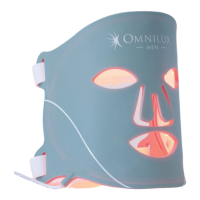
Omnilux CLEAR comes with two adjustable Velcro straps that allow you to
comfortably wear the mask.
To fit the mask, thread the straps through the inlet holes on either side of
the mask.
Loop the straps around your head and secure firmly.
Adjust if necessary.
7.2 Wearing the Omnilux CLEAR device
1. Cleanse and exfoliate skin to remove any traces of skincare.
2. Place Omnilux CLEAR on the face, secure with the adjustable straps.
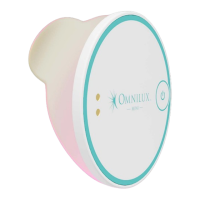
3. Connect the Omnilux CLEAR device to the controller and press the
ON/OFF
button on controller. The device turns off after its 10-minute
treatment. You may stop the treatment at any time by pressing the ON/OFF
button on the controller.
4. Remove the device, apply your normal skincare.
5. Clean the device using a water-based wipe or a damp, clean cloth.
Ensure that the device is NOT being charged when cleaning.
6. For best results, treat for 4 days a week for 6 weeks.
7.3 Carrying out a treatment
8.2 Disposal
DO NOT dispose of any part of the device at a domestic waste
facility.
The Omnilux CLEAR controller contains a lithium-ion polymer
battery. For protection of the environment, please package and
return this unit to the manufacturer or their representative at the end
of its working life or safely dispose of the device following your local
guidelines.


 To Next Page