EasyManua.ls Logo

Omnilux MINI - User Manual

Omnilux MINI
29 pages
Print Icon
To Next Page IconTo Next Page
Loading...
User Guide
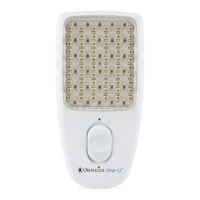
Blemish Eraser

Questions and Answers

  • M
    Melissa PetersonAug 18, 2025
    What to do if Omnilux MINI Eye Brightener LEDs flicker during treatment?
    • A
      April HarperAug 18, 2025
      If the Treatment LEDs flicker continuously during treatment with your Omnilux Personal Care Products Eye Brightener device, first ensure that the device is fully charged until the green light is illuminated. If the LEDs continue to flicker even after a full charge, this indicates that the device is faulty. In that case, contact your place of purchase to arrange a return or contact Omnilux Customer Service via email at info@omniluxled.com.
  • L
    Logan MooneyAug 20, 2025
    Why do the Treatment LEDs flash on my Omnilux Personal Care Products Eye Brightener?
    • B
      Benjamin RamirezAug 20, 2025
      If the Treatment LEDs on your Omnilux Personal Care Products Eye Brightener device flash when switched on, it means the battery has insufficient charge to complete a treatment. To resolve this, connect the 2-pin connection cable to the port on the upper side of the LED device and insert the USB A connector into a suitable USB port power supply or laptop. Charge the device until the indicator light turns from orange to green.
  • C
    Clifford JuarezAug 23, 2025
    How to fix no light from Omnilux Personal Care Products Eye Brightener?
    • P
      Patricia MackAug 23, 2025
      If there is no light from your Omnilux Personal Care Products Eye Brightener device and the indicator light is not illuminated, it is likely that the battery is drained. To fix this, connect the 2-pin connection cable to the port on the upper side of the LED device and insert the USB A connector into a suitable USB port power supply or laptop. Charge the device until the indicator light turns from orange to green.
  • J
    Julie JimenezAug 26, 2025
    What to do if Omnilux MINI LEDs do not turn off?
    • C
      Cindy LeonardAug 26, 2025
      If the Treatment LEDs on your Omnilux Personal Care Products Eye Brightener do NOT turn OFF after 10 minutes, it indicates that the device is faulty. Contact your place of purchase to arrange a return or contact the Omnilux Customer Service email: info@omniluxled.com.
  • J
    jessica70Aug 28, 2025
    How to fix no light on Omnilux Personal Care Products Blemish Eraser device?
    • J
      Joseph BurkeAug 28, 2025
      If your Omnilux Personal Care Products Blemish Eraser device shows no light and the indicator light isn't on, the battery is likely drained. To fix this, connect the 2-pin connection cable to the port on the upper side of the LED device and insert the USB A connector into a suitable USB port power supply or laptop. Charge it until the indicator light changes from orange to green.
  • M
    mosesbrianAug 30, 2025
    What to do if Omnilux Personal Care Products Blemish Eraser LEDs are flashing?
    • M
      Marie LopezAug 31, 2025
      If the treatment LEDs on your Omnilux Personal Care Products Blemish Eraser device flash when you switch it on, it means the battery doesn't have enough power to complete a treatment. To resolve this, connect the 2-pin connection cable to the port on the upper side of the LED device and insert the USB A connector into a suitable USB port power supply or laptop. Let it charge until the indicator light turns from orange to green.
  • D
    Debbie BarnesSep 2, 2025
    Why is there no blue or red light from my Omnilux Personal Care Products Blemish Eraser?
    • S
      Sherri MillerSep 2, 2025
      If there's no blue or red light coming from your Omnilux Personal Care Products Blemish Eraser device, make sure the indicator light is solid green. Remove the magnetic charging connector from the Blemish Eraser device and ensure that the charging cable is unplugged from the charging source.
  • M
    Mario JacobsSep 4, 2025
    What to do if Omnilux Personal Care Products LEDs flicker during treatment?
    • A
      Angela BrowningSep 4, 2025
      If the treatment LEDs on your Omnilux Personal Care Products Blemish Eraser device flicker continuously during treatment, ensure that the indicator light is solid Green. Remove the magnetic charging connector from the Blemish Eraser device and ensure that the charging cable is unplugged from the charging source. Also, ensure that the Blemish Eraser device is fully charged, and the green light is illuminated. If the green light is illuminated and the LEDs continue to flicker contact your place of purchase to arrange a return or contact.
  • D
    danielgeorgeSep 7, 2025
    Why is there no red or infrared light from my Omnilux Personal Care Products Skin Corrector device?
    • G
      ginasullivanSep 7, 2025
      If the Omnilux Personal Care Products Skin Corrector device shows no red or infrared light, it might be because it's connected to an electrical outlet. Make sure the indicator light is solid green. Disconnect the magnetic charging connector from the device and unplug the charging cable from the power source.
  • J
    James HartmanSep 9, 2025
    What to do if Omnilux Personal Care Products Skin Corrector LEDs flash when switched on?
    • V
      Victoria MoralesSep 9, 2025
      If the Omnilux Personal Care Products Skin Corrector device LEDs flash when switched on, it means the battery is not sufficient to complete the treatment. To fix this, connect the 2-pin connection cable to the port on the upper side of the LED patch. Insert the USB A connector into a suitable USB port power supply or laptop and charge until the indicator light turns from orange to green.

Summary

Who Should Use the Blemish Eraser Device

Contraindications, Warnings, and Precautions

Contraindications

Lists conditions and situations where the device should not be used.

Warnings

General Safety

Precautions

Risks and Benefits

First Time Setup

Unpacking and Charging the Device

Instructions for unboxing and initially charging the device before first use.

Charging the Device

Details on how to connect and charge the device using the provided cable.

Charging Status of the Blemish Eraser Device

Sensitization Test

Using the Blemish Eraser Device

Troubleshooting

Warranty Information

Omnilux MINI Specifications

General IconGeneral
Light Wavelength633nm (Red Light), 830nm (Near-Infrared Light)
LED TechnologyLED
Wavelength633nm (Red Light), 830nm (Near-Infrared Light)
Treatment Time10 minutes per session
Power SourceBattery
Skin Concerns AddressedAcne

Related product manuals