95
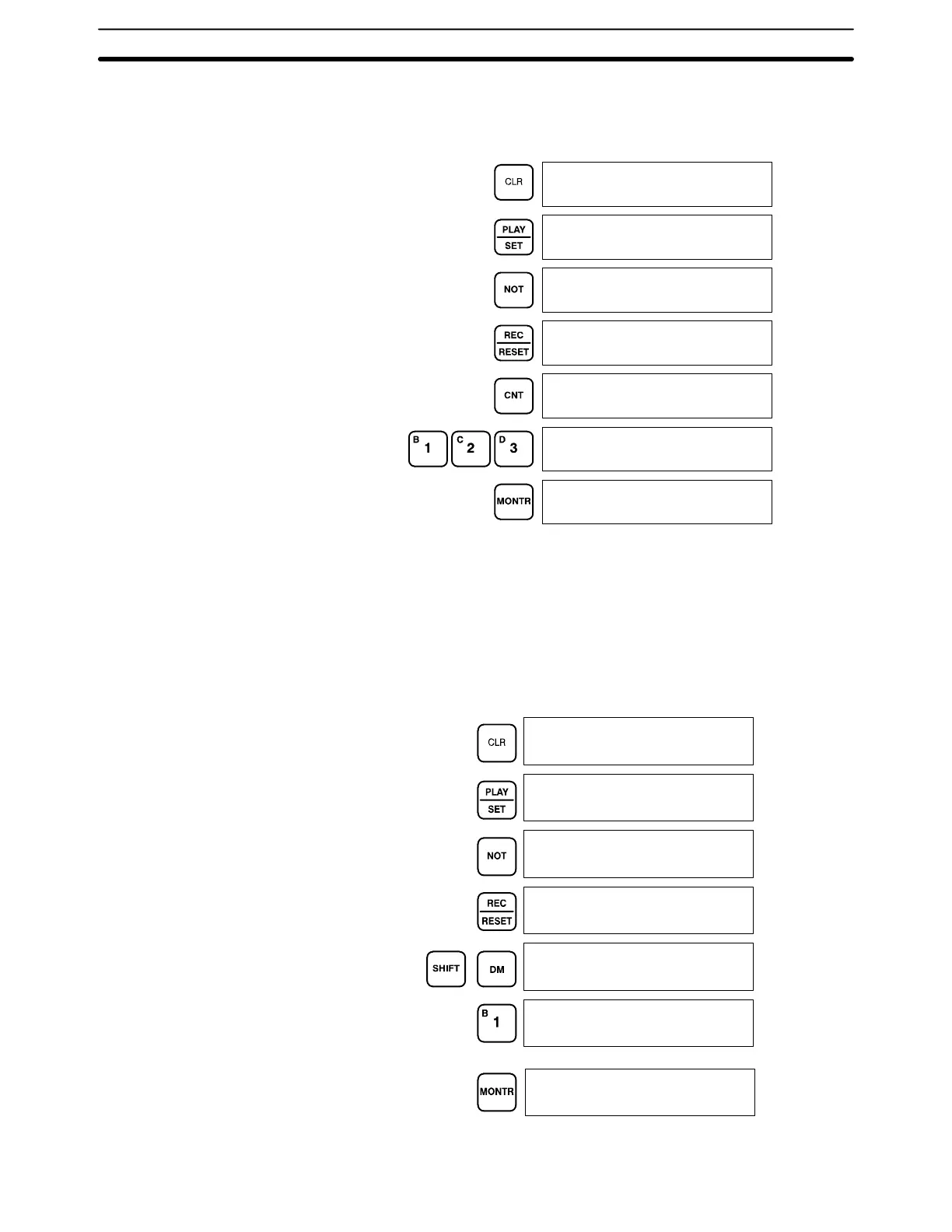
To leave the TC area uncleared and retain Program Memory addresses 00000
through 00122, input as follows:
00000
00000
00000
00000MEMORY CLR?
HR CNT DM EM~
00000MEMORY CLR?
HR DM EM~
00123MEMORY CLR?
HR DM EM~
00000MEMORY CLR
END HR DM EM
Clearing Selected EM Banks When a partial memory clear operation is being performed, specific banks can
be selected for clearing rather than selecting the entire EM area. In the following
example, EM banks 0 and 2 are selected for clearing.
The Programming Console will display the following screens:
00000
00000
00000
00000MEMORY CLR?
HR CNT DM EM
00000 EM CLR ?
012
00000 EM CLR ?
0 2
00000 EM CLR END
0 2
Preparation for Operation Section 4-6





 To Next Page