MSG
ABCDEFGHIJKLMNOP
308
In handling indirectly addressed messages (i.e. DM), those with the
lowest DM address values have higher priority.
Clearing Messages To clear a message, execute FAL(06) 00 or clear it via a Programming Console
using the procedure in 4-6-5 Clearing Error Messages.
If the message data changes while the message is being displayed, the display
will also change.
Flags ER: Indirectly addressed DM word is non-existent. (Content of DM word is
not BCD, or the DM area boundary has been exceeded.)
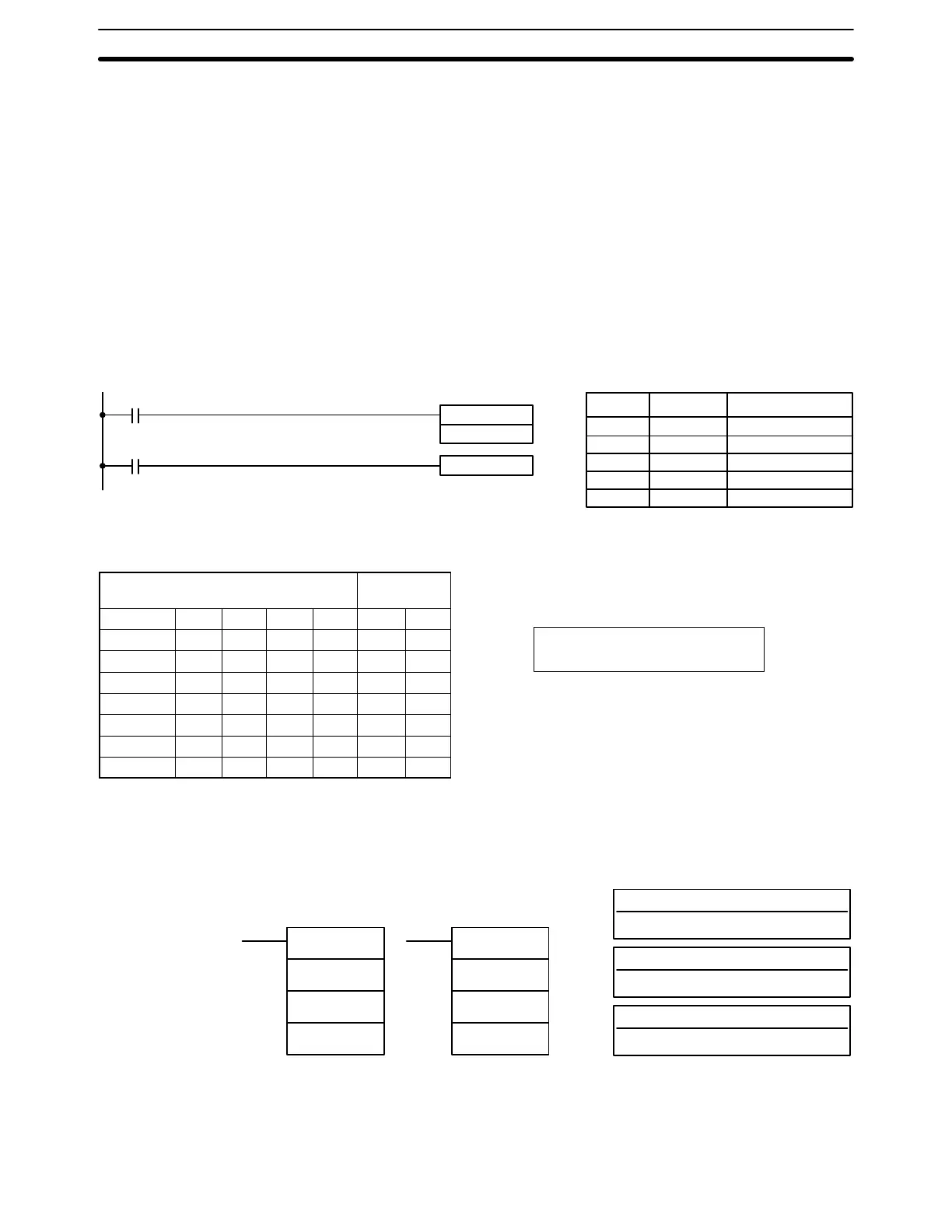
Example The following example shows the display that would be produced for the instruc-
tion and data given when 00000 was ON. If 00001 goes ON, a message will be
cleared.
MSG(46)
DM 0010
FAL(06) 00
00000
00001
Address Instruction Operands
00000 LD 00000
00001 MSG(46)
DM 0010
00002 LD 00001
00003 FAL(06) 00
DM contents ASCII
equivalent
DM 0010 4 1 4 2 A B
DM 0011 4 3 4 4 C D
DM 0012 4 5 4 6 E F
DM 0013 4 7 4 8 G H
DM 0014 4 9 4 A I J
DM 0015 4 B 4 C K L
DM 0016 4 D 4 E M N
DM 0017 4 F 5 0 O P
5-25-5 LONG MESSAGE – LMSG(47)
S: First source word (ASCII)
IR, SR, AR, DM, HR, TC, LR
---: Not used.
Set to 000
Ladder Symbols
Operand Data Areas
---: Not used.
Set to 000
LMSG(47)
S
---
---
@LMSG(47)
S
---
---
Limitations S through S+15 must be in the same data area and must be in ASCII. The mes-
sage will be truncated if a null character (0D) is contained between S and S+15.
Special Instructions Section 5-25





 To Next Page