223
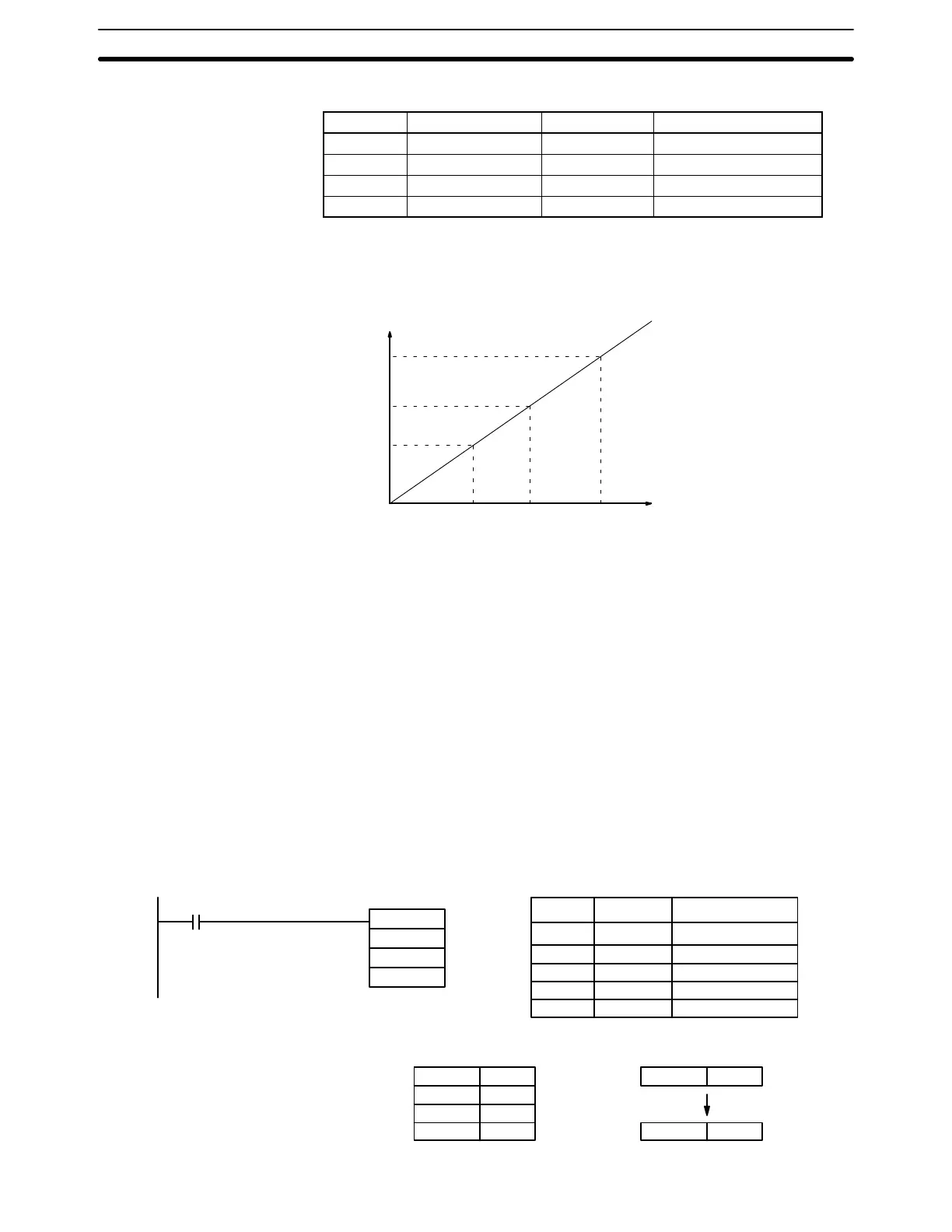
The following table shows the functions and ranges of the parameter words:
Parameter Function Range Comments
P1 BCD point #1 (A
Y
) 0000 to 9999 ---
P1+1 Hex. point #1 (A
X
) 0000 to FFFF Do not set P1+1=P1+3.
P1+2 BCD point #2 (B
Y
) 0000 to 9999 ---
P1+3 Hex. point #2 (B
X
) 0000 to FFFF Do not set P1+3=P1+1.
The following diagram shows the source word, S, converted to D according to
the line defined by points (A
Y
, A
X
) and (B
Y
, B
X
).
A
X
SB
X
Value after conversion
(BCD)
B
Y
R
Value before conversion
(Hexadecimal)
A
Y
The results can be calculated by first converting all values to BCD and then using
the following formula.
Results = B
Y
– [(B
Y
– A
Y
)/(B
X
– A
X
) X (B
X
– S)]
Flags ER: The value in P1+1 equals that in P1+3.
Indirectly addressed DM word is non-existent. (Content of DM word is
not BCD, or the DM area boundary has been exceeded.)
P1 and P1+3 are not in the same data area, or other setting error.
EQ: ON when the result, R, is 0000.
Example When 00000 is turned ON in the following example, the BCD source data in DM
0100 (#0100) is converted to hexadecimal according to the parameters in DM
0150 to DM 0153. The result (#0512) is then written to DM 0200.
@SCL(––)
DM 0150
DM 0100
00000
DM 0200
Address Instruction Operands
00000 LD 00000
00001 @SCL(––)
DM 0100
DM 0150
DM 0200
DM 0150 0010
DM 0151 0005
DM 0152 0050
DM 0153 0019
DM 0100 0100
DM 0200 0512
Data Conversion Section 5-18





 To Next Page